
Security tools are supposed to keep bad traffic out. The trouble is that, to a security tool, a payment gateway’s webhook looks a lot like bad traffic: an automated server, with no browser, no cookies and no human, sending a POST request to your site at odd hours.
So security tools block it. And when a payment webhook is blocked, the gateway knows the customer paid, but WooCommerce never finds out. The order sits on Pending payment, the Hold stock timer cancels it, and a paying customer receives nothing.
This is one of the most common root causes behind stuck orders, and one of the least obvious, because the security tool is doing exactly what it was configured to do. This guide shows how each layer of security can block webhooks, how to prove it, and how to let payment confirmations through without weakening your protection.
Why webhooks are so easy to block
Payment gateways use webhooks to tell your store what happened: payment succeeded, payment failed, refund issued, dispute opened. A webhook is:
- an automated POST request from the gateway’s servers,
- to a specific URL on your site (for the WooCommerce Stripe plugin, typically
https://yourstore.com/?wc-api=wc_stripe), - with no browser, so it can’t solve a JavaScript challenge or CAPTCHA,
- often from data-centre IP addresses,
- signed with a secret so your store can verify it’s genuine.
Bot protection, WAF rules, rate limits and “block suspicious POST requests” settings are designed to stop exactly this shape of traffic.
The security layers that commonly block webhooks
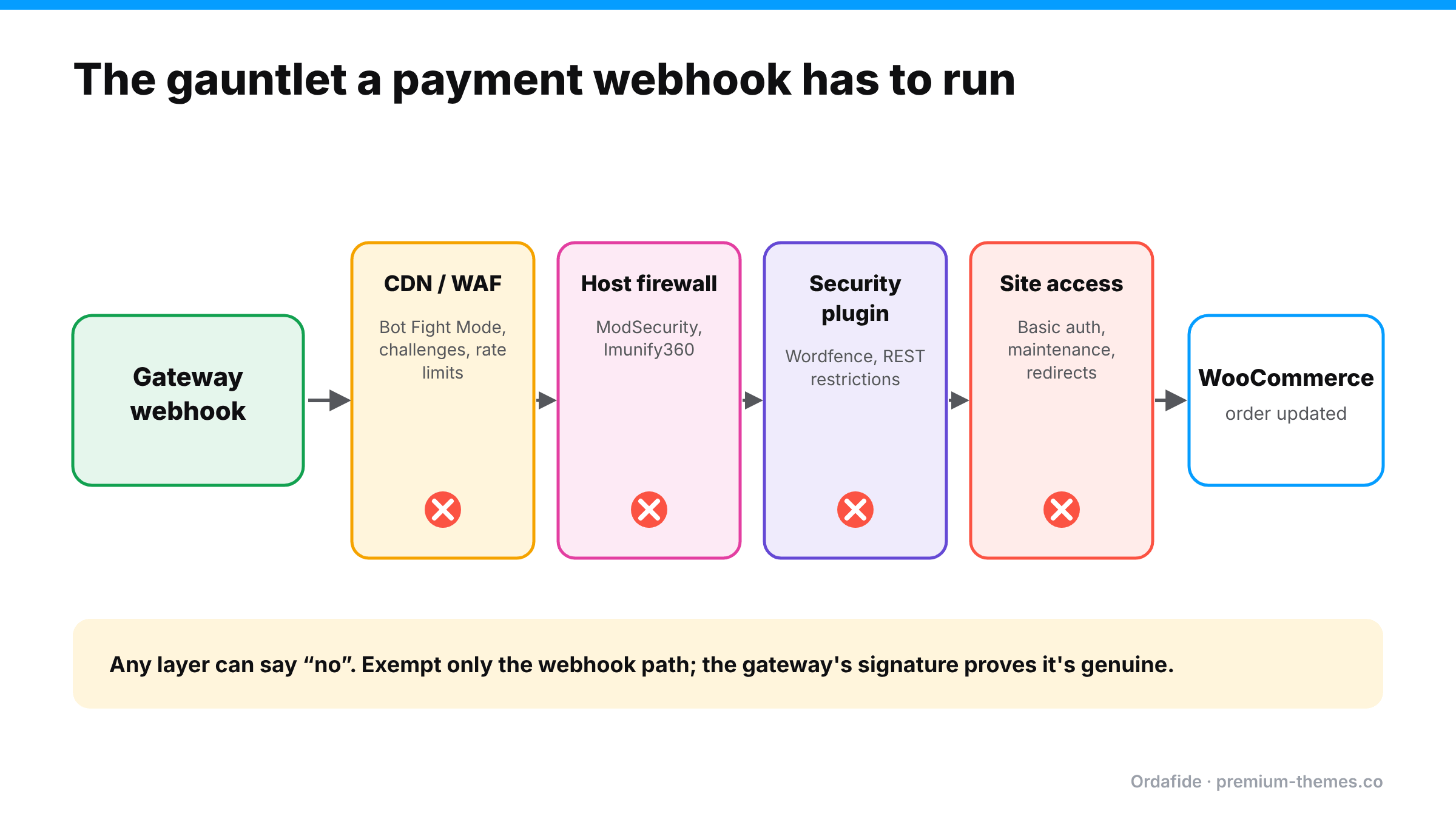
Layer 1: Cloudflare (or another CDN/WAF)
- Bot Fight Mode. On Cloudflare’s free plan, Bot Fight Mode is a single zone-wide setting that challenges or drops automated-looking requests, with no per-path exemptions. Large senders like Stripe are usually on Cloudflare’s verified bots list and pass, but smaller gateways, regional payment providers and monitoring services are often blocked. On Pro and Business plans, Super Bot Fight Mode can be skipped for specific paths with a WAF custom rule.
- Managed challenges and “Under Attack” mode. A webhook sender can’t solve a JavaScript challenge. If you switch on a challenge for all traffic during an attack (or for Black Friday), webhooks fail until you switch it off.
- WAF custom rules that block by country, user agent or request method.
- Rate limiting that catches bursts of webhook deliveries during busy periods.
Layer 2: Security plugins (Wordfence and others)
Security plugins inspect requests inside WordPress. A WordPress.org thread shows Wordfence returning 403 with “A potentially unsafe operation has been detected in your request to this site” for incoming webhooks. Wordfence support’s answer was to allowlist the exact URL or parameters under the firewall’s Allowlisted URLs setting rather than switching the firewall to Learning Mode, which carries its own risks.
Other common plugin-level blocks:
- “Disable REST API” or “restrict REST API to logged-in users” settings (several gateways and the Store API use REST routes)
- Country blocking that blocks the gateway’s server location
- Brute-force or rate-limit rules applied to all POST requests
Layer 3: Host firewalls (ModSecurity, Imunify360 and similar)
Hosts run their own web application firewalls. Rules can flag webhook payloads (which contain JSON with fields that look like code or SQL to a crude rule) and return 403 or 406 without anything appearing in WordPress at all.
Layer 4: Site-level access controls
- Password protection or HTTP basic auth (common on staging copies that were pushed live)
- Maintenance mode (returns 503)
- Redirects on the webhook URL (HTTP→HTTPS, www→non-www, trailing slashes), since webhooks generally don’t follow them
The signs you’re being blocked
- Orders paid at the gateway are stuck on Pending payment or auto-cancelled an hour later
- Your gateway emails you that webhook deliveries are failing (Stripe sends these warnings, and can eventually disable a failing endpoint)
- Problems started after enabling a security feature, changing CDN settings, or moving host
- It affects some orders (for example, only during busy periods when rate limits trigger)
One WordPress.org thread describes Stripe repeatedly warning a store that its webhook endpoint was failing with 403 errors. The owner recreated the endpoint and worked with their host, yet failures kept returning, and Stripe disabled the endpoint at one point. A 403 is almost always something on your side saying “no”.
How to prove where the block is
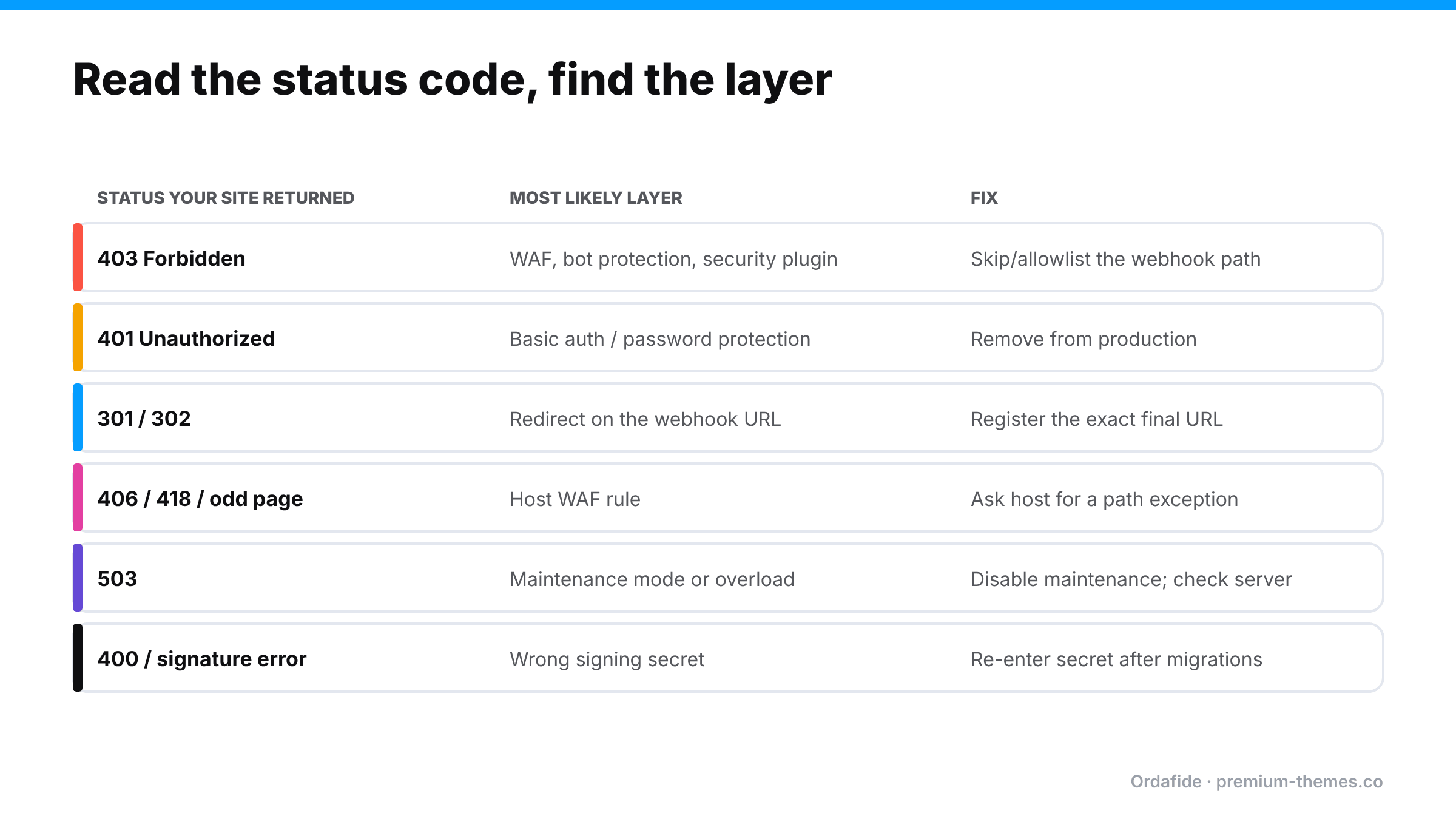
1. Read the gateway’s delivery log. In Stripe, open the webhook endpoint in the Dashboard (Developers / Workbench → Webhooks) and look at recent deliveries. The HTTP status your site returned tells you which layer to check. PayPal and other gateways have similar logs or notification histories.
2. Look at the response body. A Cloudflare block page, a Wordfence message, a host’s “Not Acceptable” page or a login prompt each identify themselves.
3. Check each layer’s logs:
- Cloudflare: Security → Events, filtered by the webhook path. The Service column tells you whether Bot Fight Mode, a WAF rule or rate limiting acted.
- Wordfence: Live Traffic and the firewall’s blocked requests.
- Host: ask support to check WAF logs for the webhook URL and time.
4. Send a test event from the gateway and watch it arrive (or not) in each log.
Fixing it without weakening security
The principle: don’t turn protection off for the whole site. Make a narrow, specific exception for the webhook path, and rely on the gateway’s signature verification to prove requests are genuine.
- Cloudflare (Pro/Business): allow verified bots, and add a WAF custom rule that skips Super Bot Fight Mode (and any challenge rules) for the webhook path. Optionally restrict it further to the gateway’s published IP ranges.
- Cloudflare (Free): Bot Fight Mode can’t be exempted per path. Either turn it off and replace it with rate limiting and targeted custom rules, or serve the webhook endpoint from a hostname that bypasses the proxy and restrict it to the gateway’s IP ranges with signature verification.
- Never put a managed challenge on machine-to-machine endpoints. Use allow, skip or block, not challenge.
- Wordfence: allowlist the exact webhook URL/parameters in the firewall’s allowlisted URLs.
- Other security plugins: allow REST and webhook routes for unauthenticated requests where the gateway needs them.
- Host WAF: ask your host to add a rule exception for the webhook path.
- Redirects: register the exact final URL (correct protocol and domain) with the gateway.
- Re-check after every security change, including temporary “under attack” settings.
Then resend failed events from the gateway, or reconcile the stuck orders by hand. (Stuck pending orders)
A worked example: the Black Friday hardening
A week before Black Friday, a store owner reads about bot attacks on checkout and tightens security: Cloudflare’s security level goes up, a managed challenge is added for “suspicious” traffic to /?wc-api=* and /wp-json/*, and the security plugin’s rate limit is lowered.
- Card testing attempts drop, which is good.
- Stripe webhooks start receiving challenge pages. Stripe retries, and keeps failing.
- Paid orders sit on Pending payment. The 60-minute Hold stock timer cancels them.
- On Black Friday morning, 37 paid orders are in Cancelled. Stripe has emailed a warning about the failing endpoint to an address nobody checks during the sale.
Nothing was “broken” in the usual sense. Every tool did what it was told. The managed challenge was the right idea for checkout pages and exactly the wrong idea for a machine-to-machine webhook path.
The fix took five minutes: a skip rule for the webhook path, then resend failed events from Stripe and restore the cancelled orders. Detection took most of a day.
Different gateways, same problem
| Gateway | How it notifies | Where to see failed deliveries |
|---|---|---|
| Stripe | Webhooks, signed | Dashboard → Webhooks → endpoint → deliveries |
| PayPal Payments | Webhooks | PayPal developer dashboard / plugin settings and logs |
| PayPal Standard (legacy) | IPN | PayPal IPN history |
| Square, Mollie, Razorpay and others | Webhooks or callbacks | Each gateway’s developer dashboard / plugin logs |
Whatever the gateway, the principle is the same: find the delivery log, read the status code, then check the layer that returned it.
The bigger lesson: you need a detector downstream
Security settings change for good reasons: an attack, a new plugin, a host’s new rule set, a Black Friday hardening pass. Every one of those changes can break webhooks, and nothing in WooCommerce raises an error when they do. The gateway emails someone, eventually. Meanwhile paid orders pile up on Pending.
What you need isn’t a promise never to touch security settings. It’s a check that notices paid orders not progressing, whatever the cause.
How Ordafide catches the effect of a blocked webhook
Ordafide isn’t a firewall and doesn’t change your security settings. It watches for the consequences of a blocked webhook, which look the same whichever layer did the blocking.
Ordafide Order Integrity for WooCommerce (free) scans recent orders and flags:
- Stuck payment: orders on Pending payment or Failed that carry a gateway payment reference, the classic fingerprint of a webhook that never landed.
- Paid but cancelled: orders with a confirmed payment date that ended up Cancelled or Failed, with nothing refunded.
- Customer never emailed: paid orders where no confirmation reached your mail server.
It also checks the background job queue and offers a loopback test (your site calling itself), useful when the same firewall rules that block webhooks also block your own site’s background processing. (Loopback request failed)
Ordafide Pro adds read-only gateway reconciliation (Stripe, PayPal, Square, Mollie, Razorpay), which shows payments the gateway collected that WooCommerce never recorded properly. It also sends real-time alerts to Slack, SMS, email or a signed webhook. Pro’s signed heartbeat endpoint lets an external uptime monitor confirm that Ordafide’s own checks are still running.
Webhook safety checklist
- Webhook URL registered exactly (protocol, domain, no redirects)
- Signing secret correct after every migration or clone
- CDN bot protection allows or skips the webhook path
- No managed challenge on webhook paths, including in “under attack” mode
- Security plugin allowlists the webhook URL
- Host WAF has an exception for the webhook path
- Test event sent and confirmed after every security change
- Automated detection of paid orders that don’t progress
Talking to your host or security provider
When you contact your host or security vendor, give them what they need to find the block quickly:
- the exact webhook URL (for example
https://yourstore.com/?wc-api=wc_stripe) - the time of a failed delivery and the status code your site returned
- the gateway’s published IP ranges if available
- a clear request: “Please make sure requests to this path from these sources aren’t challenged or blocked. The payment plugin verifies signatures.”
Ask them to tell you if their rule sets change in future. Host-level WAF updates are a common, invisible cause of new webhook failures.