Tag Archives: Recirco

Exchanges vs Refunds: How WooCommerce Stores Keep Revenue From Returns

Exchanges vs Refunds: How WooCommerce Stores Keep Revenue From Returns

When a customer returns something, you have three ways to resolve it:

  1. Refund. The money goes back. The sale is gone.
  2. Exchange. They get a different size, colour or product. The sale stays.
  3. Store credit. The money stays with you, to be spent later.

Most WooCommerce stores default to option 1, because it’s the only one WooCommerce supports natively. That’s an expensive default.

This article looks at why exchanges and store credit matter, what the data says about shopper behaviour, and how to offer both in WooCommerce without building a manual process around them.

The scale of the problem

The National Retail Federation estimated US consumers would return $849.9 billion of merchandise in 2025, with 19.3% of online sales returned (NRF, October 2025).

You can’t stop all returns, and you shouldn’t try. Many happen because the customer genuinely needed a different size. But you can change how they end.

What shoppers actually want

Chart: returns currently end as refunds 46%, exchanges 29%, store credit 25%. 75% of consumers prefer a full refund by default, but 87% would consider an exchange if it were easy, and 39% could be swayed by bonus store credit. Source: Loop Returns, July 2026.

Loop’s 2026 survey of 3,000 consumers and 600 retailers across the US, UK and Australia found (Loop Returns, July 2026):

  • 75% of consumers prefer a full refund by default…
  • …but 87% would consider an exchange if the experience were easy enough.
  • The top factors in choosing an exchange were ease of processing (37%) and speed (35%).
  • Incentives work: 39% said bonus store credit could steer them away from a refund, 36% a waived exchange fee, and 35% a speedy replacement.
  • Across retailers surveyed, refunds made up 46% of returns processed, exchanges 29%, store credit 25%.

The takeaway: customers don’t insist on refunds because they hate exchanges. They default to refunds because exchanges are usually harder. Usually that means emailing, waiting for the return to arrive, then placing a new order themselves.

Why exchanges are worth so much

  • You keep the revenue. The original sale stays on your books.
  • You keep the customer. A shopper who gets the right size is far more likely to buy again than one who got a refund and moved on.
  • The customer gets what they wanted. They wanted the product. It just wasn’t quite right.
  • Variant swaps are low-risk. Same product, same price, different size or colour.

Why store credit is worth offering too

Not every return has an obvious replacement. Store credit lets the customer decide later, while the money stays with you.

  • A small bonus changes behaviour. Offering, say, 10% extra as store credit versus a refund is a strong nudge, and costs you far less than losing the full sale.
  • Expiry encourages use (check local laws on credit and gift card expiry before setting one).
  • It brings customers back to your store to spend it, often spending more than the credit.

How WooCommerce handles exchanges and store credit today

Out of the box, it doesn’t.

  • No exchanges. The usual workaround is to refund the original order and ask the customer to place a new one, or manually create a new order and adjust stock by hand. Both are slow and error-prone, and the “refund then reorder” route often ends with just the refund.
  • No store credit. Stores typically generate a one-off coupon code as a substitute. Coupons work, but they’re awkward to track: no running balance, no ledger, and partial use often gets messy.

How to offer exchanges and store credit properly

Recirco – Returns & Exchanges for WooCommerce gives you a free self-service returns portal, approval queue and refund workflow. Recirco Pro adds exchanges and store credit on top.

Exchanges and variant swaps

When requesting a return, the customer picks a replacement right inside the returns portal, such as a different size or colour. When the return is completed, Recirco creates a zero-total replacement order in Processing, so it flows into your normal fulfilment like any other order. No manual order entry, no stock adjustments by hand, and the customer never has to place a new order.

Store credit

Store credit in Recirco Pro is built as an append-only ledger. Every credit and every use is a separate entry, and the balance is calculated from those entries rather than overwritten, so there’s always an audit trail.

  • Bonus percentage to make credit more attractive than a refund
  • Optional expiry
  • A store credit balance page in My Account
  • Applied at checkout, deducted from the order total

Pair it with approval rules

Recirco Pro’s conditional approval rules let you automate decisions. You could auto-approve exchanges (low risk, revenue retained) while holding refund requests above a certain value for review.

Making exchanges the easy choice

Whatever tool you use, the principles are the same:

  1. Show the exchange option first in the returns flow, before refund.
  2. Make it fast. Ship the replacement as soon as you’re comfortable (on approval for trusted customers, on arrival for others).
  3. Incentivize credit. A bonus on store credit is cheaper than a refund.
  4. Keep refunds available. Hiding refunds frustrates customers and, in the EU and UK, conflicts with their legal right to withdraw. Exchanges should be the easy choice, not the only one.
  5. Measure it. Track the share of returns ending as exchange, credit or refund each month. Recirco Pro’s analytics show requests over time, value returned, top reasons and most-returned products.

A quick example

Illustrative bar chart: 100 returns a month at $60 each means $6,000 leaving the business if all are refunded. If a quarter move to exchanges or store credit, $1,500 a month is kept. Illustrative numbers.

Say you process 100 returns a month at an average of $60, and every one ends as a refund. That’s $6,000 a month leaving the business.

If an easy exchange flow and a store-credit bonus moved even a quarter of those to exchanges or credit, you’d keep roughly $1,500 a month in revenue before counting the repeat purchases those customers go on to make. (Illustrative numbers; your results will depend on your products and customers.)

WooCommerce Return Policy: A Free Template, the Rules That Apply, and How to Actually Enforce It

WooCommerce Return Policy: A Free Template, the Rules That Apply, and How to Actually Enforce It

Most WooCommerce return policies have the same problem. The page says “Returns accepted within 30 days,” and then nothing in the store enforces it.

A customer asks to return something on day 47. Your team member doesn’t want an argument, so they approve it. Another customer returns a final-sale item because nothing stopped them from asking. The policy exists, but only on paper.

This guide covers what a good return policy includes, the legal minimums for the main Western markets, a free template you can adapt, and how to make WooCommerce enforce your policy automatically.

This article is general information, not legal advice. Consumer law varies by country and state, so check the rules for the markets you sell to.

Why your return policy affects sales, not just returns

Shoppers read return policies before they buy. Loop’s 2026 Returns Revenue Gap survey of 3,000 consumers in the US, UK and Australia found that 59% always or often check the returns policy before buying, and 58% have abandoned a purchase or walked away from a brand because of its return policy (Loop Returns, July 2026).

The NRF found 82% of consumers say free returns are a major purchase consideration (NRF, October 2025).

A clear policy isn’t just protection. It’s a conversion tool.

What every return policy should cover

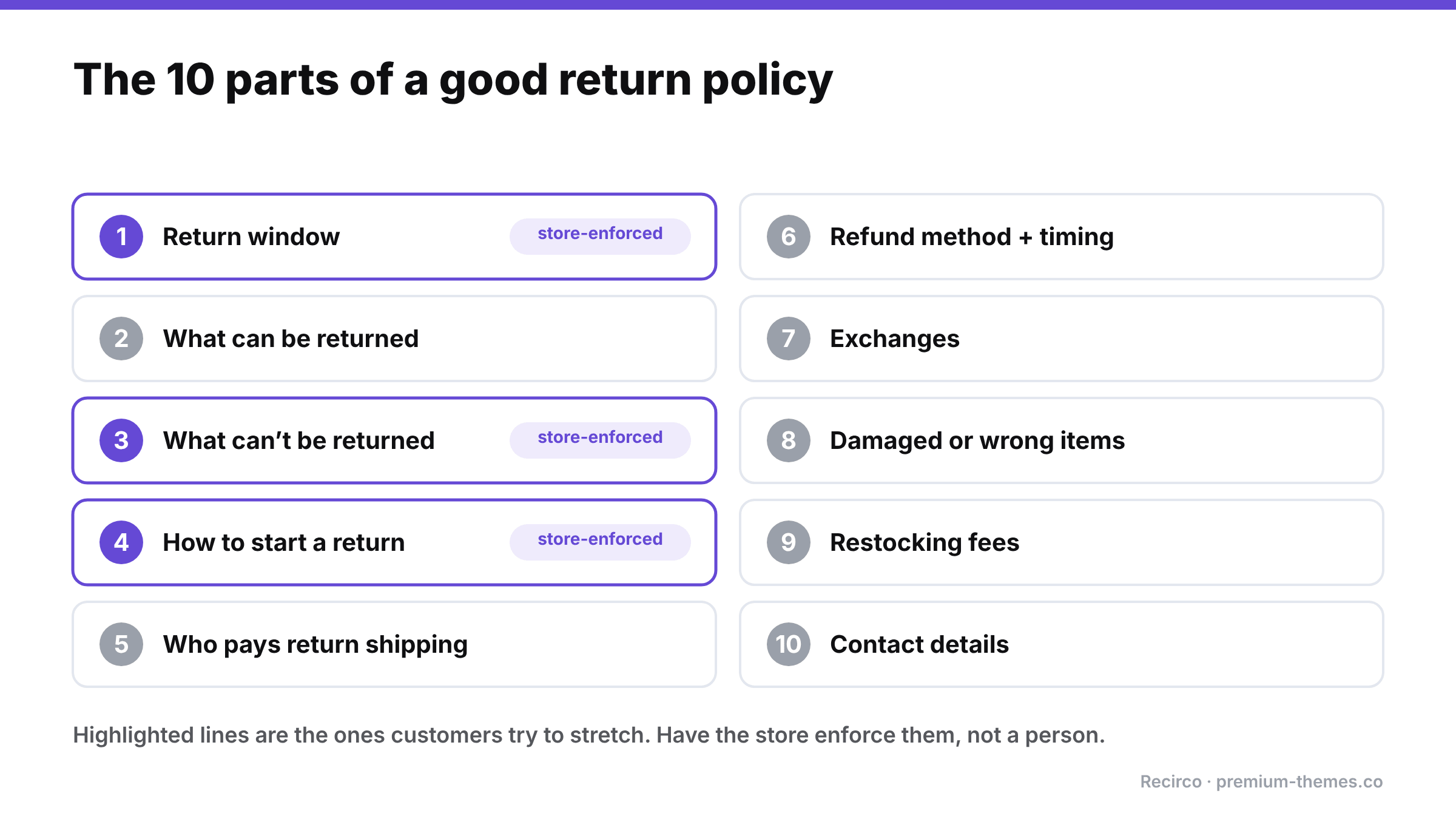
Checklist of ten return policy elements: return window, what can be returned, what can't be returned, how to start a return, who pays return shipping, refund method and timing, exchanges, damaged or wrong items, restocking fees, and contact details. The return window, exclusions and how to start a return should be enforced by the store.

  1. The return window: how many days, and counted from when (order date, delivery date).
  2. What can be returned: condition requirements (unused, tags attached, original packaging).
  3. What can’t be returned: final sale, personalized, hygiene items, perishables, digital downloads.
  4. How to start a return: ideally “from your account,” not “email us.”
  5. Who pays return shipping, and whether a label is provided.
  6. Refund method and timing: original payment method, store credit, or exchange, and how long it takes after the item arrives.
  7. Exchanges: whether you offer them and how.
  8. Damaged or wrong items: a separate, faster process.
  9. Restocking fees, if any.
  10. Contact details for questions.

The legal minimums in key markets

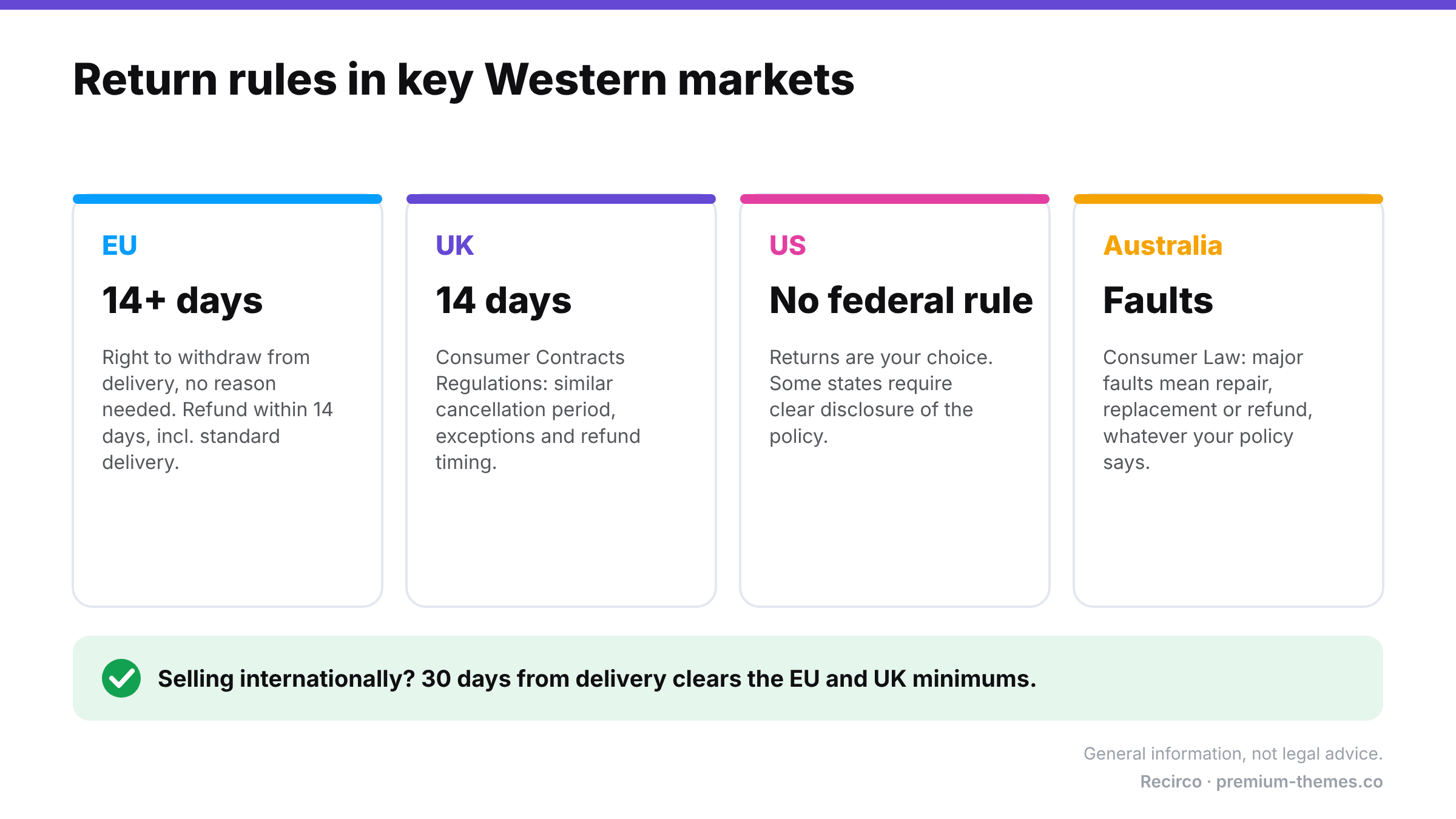
Return rules by market: EU, at least 14 days to withdraw from delivery with a refund within 14 days; UK, 14-day cancellation period; US, no federal rule but some states require disclosure; Australia, major faults require repair, replacement or refund. A 30-day window from delivery clears EU and UK minimums. General information, not legal advice.

European Union

Under the EU Consumer Rights Directive, consumers buying online generally have at least 14 days from receiving the goods to withdraw from the purchase without giving a reason. Once they tell you, you generally have 14 days to refund, including the original standard delivery cost. You may withhold the refund until you receive the goods or proof they were sent back. There are exceptions, such as personalized goods, sealed hygiene products that were unsealed, and perishables. If you don’t inform customers of their right of withdrawal, the period can be extended significantly.

United Kingdom

The Consumer Contracts Regulations give a similar 14-day cancellation period for online purchases, with similar exceptions and refund timing.

United States

There’s no general federal law requiring retailers to accept returns. Some states have rules about disclosing your policy (especially if you don’t offer refunds). Whatever you choose, state it clearly and stick to it.

Australia

Australian Consumer Law gives customers rights to a repair, replacement or refund when goods have a major fault, regardless of your “change of mind” policy. Don’t write a policy that implies otherwise.

The practical takeaway: if you sell internationally, a 30-day window counted from delivery comfortably clears the EU and UK minimums and matches what many shoppers expect.

Free WooCommerce return policy template

Copy this into a page (e.g. Returns & Refunds), replace the bracketed parts, and link it from your footer, product pages and checkout.

—

Returns & Refunds

We want you to love what you ordered. If something isn’t right, you can return it within [30] days of delivery.

How to start a return

Log in to My Account → Returns, choose the order and items, and tell us why. You’ll get a return number (RMA) and our return address straight away. No need to email us.

What can be returned

Items must be unused, in their original condition and packaging, with tags attached.

What can’t be returned

[Final-sale items], [personalized items], [underwear and swimwear for hygiene reasons], [gift cards]. These are marked on the product page.

Return shipping

[Return shipping is free / Return shipping costs are deducted from your refund / We’ll email you a prepaid label once your return is approved.]

Refunds

Once your return arrives and is checked, we’ll refund your original payment method within [5] business days. Your bank may take a few more days to show it.

Exchanges and store credit

[Prefer a different size or colour? Choose an exchange when you request your return and we’ll send the replacement once your return is processed.] [Choose store credit and we’ll add a [10]% bonus.]

Damaged, faulty or wrong items

Please request a return within [7] days of delivery and select “Damaged or defective” or “Wrong item,” with a short description. We’ll make it right at no cost to you.

EU and UK customers

You have the right to cancel your order within 14 days of receiving it without giving a reason. This policy does not affect your statutory rights.

Questions? Contact us at [help@premium-themes.co].

—

Best practices that reduce friction (and abuse)

  • Count from delivery, not order date. It’s fairer, and it’s how EU law counts.
  • Make “how to start a return” self-service. Every email exchange costs you time and frustrates the customer.
  • Ask for a reason on every return. It costs the customer two seconds and gives you the data to fix product pages and sizing.
  • Require detail for some reasons only. “Damaged” needs a description. “Changed my mind” doesn’t.
  • Offer exchanges and store credit alongside refunds. (See Exchanges vs refunds.)
  • Be consistent. Inconsistent exceptions are what train customers to push.

How to enforce your policy in WooCommerce

Here’s the gap: WooCommerce has no concept of a return window or non-returnable products. Your policy page can say anything, but nothing in the store applies it.

The free Recirco – Returns & Exchanges for WooCommerce plugin turns your written policy into rules the store enforces:

Policy line How Recirco enforces it
“Within 30 days of delivery” Return window in days, counted from the order’s completed, paid or created date
“Final sale items can’t be returned” Excluded products and categories never appear as returnable
“Start your return in My Account” A Returns tab in My Account with only eligible items shown
“Tell us why” Configurable reasons, each optionally requiring an explanation
“You’ll get a return number” Automatic RMA numbers with your own prefix
Policy text and return address Shown to customers on the return status page

Customers simply can’t submit a return outside the window or for an excluded item, so your team never has to say no by email. Late or borderline cases you want to allow can still be handled manually.

Recirco Pro goes further with conditional approval rules (seven conditions, four actions: approve, reject with reason, flag, or hold, with the first matching rule winning and the deciding rule named in the activity log). For example, you could auto-approve low-value returns from repeat customers and flag high-value ones for review.

How to Add a Self-Service Returns Portal to WooCommerce (Free, Step by Step)

How to Add a Self-Service Returns Portal to WooCommerce (Free, Step by Step)

WooCommerce can issue refunds. What it can’t do out of the box is handle returns.

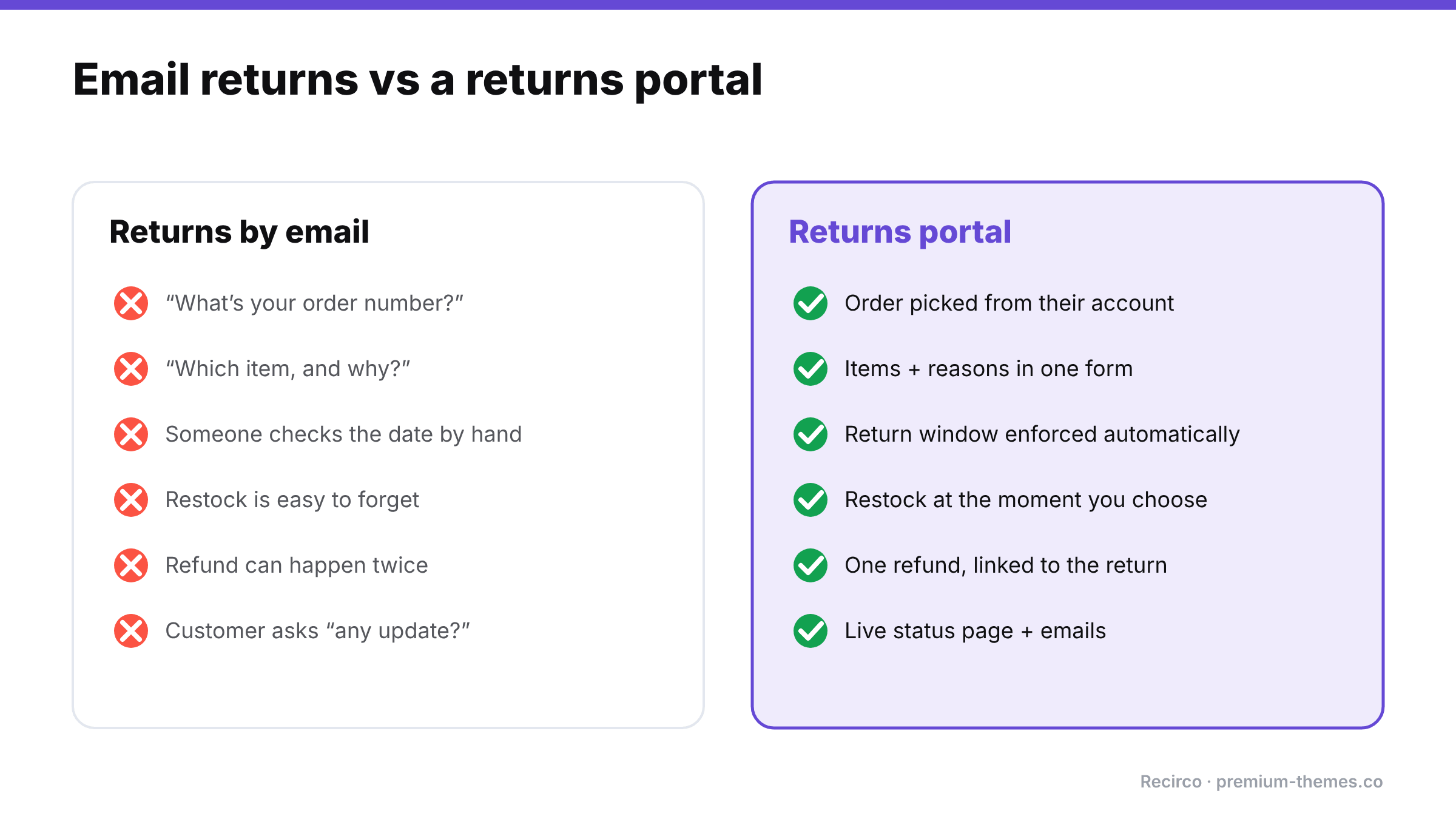
There’s no way for a customer to request a return from their account, no approval step, no RMA number, no return reasons, no return window. So most stores end up running returns through email: “Hi, I’d like to return my order…” followed by a back-and-forth to find the order number, which item, why, whether it’s still in the return window, and where to send it.

That works at five returns a month. At fifty, it becomes a part-time job and a source of mistakes: forgotten restocks, refunds issued twice, late returns approved because nobody checked the date.

This guide shows how to replace that email thread with a proper self-service returns portal, for free.

Why it’s worth doing

Comparison. Returns by email: asking for the order number, item and reason, checking dates by hand, forgotten restocks, double refunds, and customers chasing updates. Returns portal: order picked from the account, items and reasons in one form, window enforced automatically, restock at a chosen moment, one linked refund, and a live status page.

Returns aren’t an edge case. The National Retail Federation estimated that 19.3% of online sales would be returned in 2025, and that 76% of consumers are more likely to choose a retailer offering an instant refund or exchange. 71% said they’re less likely to shop with a retailer again after a poor returns experience (NRF, October 2025).

A clear, self-service returns process does three things:

  1. It cuts support time. Customers submit everything you need in one go.
  2. It enforces your policy consistently. The system checks the return window, not a tired staff member.
  3. It builds buying confidence. Shoppers check returns policies before they buy. An easy process removes a reason to hesitate.

What a good WooCommerce returns portal needs

For customers:

  • A Returns area inside My Account, not a separate form they have to find
  • Only eligible orders and items offered (inside the return window, not already refunded, not excluded)
  • Per-item quantities and a reason for each
  • A status page showing what happens next, where to send the item, and an RMA number
  • The ability to add a tracking number and cancel their own request

For your team:

  • A single approval queue with search, filters and bulk actions
  • A clear status workflow that can’t be skipped or reversed by accident
  • Restocking at the right moment
  • Refunds created from the return, with no double-refunding
  • Notes (internal and customer-facing) and an activity log
  • Emails at each step

Step-by-step: setting up a free returns portal with Recirco

We’ll use Recirco – Returns & Exchanges for WooCommerce, a free plugin on WordPress.org. It requires WordPress 6.2+, PHP 7.4+ and WooCommerce 7.0+, supports HPOS and block checkout, and makes no outbound calls. Your returns data stays in your own database.

Step 1: Install and activate

Go to Plugins → Add New, search for Recirco, install and activate. WooCommerce must already be active.

Step 2: Set your return window

Go to WooCommerce → Returns settings and set:

  • Return window (days). How long customers have to request a return.
  • What the window counts from: the order’s completed, paid or created date. “Completed” is usually fairest if you mark orders complete when they ship or are delivered.
  • Eligible order statuses. Typically Completed (and Processing if you allow returns before shipping is marked complete).

Selling to EU customers? EU consumers have a legal right to withdraw from most online purchases within at least 14 days of receiving the goods. Set your window to at least that. More on this in our WooCommerce return policy guide.

Step 3: Exclude what can’t be returned

Exclude specific products or categories such as final-sale items, personalized products, underwear or perishables. Excluded items simply won’t appear as returnable in the portal.

Step 4: Set up return reasons

Recirco comes with six common reasons pre-loaded. You can edit them and choose which ones require an explanation. For example, “Damaged or defective” might require details, while “Changed my mind” doesn’t. Good reason data is how you’ll later reduce your return rate.

Step 5: Add your return address and policy text

Add the address customers should send items to and a short policy summary. Customers see these on their return status page along with the RMA number. You can set your own RMA prefix (e.g. ‘RMA-‘ or ‘RET-‘), customize the portal’s URL slug, and adjust the policy text.

Step 6: Choose when stock goes back

Pick when returned items are added back into inventory: never, on approval, on arrival, or on completion. For most stores, on arrival is safest. You only restock what physically came back.

Step 7: Review the emails

Recirco sends six editable emails (HTML and plain text): request received, admin alert, approved, rejected, completed, and customer note. Adjust the wording to match your brand voice.

Step 8: Test it as a customer

Log in as a test customer with a completed order, open My Account → Returns, and submit a request. If the Returns page shows a 404, go to Settings → Permalinks and click Save once to refresh WordPress’s URL rules.

What processing a return looks like

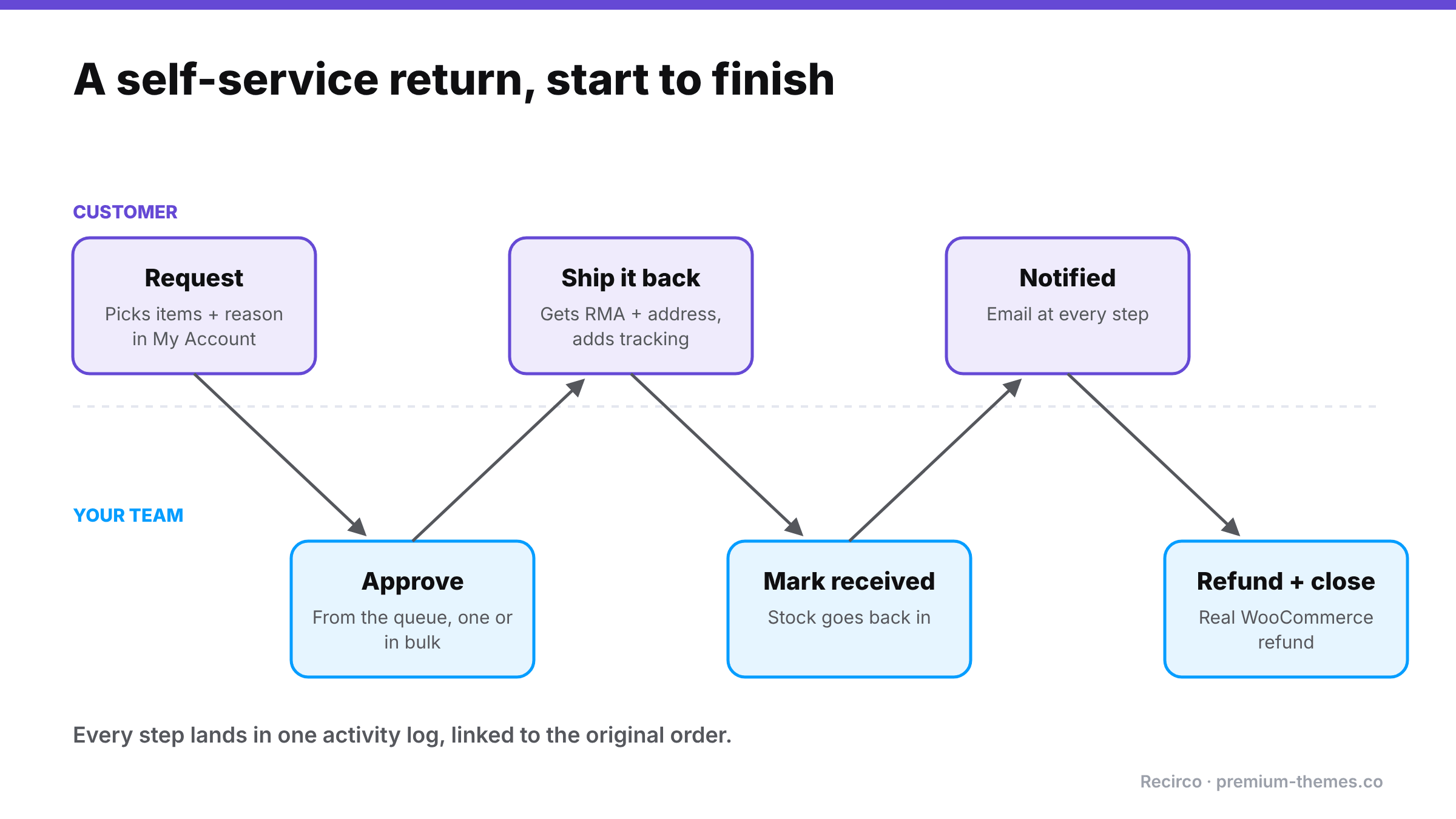
Return lifecycle alternating between customer and store: customer requests a return in My Account, team approves it, customer ships it back with the RMA number and tracking, team marks it received and restocks, customer is notified, team issues a WooCommerce refund and closes it. Every step is in one activity log.

(For the reasoning behind each step, see our WooCommerce RMA workflow guide.)

  1. The customer submits a request. You get an admin alert and see it in the queue with a pending badge.
  2. You (or a teammate) open it, review the items, reasons and order, and approve or reject. Several at once with bulk actions if you like.
  3. The customer gets the approval email with the RMA number and return address, ships the item, and adds a tracking number.
  4. When the parcel arrives, you mark it received. Stock is restocked if you chose on arrival.
  5. You create the refund from the return. Recirco creates a proper WooCommerce refund, optionally sent through your payment gateway, with net and tax split from the original line. Auto-refund on completion is available but off by default.
  6. The return is completed and the customer is notified. Every step is in the activity log, and a panel on the order edit screen shows the return.

Going further: exchanges, store credit and labels

The free plugin is a complete returns system. If you want to keep more revenue from returns and automate the busywork, Recirco Pro adds:

  • Exchanges and variant swaps. Customers pick a replacement size or colour, and a zero-total replacement order is created on completion.
  • Store credit with an optional bonus percentage and expiry, applied at checkout.
  • Conditional approval rules to auto-approve, reject, flag or hold requests.
  • Carrier return labels via Shippo, generated on approval.
  • Returns analytics: reasons, most-returned products, value returned and time to resolve.
  • Warranty claims with serial numbers and photo uploads.

We go deeper on why exchanges matter in Exchanges vs refunds.