Tag Archives: Exchanges

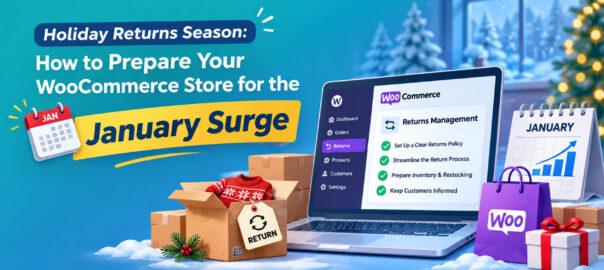
Holiday Returns Season: How to Prepare Your WooCommerce Store for the January Surge

Every store owner plans for Black Friday. Far fewer plan for what comes after it.

Holiday purchases come back at a higher rate than the rest of the year. The NRF and Happy Returns expected 17% of holiday merchandise to be returned in 2025, against 15.8% of retail sales across the whole year (NRF / Retail Insight Network, October 2025). Gifts don’t fit, duplicates arrive, impulse sale purchases look less exciting in January.

For a WooCommerce store this creates a predictable crunch. Returns pile up in the slowest sales weeks of the year, often while your team is on holiday. Gift recipients who aren’t your customers try to return things. Extended holiday windows get applied inconsistently. And the revenue you worked so hard for in November leaks out in January.

This guide covers how to prepare: the policy decisions to make now, how to handle gift returns, how to turn holiday returns into exchanges rather than refunds, and how to keep the operation running when volume peaks.

What makes holiday returns different
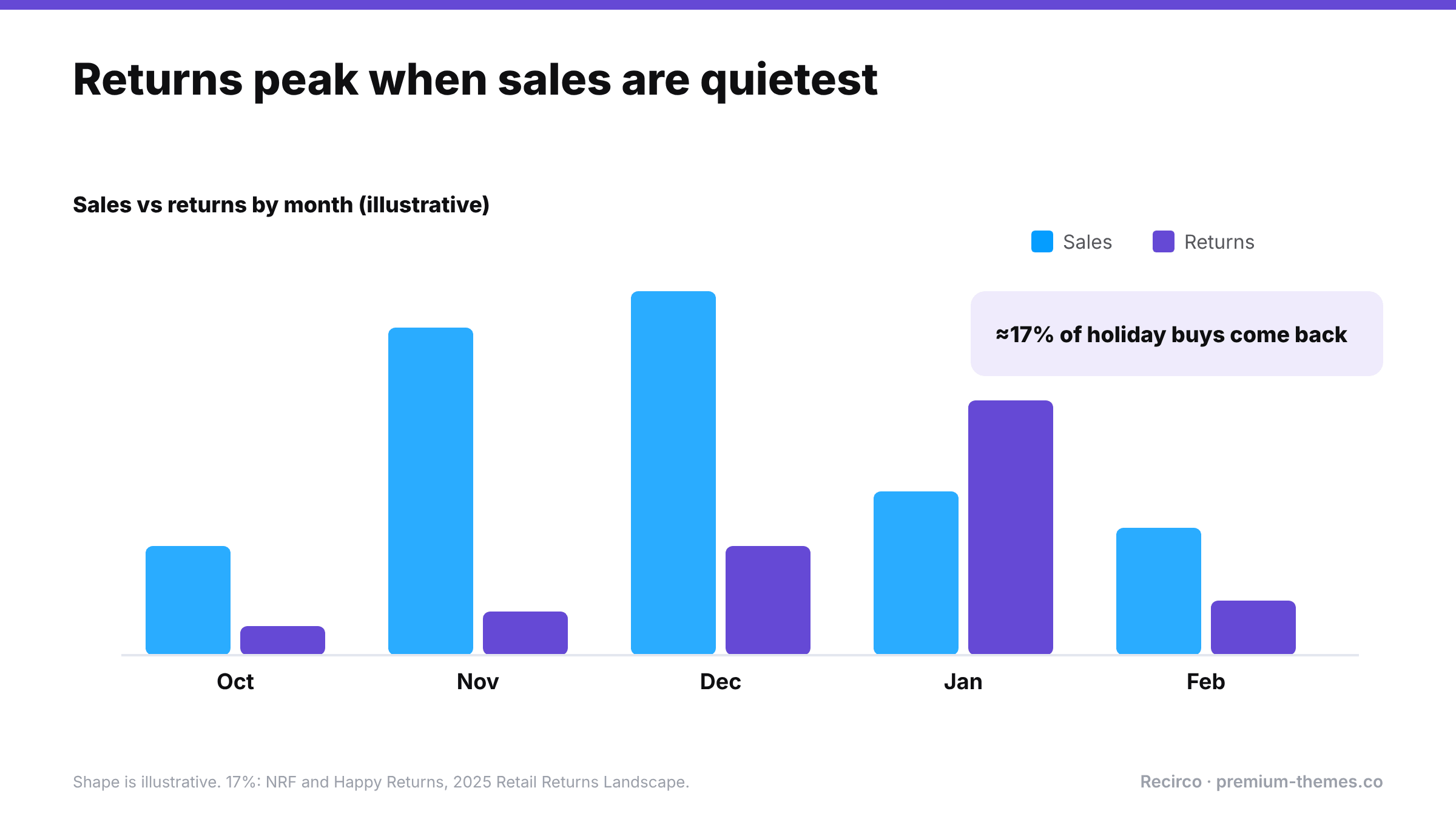
Illustrative chart of sales and returns from October to February: sales peak in November and December while returns peak in January. About 17% of holiday purchases are expected to be returned (NRF and Happy Returns, 2025).

  1. Volume is concentrated. Returns from November and December purchases cluster in late December and January.
  2. Many returners didn’t buy the item. Gift recipients have no account, no order number, and no idea what was paid.
  3. Return windows get confusing. An item bought on 20 November with a 30-day window expires before Christmas, before the gift is even opened.
  4. Expectations are higher. Shoppers check holiday return policies before buying gifts, and generous policies sell.
  5. Your team is smaller. Holidays mean fewer people to process more returns.
  6. Fraud ticks up. Wardrobing around parties and events, and “gifts” bought specifically to return.

Decision 1: Extend your return window for holiday purchases

Most retailers extend returns for holiday purchases, typically letting items bought from early November be returned until mid or late January. It’s become a standard expectation and a genuine selling point in gift-buying season.

How to set it up well:

  • Decide the dates now. For example: “Items bought between 1 November and 24 December can be returned until 31 January.”
  • Publish it on product pages, the cart, checkout and your returns policy page from early November. It’s a conversion tool, so use it in your Black Friday messaging.
  • Make sure your system enforces it. If your returns system uses a fixed number of days, temporarily raise it to cover the latest date you’ll allow, then lower it again afterwards. Note the dates in your calendar so the change isn’t forgotten.
  • Remember the legal minimum still applies. EU and UK customers have at least 14 days from delivery regardless; your extended window simply goes further.

Communicate holiday dates in the right places

Customers need to see your extended window when they buy, not just when they return. Put it:

  • in a site-wide banner during November and December (“Gifts bought now can be returned until 31 January”)
  • on product pages, near the add-to-cart button
  • in the cart and checkout, where gift buyers hesitate
  • in order confirmation emails for orders placed in the holiday period
  • on your returns policy page, with exact dates

Decision 2: How you’ll handle gift returns
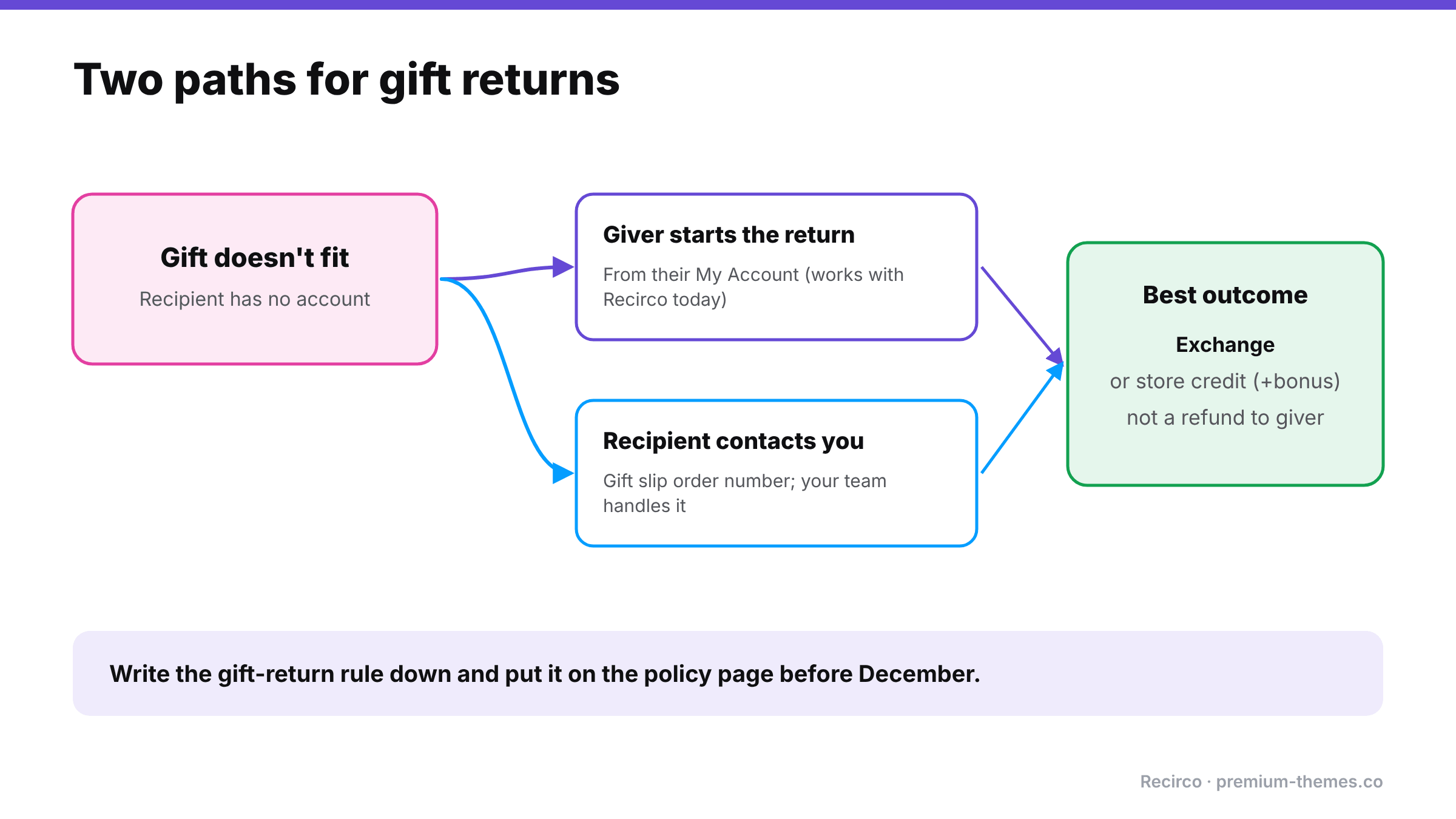
Gift returns: when a gift doesn't fit and the recipient has no account, either the giver starts the return from their account, or the recipient contacts you with the gift slip order number. Best outcome is an exchange or store credit, not a refund to the giver.

Gift returns are where most holiday friction lives. The person returning the item:

  • probably doesn’t have an account with you,
  • doesn’t have the order number,
  • shouldn’t see what the giver paid,
  • and usually wants an exchange or store credit, not a refund to the giver’s card.

Common approaches:

Approach How it works Trade-off
Giver handles it The original buyer requests the return from their account Simple and secure; awkward for the recipient
Gift receipt / gift order number Recipient contacts you with a gift reference; you process manually Friendly; manual work for your team
Exchange or credit only for gifts Gift returns become exchanges or store credit, never refunds to the giver Keeps revenue; avoids revealing the price; needs clear policy

Whatever you choose, write it down. “Gift returns: please ask the person who bought the gift to start the return from their account, or contact us with the order number from the gift slip and we’ll arrange an exchange or store credit.”

Recirco note: the current version of Recirco requires returns to be requested from a customer account, so gift returns work through the giver’s account or through your team handling the recipient’s request. Plan your gift-return wording around that.

Decision 3: Make exchanges and credit the easy option

January is when keeping revenue matters most: sales are slow, and every refund comes straight off the best quarter you’ve had. Holiday returns are also unusually well suited to exchanges: wrong size, wrong colour, duplicate gift.

Loop’s 2026 survey found that while 75% of consumers prefer a refund by default, 87% would consider an exchange if it were easy enough, and 39% could be swayed by bonus store credit (Loop Returns, July 2026]).

For the holiday window:

  • Show exchange first in the returns flow.
  • Offer bonus store credit (say 10%) instead of a refund, especially for gift returns.
  • Ship exchanges fast. Speed is one of the top reasons people choose exchanges.

(More on exchanges vs refunds])

Write the holiday messages now

You won’t want to write customer communications on 27 December. Draft these in advance:

Auto-reply for the support inbox:

Thanks for getting in touch. Our team is back on [date] and we’re replying in order. If you’d like to return or exchange something, you can start it now from My Account → Returns; it takes about two minutes and you’ll get your return number and address straight away. Holiday purchases can be returned until 31 January.

Approval email addition (holiday period):

Because it’s our busiest returns season, refunds may take up to [5] working days after your return arrives. Exchanges ship as soon as your return is approved.

Gift-return reply:

Thanks for letting us know. If the gift doesn’t fit, the easiest option is an exchange or store credit, so you can choose something you love. Please ask the person who sent the gift to start the return from their account, or reply with the order number on your gift slip and we’ll take care of it.

Decision 4: Staffing and service levels

Work out roughly how many returns to expect. Take your November–December order count, multiply by your normal return rate, and add a margin for the holiday uplift. Then plan:

  • Who processes returns between Christmas and mid-January, and how many hours that needs.
  • What you’ll automate. Approving routine returns automatically is the biggest time saver.
  • Target times: for example, approve within one working day, refund within three working days of arrival.
  • A holiday auto-reply that points people to the self-service returns page and states realistic timings.

A quick volume estimate

Say you shipped 3,000 orders in November and December, and your normal return rate is 12%. Holiday uplift (using the NRF’s 17% holiday figure against a 15.8% full-year rate as a rough guide) suggests your holiday rate could run around 13%. That’s roughly 390 returns, most of them landing between 26 December and the end of January, about five weeks.

That’s around 75–80 returns a week. If each takes 6 minutes to approve, receive, inspect, restock and refund by hand, that’s 8 hours a week, during a period when you may have half your normal team. Automating approvals for routine returns and using bulk actions for receiving can cut that substantially. Knowing the number in advance is what lets you plan.

Decision 5: Warehouse and restocking

  • Inspect and restock fast. January returns are often your best January stock. Items back on sale quickly can be resold, especially in clearance.
  • Restock on arrival, not on approval, so stock levels reflect what’s physically there.
  • Batch processing: set aside fixed times each day for receiving returns rather than handling them ad hoc.

Decision 6: Watch for abuse without slowing everyone down

Holiday season brings wardrobing (party outfits, event equipment) and “buy to return” behaviour. Flag rather than block: hold returns of high-value occasion items or from customers with many recent returns for a closer look, and approve the rest. (Return fraud guide)

Turning January returns into January sales

Returned holiday stock is often in perfect condition. Get it back on sale fast, ideally in your January clearance, and you recover margin from inventory that would otherwise sit in a back room until spring. A clear rhythm helps: receive in the morning, inspect and restock by lunchtime, and let your clearance pages reflect the restocked sizes the same day.

Setting it up with Recirco

Recirco – Returns & Exchanges for WooCommerce (free) handles the core of holiday returns:

  • Self-service returns portal in My Account: customers start returns themselves, any time, including when your team is off.
  • Configurable return window in days, counted from the completed, paid or created date. Raise it for the holiday period and lower it again in February.
  • Custom policy text in the portal, where you can state your holiday dates and gift-return rules.
  • Approval queue with bulk approve, reject and mark received, plus filters, search and a pending badge, built for clearing a backlog quickly.
  • Restock timing (on arrival recommended) and refunds from the return with correct tax.
  • Six editable emails so customers get updates without emailing you.

Recirco Pro adds the tools that keep holiday revenue and save time:

  • Exchanges and variant swaps: customers pick the replacement in the portal; a zero-total replacement order is created in Processing on completion.
  • Store credit with a bonus percentage and optional expiry, applied at checkout. Ideal for gift returns.
  • Conditional approval rules to auto-approve routine returns over the holidays and hold high-value or high-risk ones.
  • Carrier return labels via Shippo, generated on approval.
  • Analytics with 7/30/90/365-day ranges to compare this January with last.

Holiday returns timeline

October / early November

  • [ ] Holiday return dates decided and published
  • [ ] Gift return process written down
  • [ ] Exchange and store credit options switched on and tested
  • [ ] Return window setting adjusted (and a reminder set to change it back)

Late November – December

  • [ ] Holiday returns policy highlighted in sale messaging
  • [ ] Staffing rota for 26 December – mid January agreed
  • [ ] Auto-approval rules reviewed
  • [ ] Holiday auto-reply drafted

January

  • [ ] Daily returns processing slots
  • [ ] Restock on arrival, quickly
  • [ ] Monitor exchange vs refund share

February

  • [ ] Return window restored to normal
  • [ ] Review: volume, top reasons, exchange share, time to resolve

Customer Ordered the Wrong Size? How to Handle an Exchange in WooCommerce (3 Methods)

It’s the most common return in fashion, footwear and anything with variations: the customer loves the product but ordered a medium when they needed a large.

They don’t want their money back. They want the right size. You want to keep the sale. It should be the easiest transaction in retail.

Then you open WooCommerce and look for the exchange button. There isn’t one.

You’re not alone. On the WordPress.org support forums there’s a thread from a store owner whose customer bought the wrong size and returned it for an exchange. They asked a simple question, how to edit the order to remove the wrong item and add the right one, and the thread closed with zero replies. It’s a common problem with surprisingly little good guidance.

This guide covers three ways to handle a size or colour exchange in WooCommerce, the trade-offs of each, and the mistakes that cause stock and reporting problems.

Why exchanges are awkward in WooCommerce

WooCommerce models a sale as an order with a payment. It supports two ways to change what happened afterwards:

  • Editing the order (only practical before payment or for small corrections), and
  • Refunding all or part of it.

An exchange is neither. The original sale stands: same price, same customer, same payment. But one unit of stock comes back and a different unit goes out. WooCommerce has no record type for “this item was swapped for that one”, so every method is a workaround or needs a plugin.

What a good exchange needs to get right

Whatever method you use, check it against these five requirements:

  1. Stock in: the returned variation goes back into stock, once it physically arrives and is sellable.
  2. Stock out: the replacement variation’s stock goes down.
  3. Money: the customer isn’t charged again (for a like-for-like swap), and your revenue isn’t counted twice or refunded by mistake.
  4. Fulfilment: the replacement appears in your normal picking and shipping process, with the right address.
  5. Records: anyone looking later can see what happened: what came back, what went out, and why.

Method 1: Edit the original order (small stores, low volume)

How it works: you change the line item on the original order from the wrong variation to the right one.

Steps:

  1. Wait until the original item has arrived back (or decide to ship first, see the note below).
  2. Open the order. Note: WooCommerce only lets you edit line items when the order is in an editable status (Pending payment or On hold). For a Processing or Completed order, you’d need to change the status to On hold temporarily, which may trigger emails depending on your setup.
  3. Remove the wrong item and add the correct variation at the same price. Don’t click Recalculate if it would change tax or discounts on a paid order. Adjust the line total if needed so the order total stays the same.
  4. Adjust stock manually: add one to the returned variation, subtract one from the new one (line edits don’t always adjust stock the way you’d expect).
  5. Return the order to Processing so it’s picked and shipped again.
  6. Add a clear order note: “Exchanged M → L on [date], original received [date].”

Pros: no extra orders; reports show one sale.
Cons: fiddly; easy to get stock wrong; status changes can trigger confusing emails; the history of what was originally shipped is lost except in notes; doesn’t scale.

Best for: occasional exchanges on a small store, handled by one careful person.

Method 2: Refund and reorder (the most common workaround)

How it works: refund the original item and create a new order for the replacement.

Steps:

  1. Receive the returned item.
  2. Refund the item from the original order (Refund via [gateway]) with Restock refunded items ticked.
  3. Either ask the customer to place a new order, or create one for them manually in WooCommerce → Orders → Add order, which means taking payment again or marking it paid.

Pros: stock and records are correct; uses only standard WooCommerce features.
Cons: the customer gets money back and has to buy again, and many won’t. The “exchange” quietly becomes a refund. Card fees on the original sale usually aren’t returned. If you create the new order manually and mark it paid without payment, your reports show revenue twice. And the customer waits for both the refund and the new order.

Best for: price-different exchanges where money genuinely needs to move, or when you don’t mind losing some exchanges to refunds.

Method 3: Zero-total replacement order (the clean approach)

How it works: the original order is left untouched. The returned item comes back into stock. A new order for the replacement at zero cost is created, linked to the original, and goes through your normal fulfilment.

Steps (manually):

  1. Receive the returned item and add it back to stock.
  2. Create a new order for the customer containing the replacement variation, with the line price set to 0.
  3. Set it to Processing so it’s picked and shipped like any other order. Stock for the replacement reduces normally.
  4. Add a note on both orders linking them (“Exchange for #4102” / “Replaced by #4188”).

Pros: no refund, no second charge; stock correct on both sides; replacement flows through normal shipping; clean records; revenue counted once.
Cons: manual effort per exchange; easy to forget the cross-reference notes; still depends on someone remembering to restock.

Best for: any store doing more than a handful of exchanges, especially once automated.

Comparing the three methods

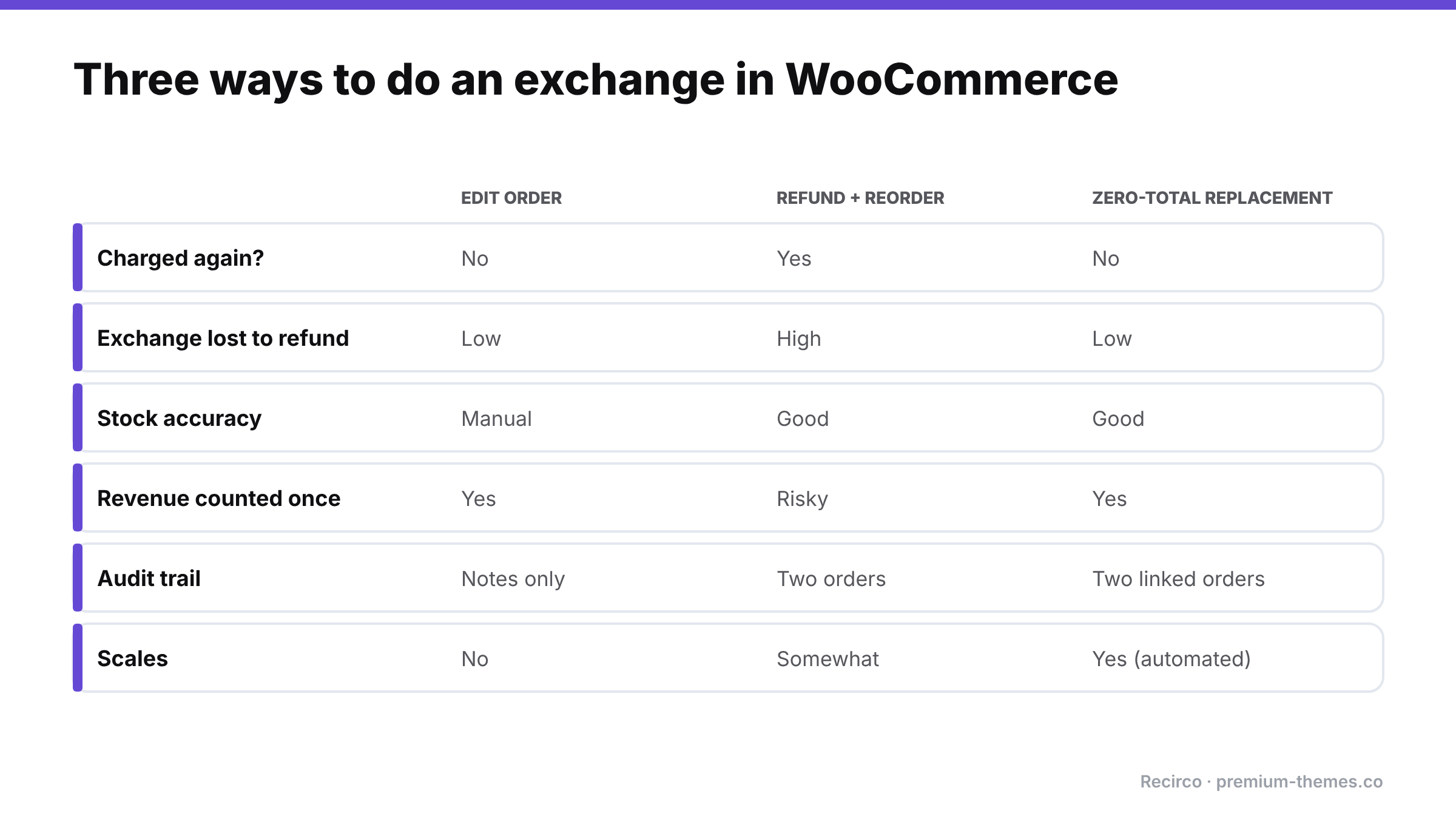
Comparison of three exchange methods: editing the order, refunding and reordering, and a zero-total replacement order, across whether the customer is charged again, risk of losing the exchange to a refund, stock accuracy, revenue counting, audit trail and scalability. The zero-total replacement scores best.

Edit order Refund + reorder Zero-total replacement
Customer charged again? No Yes (or manual “paid” order) No
Risk of exchange becoming a refund Low High Low
Stock accuracy Manual, error-prone Good Good
Revenue reporting Good Risk of double-counting Good
Audit trail Notes only Two separate orders Two linked orders
Effort per exchange High Medium Medium (manual) / Low (automated)
Scales No Somewhat Yes (automated)

Ship first or wait for the return?

A policy decision you need to make:

  • Wait for the return (safest): the replacement ships once the original arrives. No risk of losing both items, but the customer waits longer, often a week or more.
  • Ship immediately (fastest): the replacement ships when the exchange is approved. Customers love it, but you carry the risk of the original never coming back.

Many stores ship immediately for repeat customers or low-value items, and wait for new customers or high-value items. Whatever you choose, apply it consistently. If you ship first, track unreturned originals and follow up.

Speed matters more than you might think. In Loop’s 2026 survey of consumers in the US, UK and Australia, speed (35%) and ease of processing (37%) were the top factors in whether people preferred an exchange over a refund, and 87% said they’d consider an exchange if the experience were easy enough ([Loop Returns, July 2026](https://www.loopreturns.com/blog/returns-revenue-gap/)).

Common exchange mistakes

  • Restocking twice. Restocking when the exchange is approved and when the item arrives.
  • Forgetting to restock at all. The returned medium sits on a shelf while WooCommerce says you’re out of mediums.
  • Charging shipping twice without telling the customer, or refunding the original shipping when you didn’t intend to.
  • Losing the link between the original and replacement orders, so nobody can answer “what happened with my exchange?”
  • Treating price-different exchanges as like-for-like. If the replacement costs more or less, money needs to move: charge or refund the difference explicitly.
  • No reason recorded. “Wrong size” exchanges are your best sizing data. If you don’t record the reason, you can’t fix the size guide.

Exchanges and your numbers

Exchanges confuse reporting if you don’t think about them up front. A few points to agree with whoever does your books:

  • Revenue: with a zero-total replacement order, the original sale is the only revenue. The replacement adds an order to your order count, but not to revenue. If your team measures performance by order count, separate exchange orders out (a consistent order note or tag helps).
  • Cost of goods: you’ve shipped two units and received one back. If the returned unit is resellable, cost of goods is unchanged; if not, it’s a write-off. Track it.
  • Shipping cost: the replacement shipment and any return label are real costs of the exchange. Many stores absorb them because the alternative, a refund, costs more.
  • Exchange rate as a KPI: the share of returns that end as exchanges rather than refunds is one of the best indicators of how much revenue your returns process keeps. Measure it monthly.

Automating size exchanges with Recirco

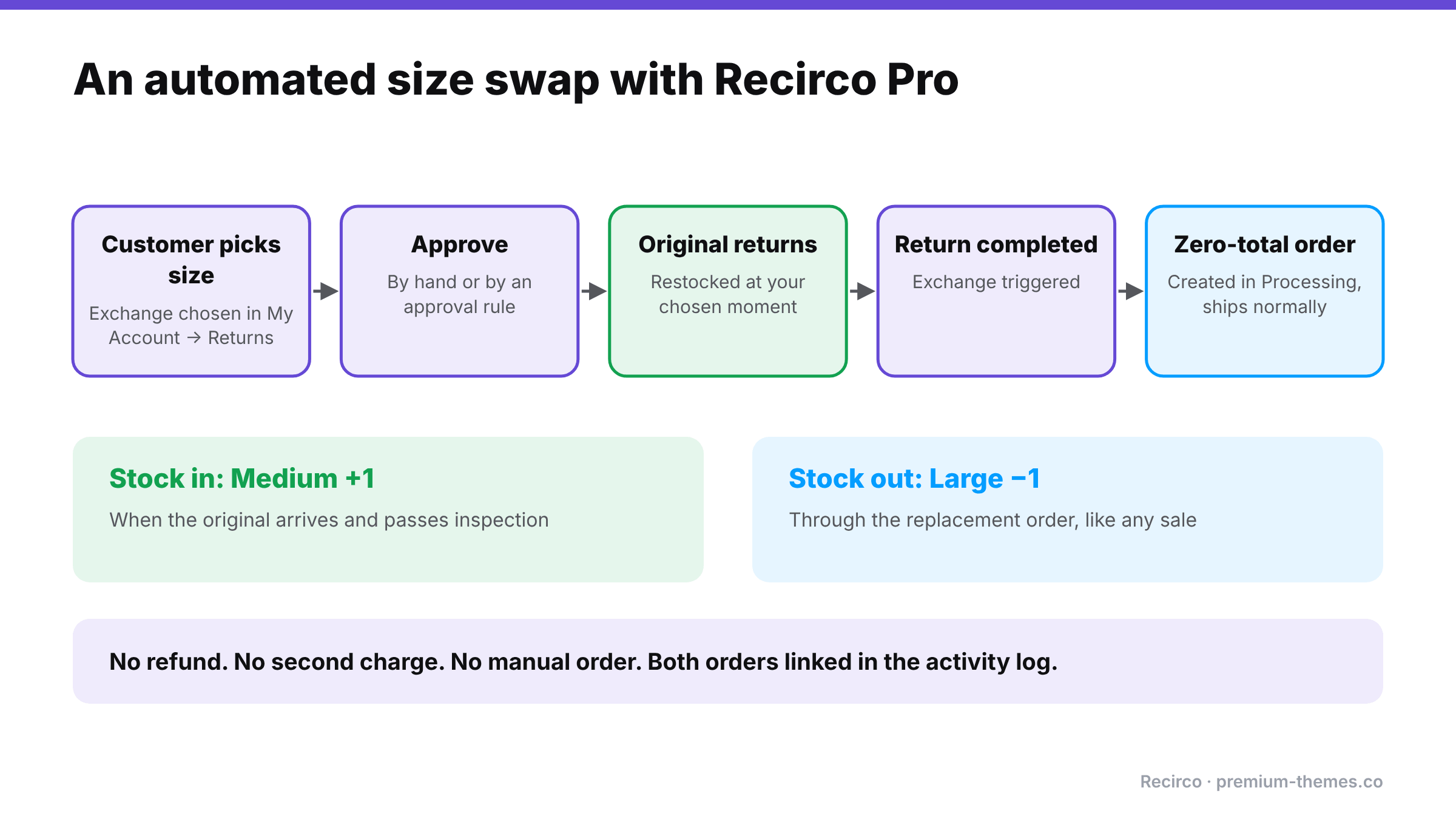
Flow: the customer picks a replacement size in My Account, the exchange is approved, the original returns and is restocked, the return completes, and a zero-total replacement order is created in Processing. Stock goes up for the returned medium and down for the new large. No refund, no second charge.

Recirco – Returns & Exchanges for WooCommerce gives you a free self-service returns portal in My Account, an admin approval queue, return windows, reasons and restocking rules. That covers the “item comes back” half: the customer requests the return, picks a reason such as Too small, ships it with the RMA number, and the item is restocked at the point you choose (on approval, on arrival or on completion).

Recirco Pro adds the “replacement goes out” half with exchanges and variant swaps, which is Method 3 done automatically:

  1. In the returns portal, the customer chooses exchange and picks the replacement, such as a different size or colour, themselves.
  2. You approve it in the queue (or let a conditional approval rule approve it automatically).
  3. When the return is completed, Recirco creates a zero-total replacement order in Processing, so it flows into your normal fulfilment.
  4. The returned item follows your restock setting; the replacement reduces stock like any normal order; both are tied together in the return’s activity log.

No refund, no second charge, no manual order entry, no lost link between orders, and the customer never has to place a new order themselves.

Because every exchange records a reason, Recirco Pro’s analytics then show which products and reasons drive exchanges, so you can see that, say, one style’s mediums are coming back as “too small” far more than others. That’s the cue to update the size guide. (See how to reduce your return rate using reason data.)

A simple exchange policy you can publish

Exchanges

Ordered the wrong size or colour? Request an exchange from My Account → Returns within [30] days of delivery, choose the replacement you’d like, and send the original back using the return number we give you.

Same-price exchanges are free. We’ll ship your replacement [as soon as your return is approved / as soon as your return arrives].

If the item you’d like costs more or less, we’ll [charge / refund] the difference.

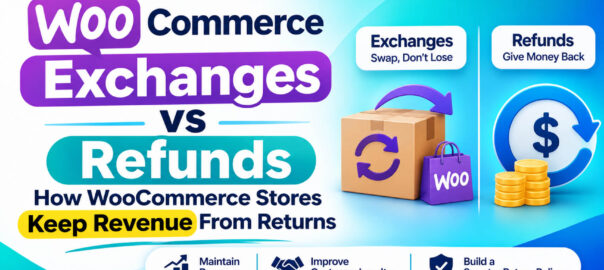
Exchanges vs Refunds: How WooCommerce Stores Keep Revenue From Returns

Exchanges vs Refunds: How WooCommerce Stores Keep Revenue From Returns

When a customer returns something, you have three ways to resolve it:

  1. Refund. The money goes back. The sale is gone.
  2. Exchange. They get a different size, colour or product. The sale stays.
  3. Store credit. The money stays with you, to be spent later.

Most WooCommerce stores default to option 1, because it’s the only one WooCommerce supports natively. That’s an expensive default.

This article looks at why exchanges and store credit matter, what the data says about shopper behaviour, and how to offer both in WooCommerce without building a manual process around them.

The scale of the problem

The National Retail Federation estimated US consumers would return $849.9 billion of merchandise in 2025, with 19.3% of online sales returned (NRF, October 2025).

You can’t stop all returns, and you shouldn’t try. Many happen because the customer genuinely needed a different size. But you can change how they end.

What shoppers actually want

Chart: returns currently end as refunds 46%, exchanges 29%, store credit 25%. 75% of consumers prefer a full refund by default, but 87% would consider an exchange if it were easy, and 39% could be swayed by bonus store credit. Source: Loop Returns, July 2026.

Loop’s 2026 survey of 3,000 consumers and 600 retailers across the US, UK and Australia found (Loop Returns, July 2026):

  • 75% of consumers prefer a full refund by default…
  • …but 87% would consider an exchange if the experience were easy enough.
  • The top factors in choosing an exchange were ease of processing (37%) and speed (35%).
  • Incentives work: 39% said bonus store credit could steer them away from a refund, 36% a waived exchange fee, and 35% a speedy replacement.
  • Across retailers surveyed, refunds made up 46% of returns processed, exchanges 29%, store credit 25%.

The takeaway: customers don’t insist on refunds because they hate exchanges. They default to refunds because exchanges are usually harder. Usually that means emailing, waiting for the return to arrive, then placing a new order themselves.

Why exchanges are worth so much

  • You keep the revenue. The original sale stays on your books.
  • You keep the customer. A shopper who gets the right size is far more likely to buy again than one who got a refund and moved on.
  • The customer gets what they wanted. They wanted the product. It just wasn’t quite right.
  • Variant swaps are low-risk. Same product, same price, different size or colour.

Why store credit is worth offering too

Not every return has an obvious replacement. Store credit lets the customer decide later, while the money stays with you.

  • A small bonus changes behaviour. Offering, say, 10% extra as store credit versus a refund is a strong nudge, and costs you far less than losing the full sale.
  • Expiry encourages use (check local laws on credit and gift card expiry before setting one).
  • It brings customers back to your store to spend it, often spending more than the credit.

How WooCommerce handles exchanges and store credit today

Out of the box, it doesn’t.

  • No exchanges. The usual workaround is to refund the original order and ask the customer to place a new one, or manually create a new order and adjust stock by hand. Both are slow and error-prone, and the “refund then reorder” route often ends with just the refund.
  • No store credit. Stores typically generate a one-off coupon code as a substitute. Coupons work, but they’re awkward to track: no running balance, no ledger, and partial use often gets messy.

How to offer exchanges and store credit properly

Recirco – Returns & Exchanges for WooCommerce gives you a free self-service returns portal, approval queue and refund workflow. Recirco Pro adds exchanges and store credit on top.

Exchanges and variant swaps

When requesting a return, the customer picks a replacement right inside the returns portal, such as a different size or colour. When the return is completed, Recirco creates a zero-total replacement order in Processing, so it flows into your normal fulfilment like any other order. No manual order entry, no stock adjustments by hand, and the customer never has to place a new order.

Store credit

Store credit in Recirco Pro is built as an append-only ledger. Every credit and every use is a separate entry, and the balance is calculated from those entries rather than overwritten, so there’s always an audit trail.

  • Bonus percentage to make credit more attractive than a refund
  • Optional expiry
  • A store credit balance page in My Account
  • Applied at checkout, deducted from the order total

Pair it with approval rules

Recirco Pro’s conditional approval rules let you automate decisions. You could auto-approve exchanges (low risk, revenue retained) while holding refund requests above a certain value for review.

Making exchanges the easy choice

Whatever tool you use, the principles are the same:

  1. Show the exchange option first in the returns flow, before refund.
  2. Make it fast. Ship the replacement as soon as you’re comfortable (on approval for trusted customers, on arrival for others).
  3. Incentivize credit. A bonus on store credit is cheaper than a refund.
  4. Keep refunds available. Hiding refunds frustrates customers and, in the EU and UK, conflicts with their legal right to withdraw. Exchanges should be the easy choice, not the only one.
  5. Measure it. Track the share of returns ending as exchange, credit or refund each month. Recirco Pro’s analytics show requests over time, value returned, top reasons and most-returned products.

A quick example

Illustrative bar chart: 100 returns a month at $60 each means $6,000 leaving the business if all are refunded. If a quarter move to exchanges or store credit, $1,500 a month is kept. Illustrative numbers.

Say you process 100 returns a month at an average of $60, and every one ends as a refund. That’s $6,000 a month leaving the business.

If an easy exchange flow and a store-credit bonus moved even a quarter of those to exchanges or credit, you’d keep roughly $1,500 a month in revenue before counting the repeat purchases those customers go on to make. (Illustrative numbers; your results will depend on your products and customers.)