Tag Archives: Fraud

Return Fraud and Serial Returners: Protecting Your WooCommerce Store Without Punishing Good Customers

A post on Reddit’s ecommerce communities captured a frustration a lot of store owners share. An apparel merchant, about two years in, noticed a small group of customers who kept buying, returning, and apparently wearing items before sending them back. Returns were auto-approved with no flags and no customer history, so the pattern only became obvious after it had cost real money. Their question: how do you spot repeat return abuse before approving the refund?

The replies were revealing. Some said ban them. Some said charge for returns. One commenter claimed that “90% of problems often come from about 2% of customers”. Others pushed back: frequent returns might mean the sizing is wrong, not that the customer is dishonest.

Both sides are right, and that’s the challenge. The NRF and Happy Returns estimated that 9% of all returns in 2025 were fraudulent (NRF, October 2025). That’s a real cost. But the other 91% are honest, and the same report found 71% of shoppers are less likely to buy again after a poor returns experience. Clamp down on everyone and you lose more good customers than you stop bad ones.

This guide covers the common types of return fraud and abuse, the signals that identify them, and how to set up WooCommerce so risky returns get a closer look while honest customers sail through.

The main types of return fraud and abuse
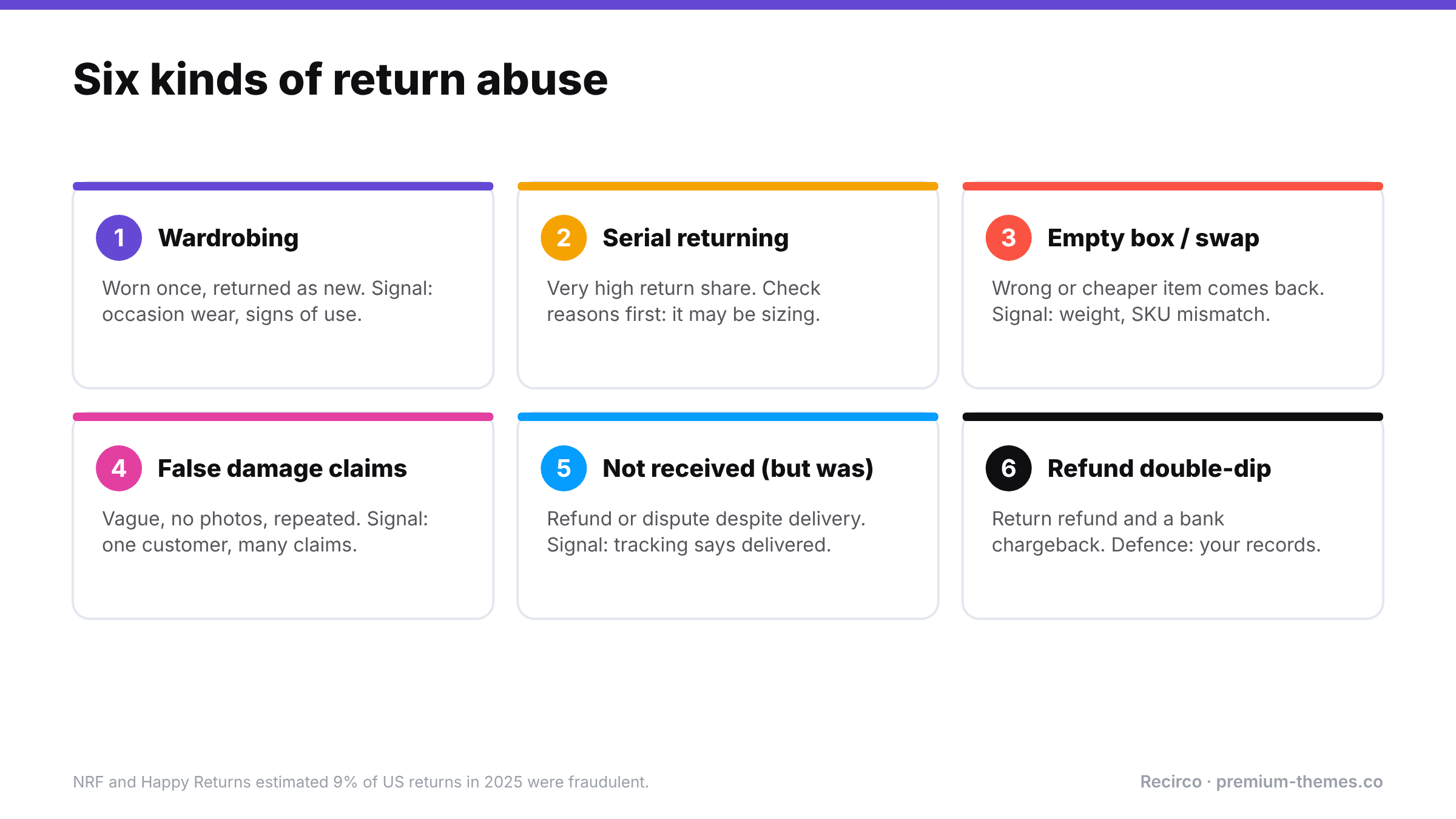
Six return abuse types and signals: wardrobing, serial returning (often a sizing problem), empty box or item swap, false damage claims, claiming non-delivery despite delivery, and double-dipping with both a refund and a chargeback. About 9% of US returns in 2025 were estimated to be fraudulent.

Type What happens Typical signal
Wardrobing Item bought, worn or used once (an event, a photo shoot), then returned Fashion, occasion wear, cameras; returns just inside the window; signs of wear
Serial returning A customer returns a very high share of what they buy High return rate per customer over time
Empty box / wrong item returned Box returned empty, or with a cheaper or counterfeit item Weight mismatch; inspection finds wrong item
False damage claims Item claimed damaged or defective when it wasn’t Vague descriptions; no packaging photos; repeat claims
“Item not received” while receiving it Customer claims non-delivery to get a refund, or disputes with their bank Delivery confirmed; history of similar claims
Return outside the policy Late returns, used items, excluded products, pushed through by persistence Requests outside window; excluded categories
Refund double-dipping Customer requests a return refund and files a chargeback Dispute on an order already refunded

Not all of these are “fraud” in a legal sense. Serial returning and late returns are often policy abuse, and sometimes not abuse at all. Your process should treat them differently.

Step 1: Separate honest-but-expensive from abusive

Before tightening anything, look at why your heavy returners return.

  • If a customer returns lots of items with “Too small” / “Too large” reasons, your size guide may be the problem. Fix the product page and offer exchanges instead of refunds. (See reducing your return rate with reason data.)
  • If they consistently return items after events or weekends, in visibly used condition, that’s wardrobing.
  • If returns come with “Damaged” claims and no evidence, that needs scrutiny.

Return reasons and history turn a vague suspicion into a clear picture. Without them, you’re guessing, and guessing usually means treating everyone the same.

Three high returners, three different answers

Customer A has returned 6 of 9 orders this year. Every return reason is Too small, mostly on one brand of jeans. Items come back unworn with tags. Not abuse. That brand runs small. Add a sizing note to those product pages, offer an exchange, and Customer A will likely become a profitable regular.

Customer B has returned 5 of 7 orders, mostly dresses and occasion wear, each requested on a Monday or Tuesday, close to the end of the return window. Two arrived with makeup marks and creased fabric. Likely wardrobing. Hold their future returns for inspection, refund only after arrival, and enforce the condition rules in your policy.

Customer C has made three “arrived damaged” claims in two months on different products, each with a one-word description and no photos, while other customers ordering the same products report no damage. Suspicious. Require photos of the item and packaging for future claims, and hold them for review.

Three customers with high return rates, and only two of them are a problem. Reasons and history are what tell them apart.

Step 2: Make the policy do the work

Most abuse thrives on ambiguity: late returns that get approved because nobody checked the date, used items accepted because the policy didn’t say “unused”, gifts kept because nobody asked for them back. Tighten the policy text, then enforce it automatically so no one has to argue:

  • Return window counted from delivery or completion, enforced by the system rather than staff.
  • Condition rules: unworn, unwashed, tags attached, original packaging. Consider non-removable tags for occasion wear.
  • Excluded categories: final sale, personalized, intimate apparel, opened hygiene products.
  • Evidence for claims: photos required for damage and fault reasons.
  • Consequences stated plainly: “Items returned used or incomplete may be refused or refunded partially.”

([Return policy template](/blog/woocommerce-return-policy/))

Step 3: Route by risk, not by rule-for-everyone
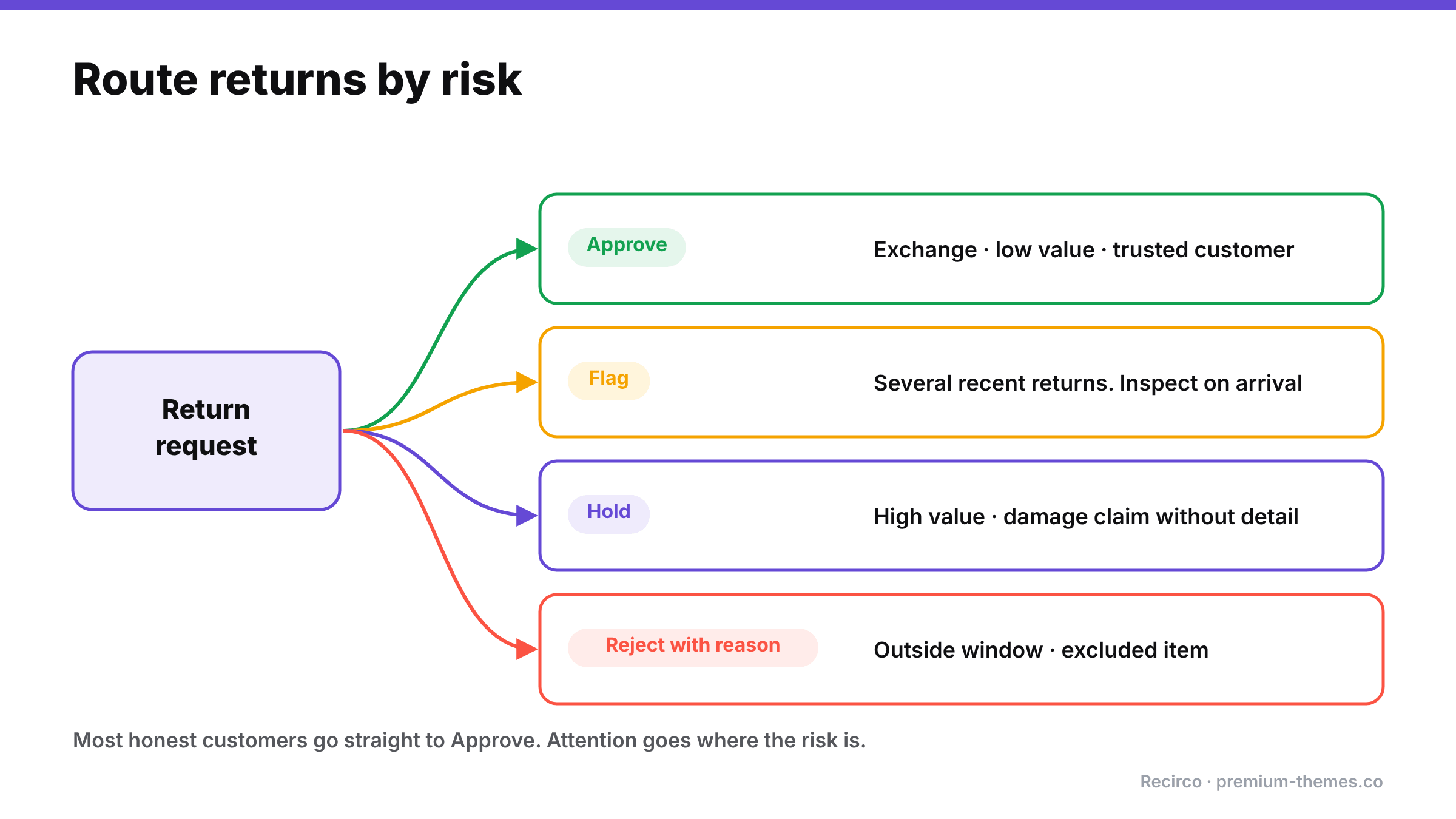
Routing diagram: a return request goes to approve (exchanges, low value, trusted customers), flag (several recent returns, inspect on arrival), hold (high value, damage claim without detail), or reject with reason (outside window, excluded item).

The best idea from that Reddit thread, and from others like it, was risk-based routing: automate the obvious cases, and send the rest to a human with context.

Return Route
Low value, trusted repeat customer, normal reason, inside window Auto-approve
Exchange for a different size Auto-approve (revenue kept, low risk)
High-value order Hold for manual review
Customer with several recent returns Flag for review
Damage claim without detail Hold; request evidence
Outside window or excluded item Reject with a clear reason (or flag if you allow exceptions)

This keeps the experience fast for the large majority while focusing your attention where risk actually is.

Step 4: Inspect what comes back

For anything above a low-value threshold:

  • Weigh parcels against expected weight.
  • Check SKU, serial number and condition before refunding.
  • Restock only after inspection. If you restock on approval, abuse gets into your sellable stock.
  • Refund after arrival for higher-risk returns, not on approval.

A simple inspection checklist

Keep it next to wherever returns are unpacked:

  1. Match the return number to the parcel and the request.
  2. Check the item and SKU match what was ordered and requested.
  3. Check the serial number for warranty products.
  4. Check condition: tags attached, unworn, unwashed, no marks, odours or damage.
  5. Check completeness: accessories, parts, manuals, packaging.
  6. Photograph anything that fails inspection before you do anything else.
  7. Record the outcome on the return (accepted, partially accepted, refused) with a note.
  8. Restock only accepted items.

It takes a minute per parcel and gives you evidence if a customer disputes a refused or partial refund.

Step 5: Keep a record, and act on patterns

Every return should record the customer, items, reason, description, condition on arrival, decision and who made it. Patterns then become visible:

  • Customers whose returns are repeatedly refused on inspection
  • The same serial number appearing in more than one claim
  • Damage claims that cluster on one customer rather than one carrier

For genuine, repeated abuse, many stores’ terms reserve the right to refuse future orders or returns. Use it sparingly, based on records rather than hunches.

When a refund becomes a chargeback

One form of abuse sits between returns and payments: the customer requests a return, gets refunded, and disputes the original charge with their bank. Without records, you can end up refunding twice. Your defence is documentation: the return record, the refund in WooCommerce, the gateway refund ID, and the customer emails. Respond to the dispute with that evidence promptly.

What not to do

  • Don’t hide the return policy or make returns deliberately painful. You’ll lose honest customers at the checkout before any fraudster is deterred.
  • Don’t treat every high returner as a fraudster. Check reasons first.
  • Don’t refund before inspecting high-value returns.
  • Don’t let staff judge exceptions differently. Inconsistency is what serial abusers exploit.
  • Don’t refund in two places. Double refunds aren’t customer fraud, but they’re just as expensive. (See refund status mismatches.)

Setting it up in WooCommerce with Recirco

WooCommerce has no returns system, so out of the box there’s no window enforcement, no reasons, no history and no approval step. Recirco – Returns & Exchanges for WooCommerce adds them for free:

  • Return window enforcement in days, measured from the order’s completed, paid or created date. Late requests simply can’t be submitted.
  • Eligible order statuses and excluded products and categories, so final-sale and hygiene items are never offered as returnable.
  • Per-unit eligibility, so the same unit can’t be returned twice.
  • Reasons on every return, each optionally requiring an explanation, so damage claims arrive with detail.
  • Approval queue with search, filters and bulk actions. Nothing is refunded until someone approves it (unless you enable auto-refund on completion).
  • Restock timing: on arrival or on completion is the safe choice for abuse-prone categories.
  • Activity log and notes on every return: an evidence trail if a customer later disputes the charge.
  • Refunds from the return, designed to prevent duplicate refunds for the same return.

Recirco Pro adds the risk-routing layer:

  • Conditional approval rules: a set of seven conditions and four actions (approve, reject with reason, flag, hold). The first matching rule wins, and the activity log names the deciding rule, so every automated decision is explainable. Auto-approve the routine, hold the risky. (Check the Recirco documentation for the exact conditions available and map your risk signals to them.)
  • Photo uploads with claims (up to 5 photos, 5 MB each) and warranty serial-number registration, which deters false damage and warranty claims.
  • Exchanges and store credit, which give honest “wrong size” returners a better path than a refund and reduce the incentive for refund abuse.
  • Analytics: reasons ranked by count and value, most-returned products, value returned. That separates product problems from customer problems.

Note: the current version of Recirco requires customers to have an account to request a return. For abuse prevention that’s a benefit: every return is tied to a known customer and their history.

A balanced anti-abuse policy (template)

Fair returns

We want returns to be easy for our customers. To keep them that way:

  • Returns must be requested within [30] days of delivery from My Account → Returns.
  • Items must be unworn, unwashed and returned with all tags and packaging.
  • [Final-sale, personalized and hygiene items] can’t be returned.
  • Damage and fault claims need a short description and photos.
  • We inspect every return. Items returned used, damaged by the customer or incomplete may be refused or partially refunded.
  • We may decline future orders or returns where we see repeated misuse of this policy.
  • This doesn’t affect your statutory rights.

WooCommerce Card Testing Attack: How to Spot It, Stop It and Clean Up Afterwards

You open WooCommerce in the morning and the orders list is unrecognizable. Hundreds of new orders arrived overnight, almost all of them Failed. They’re for the cheapest product you sell. The names look random, the email addresses are nonsense, and the billing addresses don’t match anything.

Then your payment gateway emails you about unusual activity.

This is a card testing attack, and it’s one of the most common complaints in WooCommerce communities. Threads with titles like “Spam orders, at my wits’ end” turn up regularly on r/woocommerce and the WordPress.org forums. It’s unsettling, but it’s well understood, and there’s a clear playbook for stopping it.

What card testing is (and why your store was chosen)

Criminals buy stolen card numbers in bulk. Many of those cards are already cancelled or blocked. Before they use or resell them, they need to know which ones still work. The cheapest way to find out is to attempt small purchases on real stores and see which payments go through.

Your store wasn’t chosen because of anything you sell. It was chosen because it:

  • has a cheap product (a low-value charge attracts less attention),
  • has a checkout that can be scripted (no CAPTCHA, no rate limiting),
  • uses a major gateway whose responses are easy to interpret.

WooCommerce’s developer blog has noted that attackers have targeted the WooCommerce Store API directly: the REST endpoints behind the block-based cart and checkout. This works even on stores that don’t use the Checkout block, because the endpoints exist on every modern WooCommerce install. Bots skip your checkout page entirely and talk straight to the API.

Why it matters even though the orders “failed”

It’s tempting to think failed orders are harmless. They aren’t:

  • Gateway fees. Some gateways charge per authorization attempt or for fraud screening, even when the payment fails.
  • Account risk. A flood of declines looks bad to your gateway. Stripe and others may restrict or review your account, and in serious cases pause payouts.
  • Disputes later. Some test charges succeed. When real cardholders spot them, they dispute them, and you pay a dispute fee (Stripe charges $15 per dispute in the US, win or lose) on top of refunding.
  • Polluted data. Hundreds of junk orders distort your reports, analytics and stock reservations.
  • Emails. Depending on your settings, failed-order emails can flood your admin inbox.
  • Server load. Thousands of checkout requests can slow the site for real customers.

Recognizing the signature

Illustrative bar chart of orders per hour over a day: normal low volume, then a huge overnight spike between 1 and 7 a.m., mostly failed orders with a few successful. Signature: sudden spike, mostly failed, cheapest product, random names and guest checkouts.

Card testing has a very recognizable pattern:

Signal What you’ll see
Volume A sudden spike, often overnight, far above your normal hourly order count
Status Mostly Failed, with a few Processing (the cards that worked)
Products The cheapest item, or a single low-priced product over and over
Customer details Random or mismatched names, emails and addresses; often guest checkouts
Payment notes Declines with reasons like card declined, incorrect CVC, insufficient funds
Origin Many different IPs, or bursts from data-centre ranges
Timing Requests seconds apart, at hours your real customers don’t shop

If you see most of the first four, assume it’s card testing and act now. You can confirm the details later.

What an attack looks like hour by hour

Attacks vary, but a typical overnight incident on a small store runs something like this:

  • 01:40: The first few orders arrive for a $3 product. Two fail with card declined, one succeeds. Nobody notices: it’s the middle of the night, and three orders is unremarkable.
  • 02:00–03:00: The bot speeds up once it’s confirmed the checkout can be scripted. Dozens of attempts an hour, mostly failures, from rotating IP addresses.
  • 03:00–07:00: Hundreds of attempts. The admin email inbox fills with failed-order notifications. Your gateway’s risk systems start to notice.
  • 07:30: You wake up to the inbox, the orders list, and perhaps an email from your gateway.

Every hour between 01:40 and 07:30 was another batch of stolen cards validated on your store, another set of potential disputes, and another notch against your account’s risk profile. Shortening that window is the single biggest thing you can do to reduce the damage.

Common mistakes when responding

  • Deleting the orders before refunding the successful ones. You lose the easiest list of charges to refund. Export first, refund, then clean up.
  • Refunding in the gateway dashboard only. It works for the money, but WooCommerce still shows paid orders, which distorts reports and can leave orders in Processing to be shipped. Refund from the WooCommerce order where you can.
  • Blocking by country or IP only. Attackers rotate IPs and use proxies in your own country. Use it as a supplement, not a fix.
  • Turning off the gateway entirely. It stops the attack, but it also stops real customers. CAPTCHA and rate limiting usually let you stay open.
  • Assuming it’s over because it stopped. Attackers often pause and return. Keep defences on.

Stop it: the immediate response (first hour)

Five defence layers: detect fast with order volume spike alerts; gateway fraud rules; Store API rate limiting (off by default); a CAPTCHA that covers the Store API and block checkout; and a web application firewall at the edge. No single layer is enough.

1. Put friction in front of checkout

Turn on a CAPTCHA that protects the checkout and the Store API. This matters. WooCommerce’s developer team found that some CAPTCHA plugins didn’t protect the Checkout block or Store API, so bots skipped them entirely, and worked with several plugin authors to patch them. Make sure your CAPTCHA plugin is up to date and explicitly supports block checkout and the Store API.

2. Enable Store API rate limiting

WooCommerce includes rate limiting for the Store API, but it’s off by default. Developers can enable and configure it with the `woocommerce_store_api_rate_limit_options` filter. WooCommerce 9.6 added stricter rules for the place-order endpoint that can be configured from the admin, and 9.8 added a filter for using a custom fingerprint rather than IP address. If your store sits behind a proxy or CDN, enable proxy mode so you don’t rate-limit all your real customers as one IP.

3. Tighten your gateway’s fraud rules

In Stripe, review Radar rules: block payments where the CVC or postcode check fails, and consider blocking or reviewing high-risk payments. Other gateways have equivalent risk settings. Tell your gateway’s support team you’re under attack. They see this daily.

4. Block obvious sources at the edge

If your host or CDN offers a WAF, add rules or challenges for the checkout and Store API paths, and block data-centre ranges if the attack comes from them.

5. Temporarily hide the target

If the attack hammers one cheap product, temporarily raise its price, set it to private, or require login for checkout until defences are in place.

Clean up afterwards

  1. Refund any successful test charges. Find the few Processing orders that match the attack pattern, verify them against the gateway, and refund them through the WooCommerce order (so both systems record it). Proactively refunding is cheaper than fighting the disputes that will otherwise arrive.
  2. Restore stock. Check that cancelled or failed junk orders aren’t still holding stock.
  3. Delete or trash the junk orders once refunded, so they stop polluting reports. Export a list first for your records.
  4. Check customer accounts. If the attack created accounts, remove them.
  5. Tell your gateway what you’ve done. It helps your account standing.
  6. Review your email settings so a future attack doesn’t flood your inbox.

What to tell your payment gateway

Gateways deal with card testing constantly, and a clear, early message from you helps both your account standing and their response. Include:

  • When it started and whether it’s still going
  • Roughly how many attempts and how many succeeded
  • Which product was targeted and its price
  • What you’ve done: CAPTCHA enabled, rate limiting on, fraud rules tightened, successful charges refunded
  • A request for any account-level protections they can add while things settle

Keep a copy. If your account is later reviewed because of the spike in declines, a record showing you acted quickly and responsibly is useful.

It’s also worth asking whether your gateway offers built-in card-testing protection you haven’t switched on. Several gateways and payment plugins now include specific protections against bursts of low-value attempts, and they’re often off by default or tucked away in advanced settings.

Prevent the next one

  • Keep CAPTCHA and rate limiting on permanently. Attackers return to stores that worked once.
  • Keep WooCommerce updated. Store API protections have improved release by release.
  • Watch your order volume. The earlier you notice an attack, the fewer cards get tested on your store and the smaller the clean-up.
  • Set up alerts. An attack that starts at 2 a.m. shouldn’t run until 9 a.m.

That last point is the one most stores miss. Every defence above is something you turn on after you notice. The size of the damage depends almost entirely on how long the attack runs before someone sees it.

Seeing an attack within the hour, not the morning after

Ordafide Pro includes order volume anomaly detection. Every hour, it compares the current hour’s order count with comparable past hours, using median-based statistics so that genuinely busy periods like a sale don’t distort the baseline. It flags both spikes, the typical shape of a card testing burst, and drops, which usually mean checkout is broken. Findings resolve themselves when volume returns to normal.

Combined with Pro’s alerts (Slack, SMS via Twilio, email, or a signed webhook into Discord, Microsoft Teams or PagerDuty), with severity routing and throttling, an overnight spike becomes a message on your phone while the attack is still small.

Pro’s read-only gateway reconciliation with Stripe, PayPal, Square, Mollie and Razorpay also helps afterwards. It shows any money with no order and any amount disagreements, so you can be sure you’ve found every successful test charge, including ones that never produced a clean WooCommerce order.

The free Ordafide plugin won’t detect an attack in progress (that needs volume monitoring), but its duplicate charge and refund mismatch checks help verify the clean-up: that refunds were recorded correctly, and that no refunded order is still sitting in Processing waiting to be shipped.

Ordafide is not a fraud-prevention firewall and doesn’t block requests. It’s the alarm that tells you to put the firewall up. Use it alongside CAPTCHA, rate limiting and your gateway’s fraud rules.

Card testing response checklist

Right now

  • [ ] CAPTCHA on checkout, confirmed to protect block checkout and the Store API
  • [ ] Store API rate limiting enabled (proxy mode on if behind a CDN)
  • [ ] Gateway fraud rules tightened; gateway support informed
  • [ ] WAF challenge on checkout/Store API paths

Within 24 hours

  • [ ] Successful test charges identified and refunded through WooCommerce
  • [ ] Stock checked and restored
  • [ ] Junk orders exported, then removed
  • [ ] Junk customer accounts removed

Permanently

  • [ ] WooCommerce, gateway and CAPTCHA plugins kept updated
  • [ ] Order volume monitored with alerts for spikes