Tag Archives: Peak Season

Holiday Returns Season: How to Prepare Your WooCommerce Store for the January Surge

Every store owner plans for Black Friday. Far fewer plan for what comes after it.

Holiday purchases come back at a higher rate than the rest of the year. The NRF and Happy Returns expected 17% of holiday merchandise to be returned in 2025, against 15.8% of retail sales across the whole year (NRF / Retail Insight Network, October 2025). Gifts don’t fit, duplicates arrive, impulse sale purchases look less exciting in January.

For a WooCommerce store this creates a predictable crunch. Returns pile up in the slowest sales weeks of the year, often while your team is on holiday. Gift recipients who aren’t your customers try to return things. Extended holiday windows get applied inconsistently. And the revenue you worked so hard for in November leaks out in January.

This guide covers how to prepare: the policy decisions to make now, how to handle gift returns, how to turn holiday returns into exchanges rather than refunds, and how to keep the operation running when volume peaks.

What makes holiday returns different
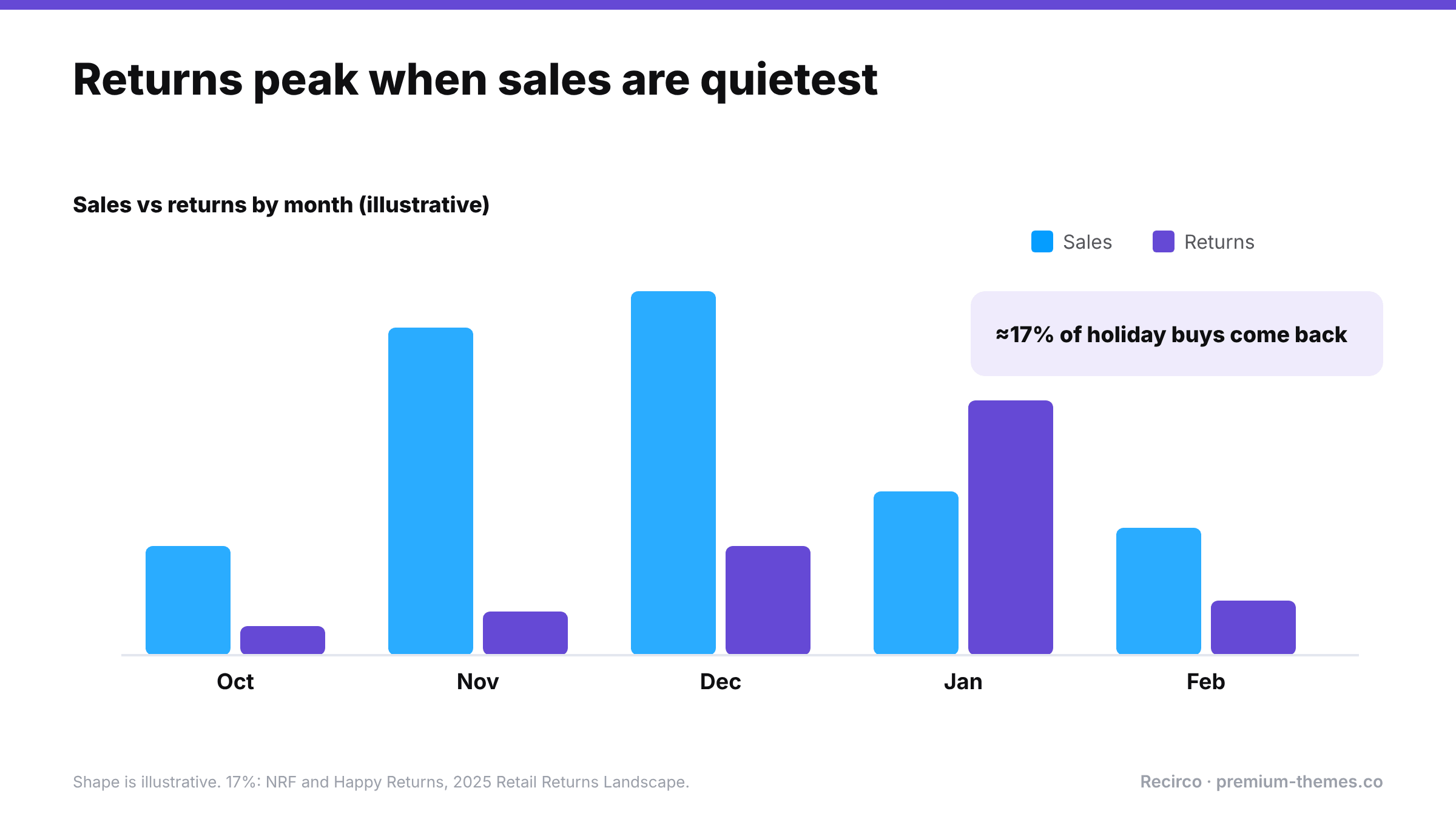
Illustrative chart of sales and returns from October to February: sales peak in November and December while returns peak in January. About 17% of holiday purchases are expected to be returned (NRF and Happy Returns, 2025).

  1. Volume is concentrated. Returns from November and December purchases cluster in late December and January.
  2. Many returners didn’t buy the item. Gift recipients have no account, no order number, and no idea what was paid.
  3. Return windows get confusing. An item bought on 20 November with a 30-day window expires before Christmas, before the gift is even opened.
  4. Expectations are higher. Shoppers check holiday return policies before buying gifts, and generous policies sell.
  5. Your team is smaller. Holidays mean fewer people to process more returns.
  6. Fraud ticks up. Wardrobing around parties and events, and “gifts” bought specifically to return.

Decision 1: Extend your return window for holiday purchases

Most retailers extend returns for holiday purchases, typically letting items bought from early November be returned until mid or late January. It’s become a standard expectation and a genuine selling point in gift-buying season.

How to set it up well:

  • Decide the dates now. For example: “Items bought between 1 November and 24 December can be returned until 31 January.”
  • Publish it on product pages, the cart, checkout and your returns policy page from early November. It’s a conversion tool, so use it in your Black Friday messaging.
  • Make sure your system enforces it. If your returns system uses a fixed number of days, temporarily raise it to cover the latest date you’ll allow, then lower it again afterwards. Note the dates in your calendar so the change isn’t forgotten.
  • Remember the legal minimum still applies. EU and UK customers have at least 14 days from delivery regardless; your extended window simply goes further.

Communicate holiday dates in the right places

Customers need to see your extended window when they buy, not just when they return. Put it:

  • in a site-wide banner during November and December (“Gifts bought now can be returned until 31 January”)
  • on product pages, near the add-to-cart button
  • in the cart and checkout, where gift buyers hesitate
  • in order confirmation emails for orders placed in the holiday period
  • on your returns policy page, with exact dates

Decision 2: How you’ll handle gift returns
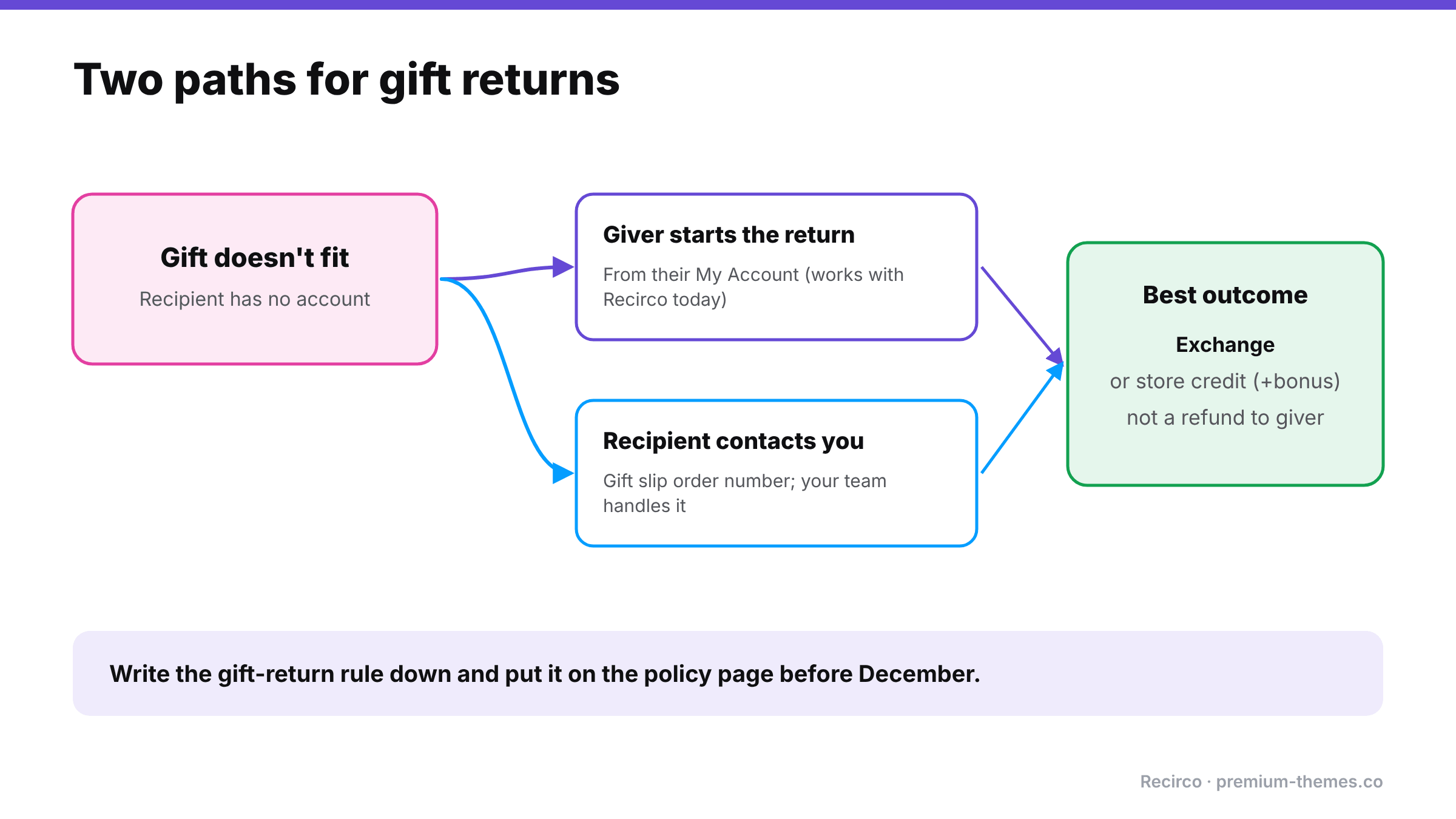
Gift returns: when a gift doesn't fit and the recipient has no account, either the giver starts the return from their account, or the recipient contacts you with the gift slip order number. Best outcome is an exchange or store credit, not a refund to the giver.

Gift returns are where most holiday friction lives. The person returning the item:

  • probably doesn’t have an account with you,
  • doesn’t have the order number,
  • shouldn’t see what the giver paid,
  • and usually wants an exchange or store credit, not a refund to the giver’s card.

Common approaches:

Approach How it works Trade-off
Giver handles it The original buyer requests the return from their account Simple and secure; awkward for the recipient
Gift receipt / gift order number Recipient contacts you with a gift reference; you process manually Friendly; manual work for your team
Exchange or credit only for gifts Gift returns become exchanges or store credit, never refunds to the giver Keeps revenue; avoids revealing the price; needs clear policy

Whatever you choose, write it down. “Gift returns: please ask the person who bought the gift to start the return from their account, or contact us with the order number from the gift slip and we’ll arrange an exchange or store credit.”

Recirco note: the current version of Recirco requires returns to be requested from a customer account, so gift returns work through the giver’s account or through your team handling the recipient’s request. Plan your gift-return wording around that.

Decision 3: Make exchanges and credit the easy option

January is when keeping revenue matters most: sales are slow, and every refund comes straight off the best quarter you’ve had. Holiday returns are also unusually well suited to exchanges: wrong size, wrong colour, duplicate gift.

Loop’s 2026 survey found that while 75% of consumers prefer a refund by default, 87% would consider an exchange if it were easy enough, and 39% could be swayed by bonus store credit (Loop Returns, July 2026]).

For the holiday window:

  • Show exchange first in the returns flow.
  • Offer bonus store credit (say 10%) instead of a refund, especially for gift returns.
  • Ship exchanges fast. Speed is one of the top reasons people choose exchanges.

(More on exchanges vs refunds])

Write the holiday messages now

You won’t want to write customer communications on 27 December. Draft these in advance:

Auto-reply for the support inbox:

Thanks for getting in touch. Our team is back on [date] and we’re replying in order. If you’d like to return or exchange something, you can start it now from My Account → Returns; it takes about two minutes and you’ll get your return number and address straight away. Holiday purchases can be returned until 31 January.

Approval email addition (holiday period):

Because it’s our busiest returns season, refunds may take up to [5] working days after your return arrives. Exchanges ship as soon as your return is approved.

Gift-return reply:

Thanks for letting us know. If the gift doesn’t fit, the easiest option is an exchange or store credit, so you can choose something you love. Please ask the person who sent the gift to start the return from their account, or reply with the order number on your gift slip and we’ll take care of it.

Decision 4: Staffing and service levels

Work out roughly how many returns to expect. Take your November–December order count, multiply by your normal return rate, and add a margin for the holiday uplift. Then plan:

  • Who processes returns between Christmas and mid-January, and how many hours that needs.
  • What you’ll automate. Approving routine returns automatically is the biggest time saver.
  • Target times: for example, approve within one working day, refund within three working days of arrival.
  • A holiday auto-reply that points people to the self-service returns page and states realistic timings.

A quick volume estimate

Say you shipped 3,000 orders in November and December, and your normal return rate is 12%. Holiday uplift (using the NRF’s 17% holiday figure against a 15.8% full-year rate as a rough guide) suggests your holiday rate could run around 13%. That’s roughly 390 returns, most of them landing between 26 December and the end of January, about five weeks.

That’s around 75–80 returns a week. If each takes 6 minutes to approve, receive, inspect, restock and refund by hand, that’s 8 hours a week, during a period when you may have half your normal team. Automating approvals for routine returns and using bulk actions for receiving can cut that substantially. Knowing the number in advance is what lets you plan.

Decision 5: Warehouse and restocking

  • Inspect and restock fast. January returns are often your best January stock. Items back on sale quickly can be resold, especially in clearance.
  • Restock on arrival, not on approval, so stock levels reflect what’s physically there.
  • Batch processing: set aside fixed times each day for receiving returns rather than handling them ad hoc.

Decision 6: Watch for abuse without slowing everyone down

Holiday season brings wardrobing (party outfits, event equipment) and “buy to return” behaviour. Flag rather than block: hold returns of high-value occasion items or from customers with many recent returns for a closer look, and approve the rest. (Return fraud guide)

Turning January returns into January sales

Returned holiday stock is often in perfect condition. Get it back on sale fast, ideally in your January clearance, and you recover margin from inventory that would otherwise sit in a back room until spring. A clear rhythm helps: receive in the morning, inspect and restock by lunchtime, and let your clearance pages reflect the restocked sizes the same day.

Setting it up with Recirco

Recirco – Returns & Exchanges for WooCommerce (free) handles the core of holiday returns:

  • Self-service returns portal in My Account: customers start returns themselves, any time, including when your team is off.
  • Configurable return window in days, counted from the completed, paid or created date. Raise it for the holiday period and lower it again in February.
  • Custom policy text in the portal, where you can state your holiday dates and gift-return rules.
  • Approval queue with bulk approve, reject and mark received, plus filters, search and a pending badge, built for clearing a backlog quickly.
  • Restock timing (on arrival recommended) and refunds from the return with correct tax.
  • Six editable emails so customers get updates without emailing you.

Recirco Pro adds the tools that keep holiday revenue and save time:

  • Exchanges and variant swaps: customers pick the replacement in the portal; a zero-total replacement order is created in Processing on completion.
  • Store credit with a bonus percentage and optional expiry, applied at checkout. Ideal for gift returns.
  • Conditional approval rules to auto-approve routine returns over the holidays and hold high-value or high-risk ones.
  • Carrier return labels via Shippo, generated on approval.
  • Analytics with 7/30/90/365-day ranges to compare this January with last.

Holiday returns timeline

October / early November

  • [ ] Holiday return dates decided and published
  • [ ] Gift return process written down
  • [ ] Exchange and store credit options switched on and tested
  • [ ] Return window setting adjusted (and a reminder set to change it back)

Late November – December

  • [ ] Holiday returns policy highlighted in sale messaging
  • [ ] Staffing rota for 26 December – mid January agreed
  • [ ] Auto-approval rules reviewed
  • [ ] Holiday auto-reply drafted

January

  • [ ] Daily returns processing slots
  • [ ] Restock on arrival, quickly
  • [ ] Monitor exchange vs refund share

February

  • [ ] Return window restored to normal
  • [ ] Review: volume, top reasons, exchange share, time to resolve
WooCommerce Black Friday Readiness: The Orders, Payments and Checkout Checklist

Black Friday and Cyber Monday are the days when everything in your store is under the most pressure, and when a failure costs the most.

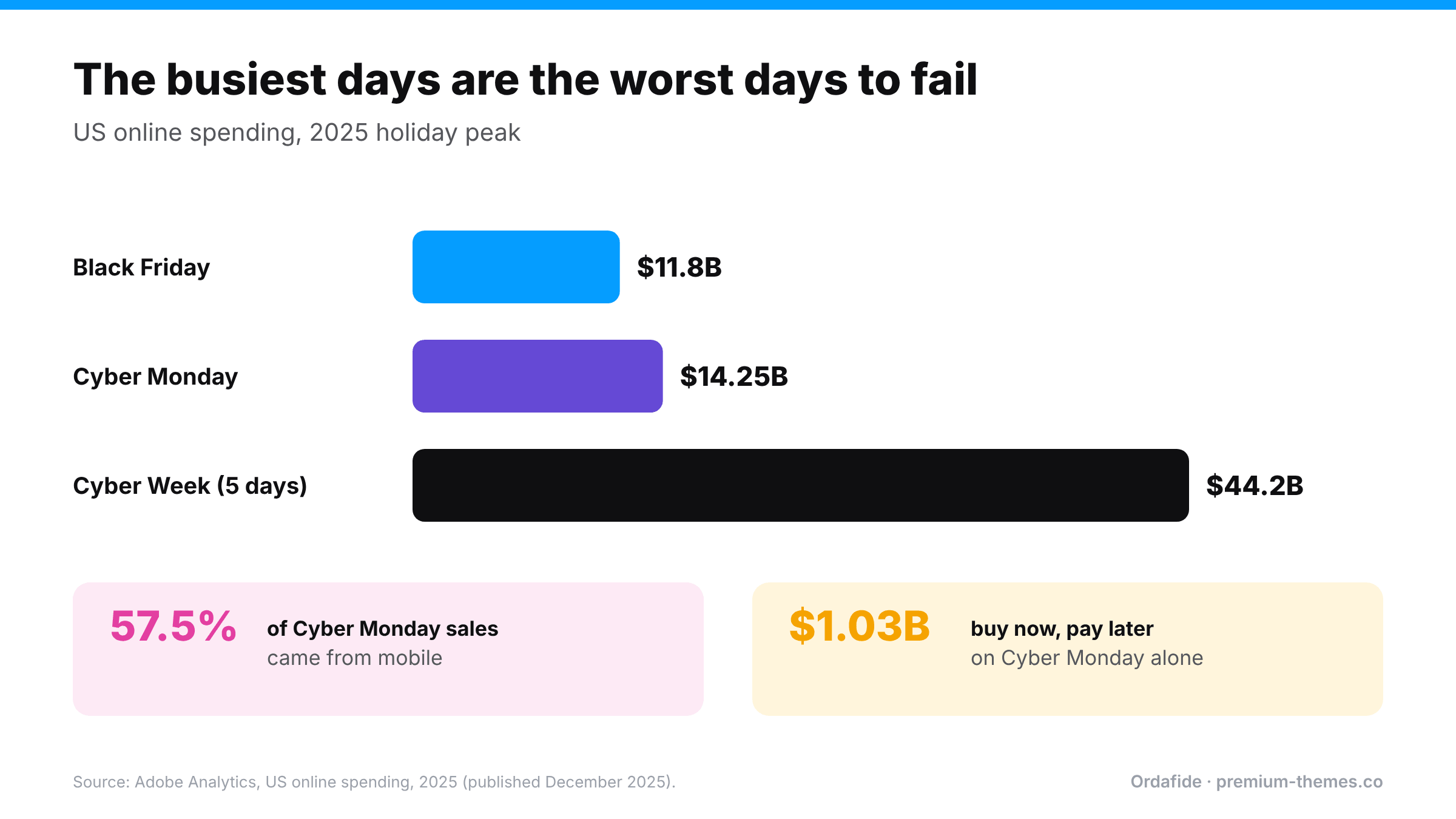
The numbers are big even at a national level. Adobe reported that US shoppers spent $11.8 billion online on Black Friday 2025 and $14.25 billion on Cyber Monday, with the five days from Thanksgiving to Cyber Monday reaching $44.2 billion. 57.5% of Cyber Monday online sales came from mobile devices, and buy-now-pay-later passed $1 billion on that one day (Adobe, December 2025).

Bar chart from Adobe Analytics 2025: Black Friday $11.8 billion, Cyber Monday $14.25 billion, Cyber Week $44.2 billion. 57.5% of Cyber Monday sales came from mobile and buy now pay later reached $1.03 billion on Cyber Monday.

For your store, the arithmetic is simpler: if you normally make a week’s revenue over Cyber Week, then one hour of broken checkout on Black Friday can cost more than a whole normal day. And peak is exactly when the conditions for failure are worst: maximum traffic, maximum plugin activity (discounts, countdowns, popups), maximum payment volume, and minimum spare attention from you.

Most Black Friday checklists cover marketing, hosting and caching. This one covers the part that turns traffic into money: orders, payments, webhooks, email and checkout, before, during and after peak.

What goes wrong at peak (and why)

Failure Why peak makes it worse
Checkout breaks after a last-minute plugin change Changes made in a rush, under pressure, often on a Friday
Payment webhooks blocked WAF and bot protection set to aggressive mode to handle traffic, and they block gateway servers too
Paid orders auto-cancelled Slower webhooks + a 60-minute Hold stock timer + high volume = more paid orders cancelled
Duplicate charges Slow checkout under load → more double clicks and request replays
Background queue backlog Thousands of scheduled actions (emails, stock, analytics) pile up faster than WP-Cron runs them
Confirmation emails delayed Queue backlog and mail provider sending limits
Discount math wrong Several discount, BOGO and pricing plugins interacting for the first time
Card testing attacks Attackers know merchants are distracted and volume hides their traffic
Overselling Stock held by stuck orders, or not restored by cancelled ones

Phase 1: Two to four weeks before

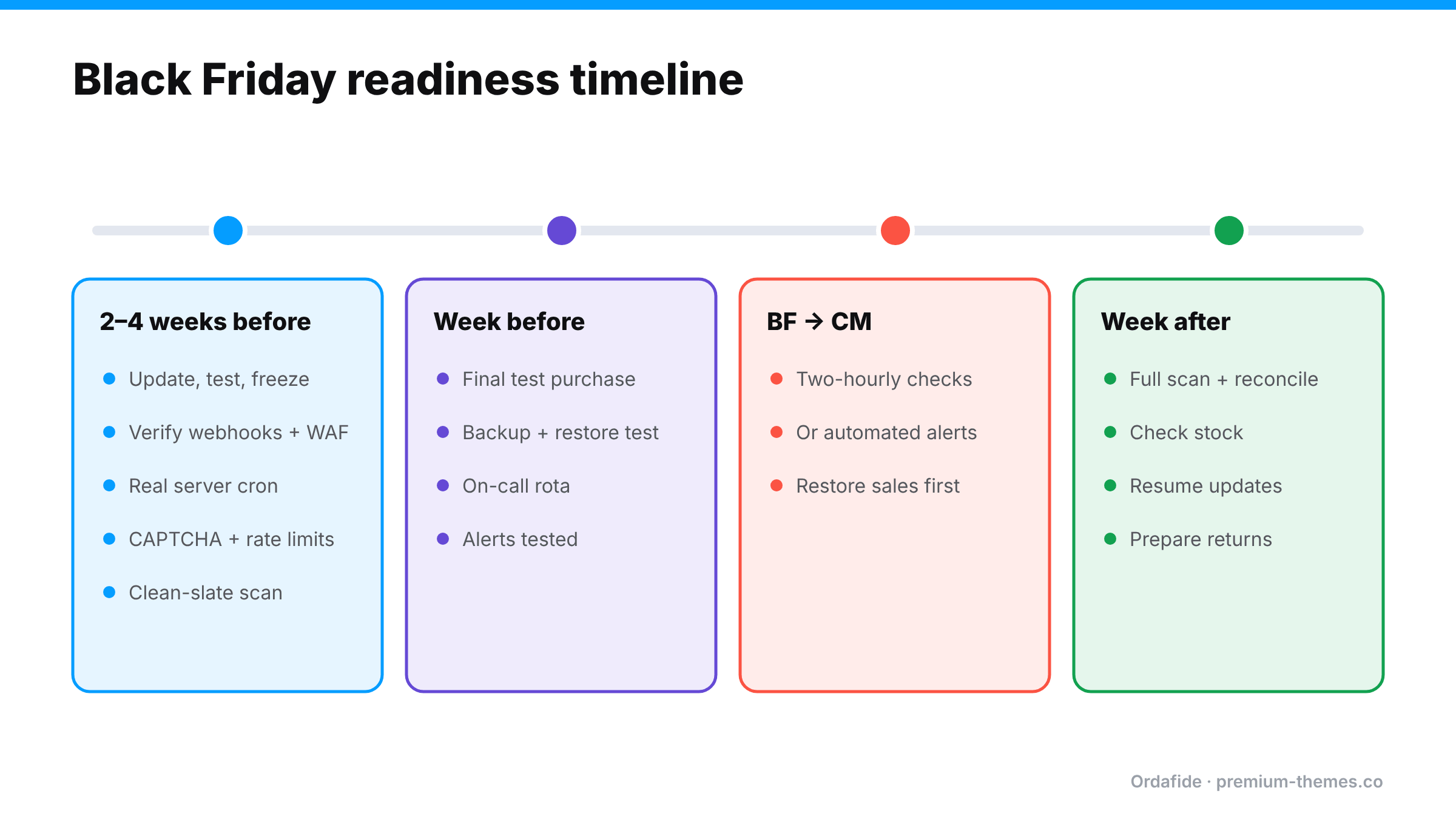
Four-phase timeline. Two to four weeks before: update, test and freeze; verify webhooks and firewall; real server cron; CAPTCHA and rate limits; clean-slate scan. Week before: final test purchase, backup and restore test, on-call rota, alerts tested. Black Friday to Cyber Monday: two-hourly checks or automated alerts; restore sales first. Week after: full scan and reconcile, check stock, resume updates, prepare returns.

Freeze the stack early

  • Finish all plugin, theme and WooCommerce updates at least two weeks before Black Friday, test them, then freeze. Only security fixes after that point.
  • Turn off auto-updates for WooCommerce, your theme, payment gateways and checkout-related plugins until after Cyber Monday. (Safe update playbook)
  • Install and configure any sale-specific plugins (countdown timers, BOGO, gift with purchase) now, not the night before, and test them with every coupon you plan to run.

Test checkout like a customer, on every path

  • Guest and logged-in; desktop and mobile (more than half of peak sales are mobile)
  • Every payment method: cards, PayPal, wallets (Apple Pay, Google Pay), BNPL
  • Each sale coupon and discount rule, including combinations you didn’t intend to allow
  • Confirm totals add up: items − discounts + shipping + fees + tax = total = charge (Guide)

Harden payment confirmations

  • Check each gateway’s webhook delivery log. Any recent failures? Fix them now.
  • Make sure your WAF/bot protection allows gateway webhook traffic on the webhook paths, and keeps allowing it if you switch to a stricter “under attack” mode during peak.
  • Re-confirm webhook signing secrets if the site has been migrated or cloned this year.
  • Review Hold stock (minutes) under WooCommerce → Settings → Products → Inventory. If you use slower methods (BNPL, bank-based), consider raising it for peak so paid-but-slow orders aren’t cancelled. (Why this matters)

Make the background queue peak-proof

  • Replace visitor-triggered WP-Cron with a real server cron running every minute or few minutes.
  • Clear any existing past-due backlog in Scheduled Actions.
  • Confirm your SMTP/email API plan can handle peak volume (order emails + marketing emails) without hitting sending limits. (Guide)

Protect against card testing

– CAPTCHA protecting checkout and the Store API, updated to a version that supports block checkout.
– Store API rate limiting enabled (and proxy mode if you’re behind a CDN).
– Gateway fraud rules reviewed. (Guide)

Clean the slate

Run a full order integrity scan now and fix everything it finds, so that during peak, any new finding is new. The free Ordafide plugin checks recent orders for stuck payments, paid-but-cancelled orders, duplicate charges, refund mismatches, total mismatches and un-emailed customers, and shows background queue and email health.

Test mobile and BNPL properly

Because mobile and buy-now-pay-later both peak at the same time, they deserve their own test pass:

  • Test on real phones, iOS and Android, not just a resized desktop browser. Wallet buttons (Apple Pay, Google Pay) only appear on supported devices.
  • Check that popups, countdown banners and cookie notices don’t cover the Place order button or the payment form on small screens.
  • Complete a BNPL purchase end to end. These methods often redirect away from your site and confirm asynchronously, so they’re more exposed to webhook and Hold stock problems than card payments.
  • Confirm the confirmation email renders properly on mobile mail apps.

Agree what “normal” looks like

Before peak, note your typical orders per hour at different times of day, and roughly what you expect over the sale. During peak, it’s surprisingly hard to tell whether “40 orders this hour” is great or a sign something’s wrong. Having a baseline written down makes the two-hourly check meaningful. That’s also exactly what anomaly detection automates.

Phase 2: The week before

  • [ ] Final full test purchase on every payment method, then no more changes
  • [ ] Fresh full backup, and a tested restore procedure
  • [ ] Host told about expected traffic; ask about resource limits and their peak support process
  • [ ] Gateway contact details and dashboard logins to hand
  • [ ] On-call plan: who checks orders when, across the whole weekend
  • [ ] Team refund rule reconfirmed: refunds from the WooCommerce order screen only (Why)
  • [ ] Alerts tested end-to-end: does the alert actually reach a phone?

Decide your peak-time rules in advance

Decisions made at 2 a.m. under pressure are rarely good ones. Agree these before the sale starts:

  • Who can change the site during peak? Ideally nobody except for emergencies, and only one named person.
  • What counts as an emergency? Checkout down, payments failing, orders not being created. Not “the banner colour looks off”.
  • What’s the rollback plan? Which backup, which plugin versions, who does it.
  • When do you switch payment methods? If your main gateway has an outage, is there a secondary method ready to enable?
  • Who answers customers? A prepared reply for “my payment went through but I didn’t get a confirmation” saves time and calms people down.

Phase 3: During peak (Black Friday to Cyber Monday)

The two-hourly check (5 minutes)

  1. Order volume: are orders arriving at roughly the rate you expect for the time of day? A sudden flat line means checkout trouble. A sudden flood of failed orders means card testing.
  2. Pending / Failed / Cancelled: any real customers with payment references?
  3. Scheduled Actions: is the past-due count climbing?
  4. Email log: are confirmations going out?
  5. A quick test of the cart and checkout on mobile.

It’s tedious and easy to skip at 2 a.m., which is the case for automating it.

Automate the watching with Ordafide Pro

Ordafide Pro is built for exactly this weekend:

  • Synthetic checkout monitoring every 15 minutes: shop, product, cart, checkout and the Store API, with response times so you can see the site slowing under load. Optional deep mode adds a product to a cart. It never creates orders, so your peak data stays clean, and it waits for two consecutive failures before raising a finding.
  • Order volume anomaly detection: compares the current hour with comparable past hours using median-based statistics, flagging drops (broken checkout) and spikes (card testing). Median-based baselines are less distorted by one exceptional day than simple averages.
  • Gateway reconciliation (Stripe, PayPal, Square, Mollie, Razorpay) with read-only keys: money with no order, paid orders with no payment, amount disagreements, refunds missing in WooCommerce.
  • Alerts via Slack, SMS, email or signed webhook, with severity routing and throttling, so a real problem reaches your phone and minor ones wait for morning.

If something breaks during peak

  1. Restore sales first. Roll back the last change, disable the offending plugin, or switch to a backup payment method. Diagnose later.
  2. Communicate. A banner or email (“We had a brief checkout issue; it’s fixed, and your discount still applies”) recovers lost buyers.
  3. Sweep up. Run an integrity scan to find orders caught mid-failure: stuck, duplicated, cancelled-but-paid, un-emailed.

Phase 4: The week after

  • Full integrity scan across the whole peak period. Fix every stuck payment, duplicate and refund mismatch while customers are still waiting patiently rather than disputing. (Self-inflicted chargebacks)
  • Reconcile WooCommerce against each gateway for the peak period. (Reconciliation guide)
  • Check stock for drift caused by cancelled and stuck orders.
  • Re-enable updates and catch up carefully, one group at a time.
  • Prepare for returns. Holiday returns arrive in December and January. The NRF and Happy Returns expected about 17% of 2025 holiday merchandise to be returned. Our sister plugin Recirco has a holiday returns guide.
  • Write a short post-mortem: what broke, how fast you noticed, what to change before next year.

The one-page checklist

2–4 weeks out

  • [ ] Updates done and tested; stack frozen; auto-updates off for critical plugins
  • [ ] Sale plugins installed and tested with every coupon
  • [ ] Checkout tested on every device, customer type and payment method
  • [ ] Webhooks verified; WAF allows gateway traffic; secrets correct
  • [ ] Hold stock timer reviewed
  • [ ] Real server cron; Scheduled Actions backlog cleared; email capacity checked
  • [ ] CAPTCHA + Store API rate limiting on
  • [ ] Integrity scan run and all findings fixed

Week before

  • [ ] Final test purchase; change freeze
  • [ ] Backup and restore tested
  • [ ] On-call rota and alert test

During

  • [ ] Two-hourly checks, or automated monitoring with alerts

After

  • [ ] Integrity scan and gateway reconciliation for the whole period
  • [ ] Stock checked; updates resumed carefully
  • [ ] Returns process ready; post-mortem written