Most WooCommerce maintenance advice is about the site: update plugins, back up the database, optimize images, check uptime. That’s all sensible. But it misses the thing that actually pays the bills: are the orders right?
A store can be fast, secure, fully updated and perfectly backed up while quietly:
- leaving paid orders on Pending payment,
- charging some customers twice,
- shipping orders that were already refunded,
- never emailing receipts,
- and recording totals that don’t match the money.
None of these produce error messages. They show up as customer complaints, chargebacks and reconciliation gaps weeks later.
This article gives you a 15-minute weekly routine for checking order health, explains what each step catches and why, and shows how to automate most of it so it keeps happening on the busy weeks too.
Why weekly?
- Daily is ideal for high-volume stores, but it’s rarely sustained by hand.
- Monthly is too slow. Customers who paid and received nothing won’t wait a month.
- Weekly catches most problems while customers are still patient, and it’s frequent enough to become a habit.
Pick a fixed slot (Monday at 10:00 works well, after the weekend’s orders) and put it in the calendar.
The 15-minute routine
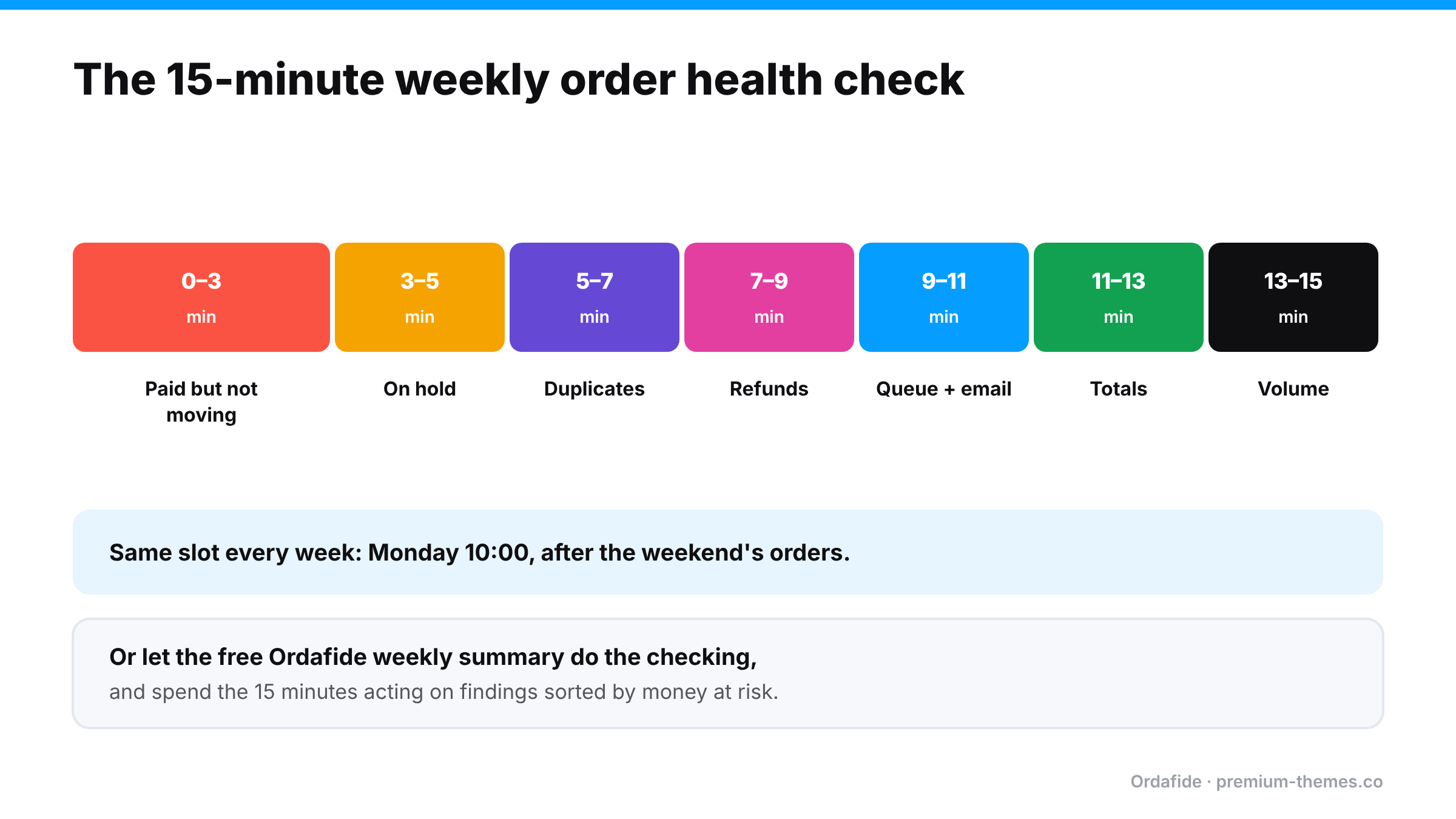
Minute 0–3: Orders that are paid but not moving
Check: filter WooCommerce → Orders by Pending payment, Failed and Cancelled for the last 7–10 days. Open any that look like real customers (real names, sensible addresses, not card-testing junk).
Look for: a gateway transaction ID, a payment note, or a paid date on an order that isn’t Processing or Completed.
Why: these are customers who paid and won’t receive anything. Webhook failures and the Hold stock auto-cancel timer are the usual causes. (Full guide)
Action: verify in the gateway, move to Processing, resend the confirmation email, apologize.
Minute 3–5: The On hold queue
Check: filter by On hold.
Look for: bank transfers you haven’t matched, card authorizations that need capturing before they expire, payments that are actually settled at the gateway.
Why: On hold orders fall outside the Processing queue your team works from. (Full guide)
Minute 5–7: Duplicates
Check: sort recent orders by customer or email and scan for the same customer, same total, minutes apart.
Look for: two orders with the same transaction ID (one payment, two orders) or two different transaction IDs (charged twice).
Why: duplicate charges are a leading cause of “duplicate processing” disputes. (Full guide)
Minute 7–9: Refunds that don’t add up
Check: filter by Refunded and spot-check a few for refund records. Then look at Processing orders older than your normal fulfilment time for red refund lines.
Look for: “Refunded” orders with no refund, fully refunded orders still in Processing, refunds larger than the order.
Why: refunded orders get shipped; promised refunds never arrive. (Full guide)
Minute 9–11: The background queue and email
Check: WooCommerce → Status → Scheduled Actions → Pending. Are there many past-due actions? Check the Failed tab too. Then send yourself a test email from your SMTP plugin.
Why: when the queue stalls, emails, stock updates and some payment processing stop, silently. (Full guide)
Minute 11–13: Totals
Check: open three or four recent orders that used a coupon, a different currency, or an unusual shipping method. Do items − discounts + shipping + fees + tax equal the total?
Why: pricing, tax and currency plugins can leave orders that don’t add up. ([Full guide](/blog/woocommerce-order-total-wrong/))
Minute 13–15: Volume sanity check
Check: compare this week’s order count and revenue with the same week last month or last year in WooCommerce → Analytics. Look at day-by-day: is there a day with suspiciously few orders?
Why: a day with almost no orders is often a broken checkout nobody noticed. A day with hundreds of failed orders is often card testing. (Checkout guide · Card testing guide)
What you’ll typically find (and what to do)
Here are the kinds of findings a first audit usually turns up on an established store, and how to handle each one.
“Order #5520, Cancelled, $142. Order notes show a Stripe payment ID.”
The webhook didn’t arrive within the Hold stock window, so WooCommerce cancelled a paid order. Check Stripe: payment succeeded. Restore to Processing, check stock, resend the confirmation, ship, and email an apology. Then find out why the webhook failed. One stuck order usually means others.
“Orders #5531 and #5532, same customer, $38 each, 40 seconds apart, different transaction IDs.”
A genuine double charge. Confirm with the customer that they wanted one, refund #5532 from the order screen, and look at checkout speed.
“Order #5490, Processing, $95. Refunded in full four days ago.”
Stop! Make sure it isn’t in today’s picking list. Change the status to Refunded (carefully, so you don’t trigger a second refund) and find out who refunded it and where.
“Scheduled Actions: 1,240 past-due.”
The queue isn’t running. Check `DISABLE_WP_CRON`, set up a real server cron, and let the backlog drain. Then check whether any customers missed confirmation emails during the stall.
“Order #5544: items + shipping + tax = $72.40; stored total = $67.40.”
A discount was applied without a matching line. Check which pricing plugin did it, and whether other orders are affected.
The first audit is usually the biggest. After that, weekly findings tend to be small and quick, and anything unusual stands out clearly.
Adapting the routine to your store size
- Under ~20 orders a week: you can open every order. The routine takes 10 minutes. Focus on paid-but-not-moving and refunds.
- Hundreds of orders a week: sampling stops working. Use filters, sort by customer, and lean on automated checks for full coverage.
- Thousands of orders a week: a weekly manual check is too slow. Problems need finding in hours, not days. Automate the checks, set alerts, and keep the weekly slot for reviewing trends and fixing root causes.
- Multiple stores: script it. Running the same check by hand across stores doesn’t last more than a few weeks.
Keep a simple log
Write down what you found each week: date, issue, number of orders, money involved, cause, fix. After a month or two, patterns emerge. Maybe the same gateway keeps leaving orders stuck, or duplicates cluster on mobile. The log turns firefighting into fixing.
| Week | Issue | Orders | Value | Cause | Fixed? |
|---|---|---|---|---|---|
| 3 Nov | Paid but cancelled | 2 | $118 | Webhook blocked by WAF | Yes: WAF rule |
| 10 Nov | Duplicate charge | 1 | $45 | Double click, slow checkout | Refunded; investigating speed |
| 17 Nov | None found |
Why manual audits fail (and what to do about it)
Be honest: will this routine still happen in the week before Christmas? During a product launch? When you’re ill?
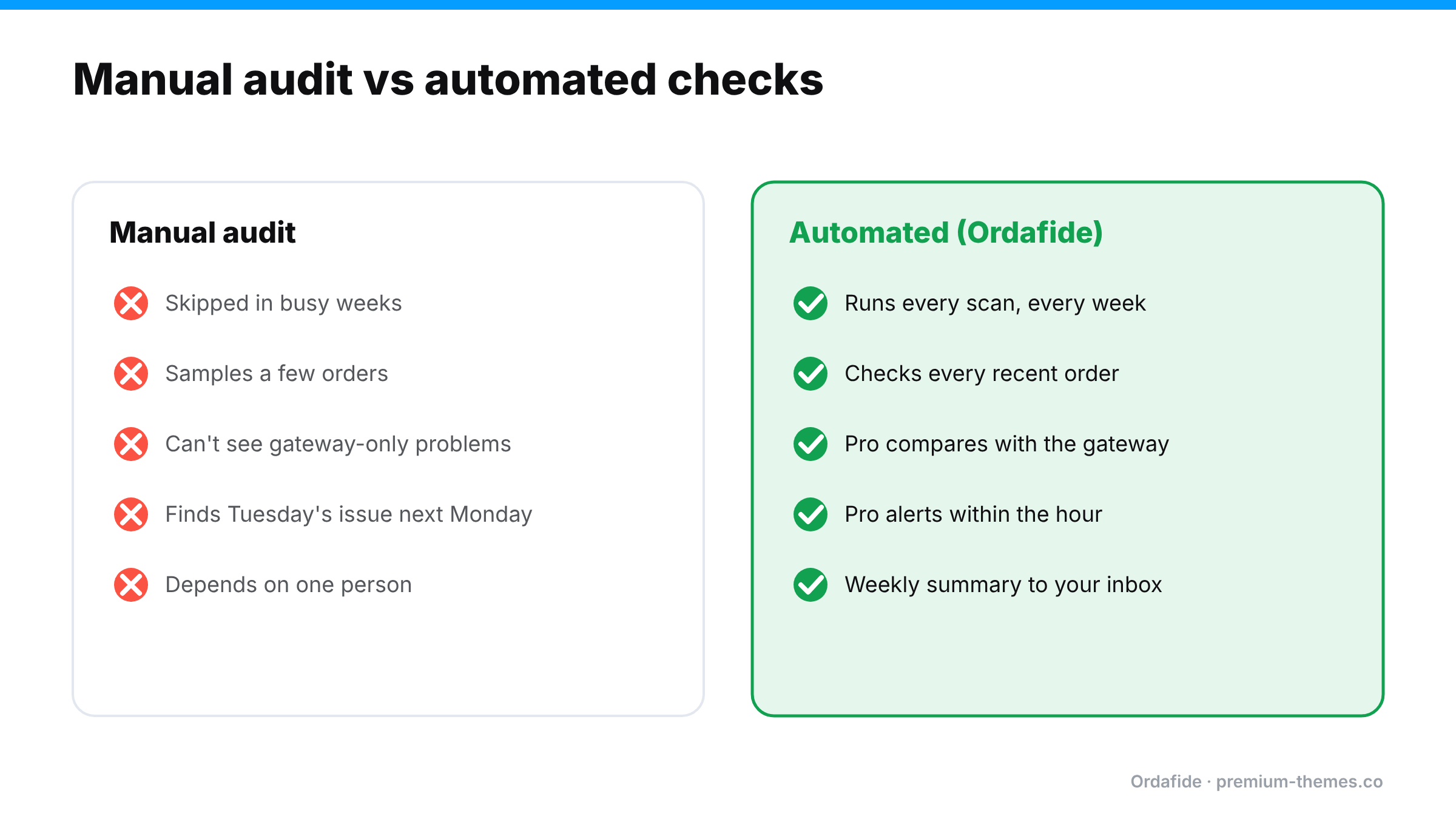
Manual audits have predictable weaknesses:
- They’re skipped when you’re busy, which is exactly when problems are most likely and most expensive.
- They’re sampled. You can’t open every order, so you check a few and hope.
- They miss the invisible. Payments with no order, refunds only at the gateway, and charges that differ from the order can’t be seen from WooCommerce screens at all.
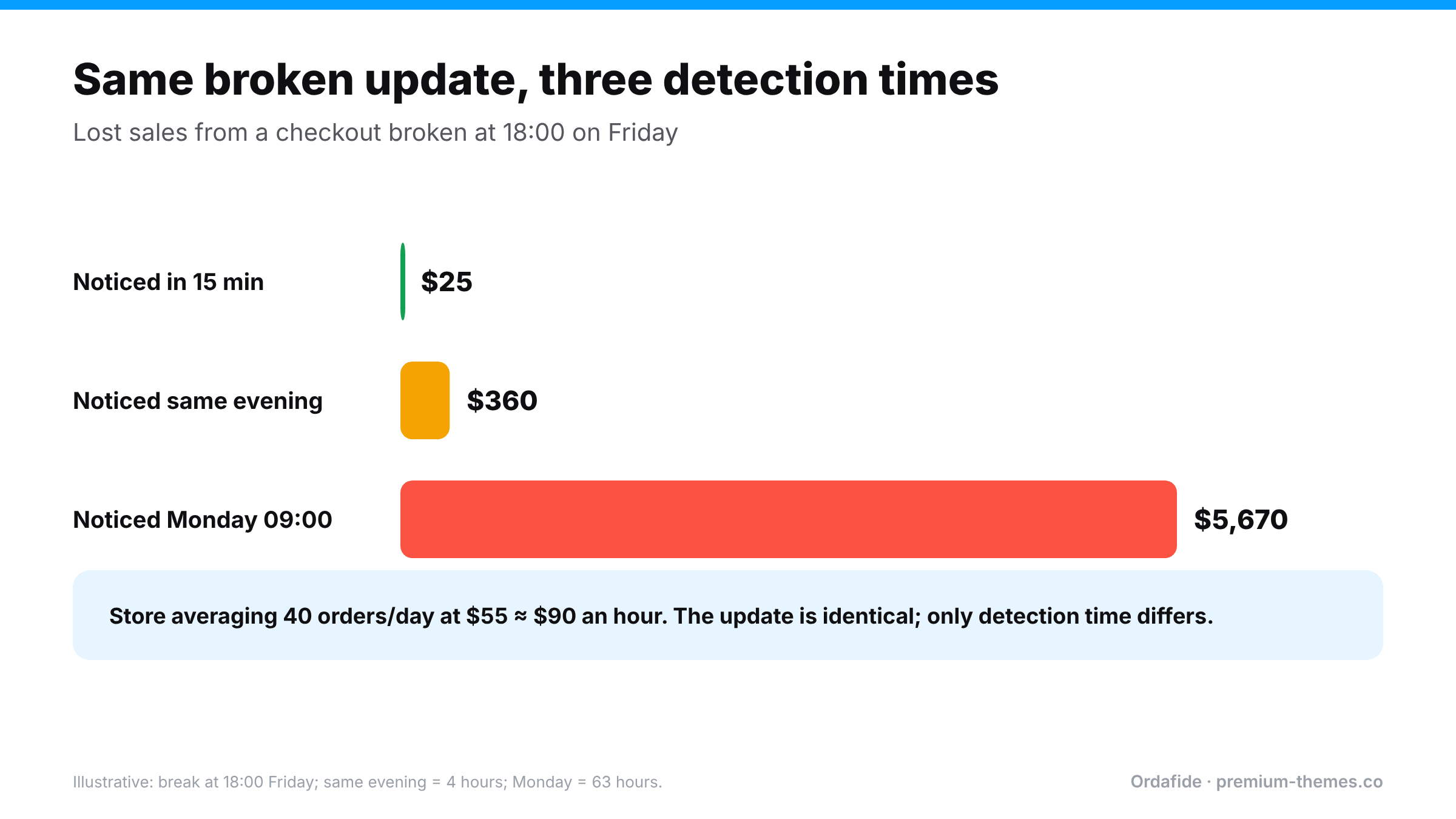
- They’re slow to react. A weekly check means a problem that starts on Tuesday is found next Monday.
The fix is to automate the checks and keep the human part for deciding and acting.
Automating the routine with Ordafide
[Ordafide Order Integrity for WooCommerce](https://wordpress.org/plugins/ordafide-order-integrity-for-woocommerce/) is a free plugin that does most of the routine above automatically, across every recent order, not a sample:
| Routine step | Ordafide (free) |
|---|---|
| Paid but not moving | Stuck payment and Paid but cancelled checks |
| Duplicates | Duplicate charge check |
| Refunds | Refund mismatch check |
| Queue and email | Store health: Action Scheduler backlog and failures, WP-Cron status, loopback test, and an order email delivery log with one-click resend |
| Totals | Order total does not add up check with a rounding tolerance |
Findings appear in one inbox, sorted by money at risk, each with the evidence and what to check before touching anything. There’s an optional weekly summary email, sent only when there’s something to report, so the routine comes to you. For developers and agencies, WP-CLI commands (`wp ordafide scan`, `wp ordafide findings`, `wp ordafide health`, `wp ordafide digest`) let you script it.
Your 15 minutes becomes: open the weekly summary, work through the findings, done.
Ordafide Pro covers the remaining steps that the free plugin structurally can’t:
- Gateway reconciliation (Stripe, PayPal, Square, Mollie, Razorpay) for the invisible cases: money with no order, paid orders with no payment, amount disagreements, refunds missing in WooCommerce.
- Order volume anomaly detection for the “suspiciously quiet day” and “overnight spike” checks, hourly rather than weekly.
- Synthetic checkout monitoring every 15 minutes, so a broken checkout is found in minutes.
- Real-time alerts to Slack, SMS, email or webhook, so urgent problems don’t wait for Monday.
Making it stick
A routine only works if it survives busy weeks. A few things help:
- Give it an owner. One named person, with a named backup for holidays.
- Put it in the calendar as a recurring meeting with yourself. A fixed slot is far more likely to happen than “sometime on Monday”.
- Start with the weekly summary email. If Ordafide’s weekly summary arrives and lists nothing, the routine takes two minutes. If it lists findings, you know exactly where to start.
- Track time saved. Note how long each issue took to fix when found early, versus the customer complaints and disputes you used to handle. It keeps the habit motivated.
- Review the log monthly. Repeated causes deserve a permanent fix, not another weekly repair.
The aim isn’t to spend 15 minutes a week forever. It’s to fix the causes so the weekly check becomes boring. A boring audit means a healthy store.
The printable checklist
Weekly order health check: 15 minutes
- [ ] Pending / Failed / Cancelled: any with payment evidence?
- [ ] On hold: every order has a reason and a next step?
- [ ] Duplicates: same customer, same basket, minutes apart?
- [ ] Refunded: every one has a refund record?
- [ ] Processing: any with refund lines?
- [ ] Scheduled Actions: past-due backlog or failures?
- [ ] SMTP test email delivered?
- [ ] Sample totals add up (coupon, currency, unusual shipping)?
- [ ] Order volume normal day by day?
- [ ] Log updated with anything found