When store owners think about chargebacks, they usually think about fraud: stolen cards, professional scammers, “friendly fraud” from customers who received their order and claim they didn’t.
Those are real. But a large share of disputes have a much less dramatic cause: the store got something wrong, and the customer didn’t hear about it in time.
- They paid, but the order never moved forward, so nothing shipped.
- They were charged twice.
- They were promised a refund that was never issued.
- They never received a confirmation email, panicked, and called their bank.
From the customer’s point of view, each of these is a legitimate reason to dispute. From yours, each is a dispute you could have prevented. You might even have won the customer’s loyalty instead, if you’d caught the problem first.
This guide maps the order failures that turn into chargebacks, shows how to catch each one before the customer acts, and explains what to do when a dispute arrives anyway.
What a chargeback actually costs
A chargeback isn’t just a refund. When a customer disputes a payment:
- The disputed amount is pulled from your balance immediately, pending the outcome.
- You pay a dispute fee. Stripe charges $15 per dispute in the US, win or lose. Other gateways charge similar or higher amounts.
- You spend time gathering evidence and responding.
- Your dispute rate rises. Stripe treats dispute activity above 0.75% as excessive, and card networks run their own monitoring programmes with their own thresholds. High rates can lead to reviews, reserves, higher fees or account closure.
- You often lose the customer, even if you win.
For a small store, a handful of avoidable disputes a month is a meaningful cost, and a meaningful risk to the payment account the whole business depends on.
The four self-inflicted dispute types
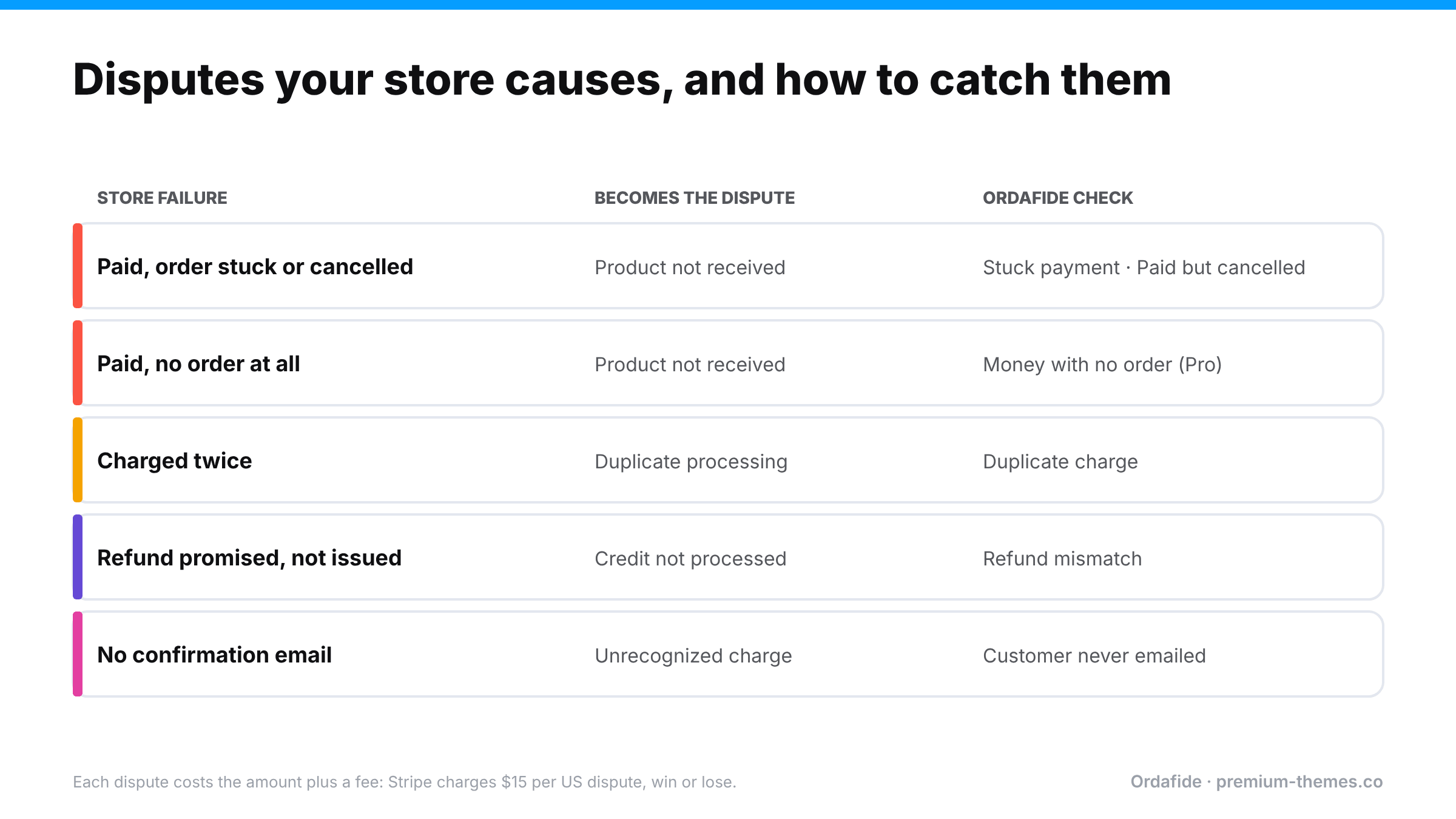
Card networks use different codes, but customer-driven disputes usually fall into a few groups. Four of them are frequently caused by store-side order failures.
1. “Product not received” when the order was never processed
The failure: the customer paid, but the order is stuck on Pending payment, was auto-cancelled by the Hold stock timer, or never created at all. Nothing ships. The customer waits a week, then two, then disputes.
The irony: you’d happily have shipped it. You just didn’t know.
Root causes: blocked or failed webhooks; a checkout crash after payment; a wallet payment that never confirmed; a staging site with live keys. (See orders stuck on pending payment) and payment received but no order.)
2. “Duplicate processing” when the customer was charged twice
The failure: a double click, a page refresh, a request replay or a plugin retry produced two charges. The customer notices two lines on their statement and disputes one.
Why it becomes a dispute: many customers go straight to their bank instead of emailing you, especially if the second charge appears days later.
Root causes: slow checkout, firewall replays, gateway plugin retries. (See customer charged twice.)
3. “Credit not processed” when a refund was promised but not issued
The failure: someone changed the order status to Refunded without creating a refund, or a refund failed silently, or a return was approved but never refunded. The customer was told the money was coming. It isn’t.
Why it becomes a dispute: “credit not processed” is one of the easiest disputes for a customer to win when you have no record of a refund.
Root causes: refund status mismatches. (See refund status mismatches.)
4. “Unrecognized” or “did not authorize” when the customer never got a receipt
The failure: the payment worked, but the confirmation email never arrived because the background queue stalled, SMTP failed, or the email was switched off. Days later the customer sees an unfamiliar descriptor on their statement and assumes fraud.
Why it becomes a dispute: no email, plus a statement descriptor that doesn’t obviously match your store name, equals “I don’t recognize this charge”.
Root causes: stalled Action Scheduler or WP-Cron, broken mail delivery. (See order emails not sending.)
Three disputes, three different endings
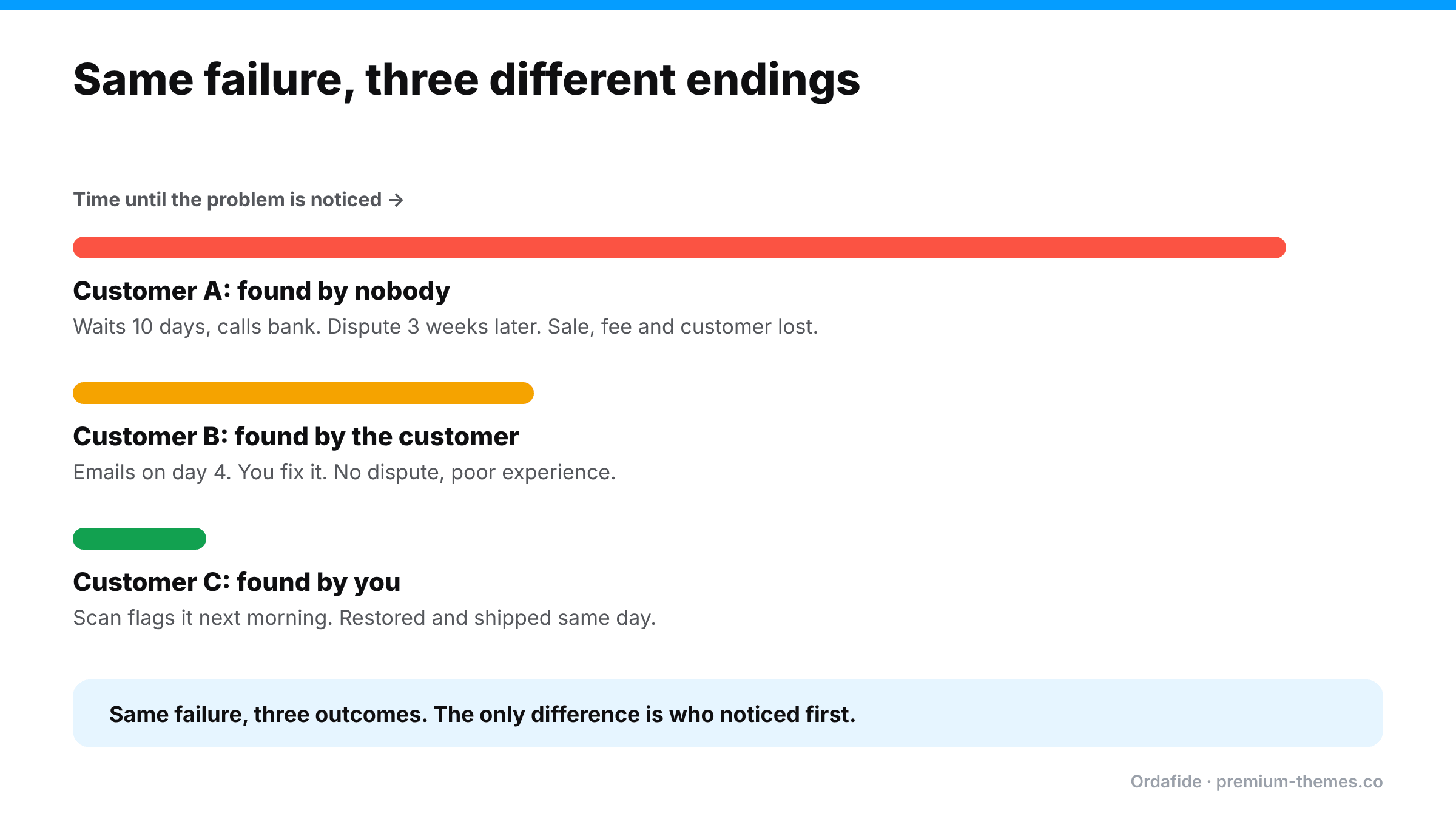
To see how much timing matters, follow three customers whose orders failed in the same way: a webhook was blocked, so each paid order sat on Pending payment and was auto-cancelled an hour later.
Customer A: found by nobody. They wait for delivery. After ten days with no parcel and no email, they search their inbox, find nothing, and call their bank. You learn about it from a dispute notification three weeks later. You lose the sale, pay the dispute fee, and the customer never returns.
Customer B: found by the customer. After four days they email you: “Where’s my order?” You investigate, find the payment in Stripe, restore the order and ship it. No dispute, but they’ve had a poor experience and you spent 30 minutes on it.
Customer C: found by you. The morning after, your integrity scan flags a paid but cancelled order. You restore it to Processing, ship it that day, and send a two-line apology. The customer probably never knew anything was wrong. Cost: five minutes.
Same failure, same customer type, wildly different outcomes. The only variable was who noticed first, and when.
The prevention principle: get there before the bank does
Every one of these disputes has a window: the time between the failure and the customer losing patience. In that window, a short email from you (“We noticed a problem with your order, here’s what we’ve done”) almost always prevents the dispute.
The window is usually days, not hours. Customers typically wait for an expected delivery date, or for their statement, before acting. That’s plenty of time if you know about the problem. Without detection, the dispute notice is the first you hear of it.
So prevention comes down to three things:
- Detect the order failure quickly
- Fix the order (ship it, refund the duplicate, issue the promised refund, resend the receipt)
- Tell the customer before they look at their statement
Detecting the four failures
| Failure | What to look for | Where |
|---|---|---|
| Paid but not processed | Orders with a payment reference or paid date sitting in Pending, Failed or Cancelled | WooCommerce orders + gateway |
| Paid with no order | Successful gateway payments with no matching order | Gateway only |
| Charged twice | Same customer, same basket, minutes apart; one transaction ID on two orders | WooCommerce orders + gateway |
| Refund not processed | Orders marked Refunded with no refund record; approved returns without refunds | WooCommerce orders + returns system |
| No receipt | Paid orders with no customer email sent or accepted | Email log |
You can work through this manually with exports and spreadsheets, as described in our [reconciliation guide](/blog/reconcile-woocommerce-orders-stripe-paypal/). Or you can automate it.
Automating detection with Ordafide
Ordafide Order Integrity for WooCommerce (free) runs six checks against your recent orders that line up closely with the dispute types above:
| Ordafide check | Prevents |
|---|---|
| Stuck payment: pending/failed orders carrying a gateway payment reference | “Not received” |
| Paid but cancelled: confirmed payment date, but Cancelled or Failed, nothing refunded | “Not received” |
| Duplicate charge: one payment reference on two orders, or the same basket charged twice within minutes | “Duplicate processing” |
| Refund mismatch: marked Refunded with no refund record; over-refunds; fully refunded but still Processing | “Credit not processed” (and shipping refunded orders) |
| Customer never emailed: paid orders where no customer email reached your mail server | “Unrecognized” |
| Order total does not add up | “Incorrect amount” disputes |
Findings are sorted by money at risk, each explains what to check in your gateway, and Ordafide can resend the customer email or restore an order to Processing when WooCommerce already recorded a confirmed payment date. Both actions are logged, and the status change can be undone. The free plugin sends nothing to any third party.
Ordafide Pro adds the gateway’s side of the story with read-only reconciliation against Stripe, PayPal, Square, Mollie and Razorpay. That’s what catches money with no order, the cleanest possible “not received” dispute, plus amount disagreements and refunds missing in WooCommerce. Pro’s alerts (Slack, SMS, email, webhook) shrink detection time from “whenever someone checks” to minutes, and its CSV/JSON audit export gives you an evidence trail if a dispute arrives anyway.
To be clear about the limits: Ordafide doesn’t see or manage disputes themselves (those live in your gateway), and it can’t prevent true fraud. It prevents the disputes caused by your store’s own order failures, which are the ones you have the most power over.
Reducing “unrecognized charge” disputes further
Two cheap fixes worth doing today:
- Check your statement descriptor. In your gateway settings, make sure the descriptor customers see on their statement clearly matches your store or brand name. “WWW.SHOPNAME.COM” beats a legal entity name nobody recognizes.
- Make the confirmation email unmistakable. Include the amount, the descriptor they’ll see, and how to contact you. A customer who can match the statement line to an email doesn’t dispute it.
The customer email that prevents a dispute
When you find a failure, speed and clarity matter more than polish. A template that works:
Subject: About your order #5520
Hi Sam, while checking orders today we found that your payment on 3 November went through, but a technical problem on our side stopped your order from being processed. That’s our mistake, and we’re sorry.
We’ve fixed it: your order is now being packed and will ship today. You’ll get tracking by email this afternoon. You won’t be charged again.
If you have any questions, just reply to this email.
Three things make it work: it names the order and payment the customer will see on their statement, it says what you’ve done (not what went wrong technically), and it states clearly that they won’t be charged twice. For duplicate charges, replace the middle paragraph with the refund amount and expected timing.
When a dispute arrives anyway
- Check the order immediately. Is this one of the four self-inflicted types? If the customer is right (they never got the goods, or were charged twice), it’s usually better to accept the dispute or refund than to fight. Contesting a valid dispute costs time and often a second fee.
- If you shipped and have proof, respond with tracking, delivery confirmation, order and email records, and any customer communication.
- Reply to the customer too. Some customers will withdraw a dispute once they see you’ve responded.
- Fix the root cause. Every self-inflicted dispute points at a failure that will happen again.
A monthly dispute review
Once a month, list every dispute and tag it:
- Fraud: card stolen, true unauthorized use
- Friendly fraud: customer received goods and disputed anyway
- Self-inflicted: order failure on your side (stuck, duplicate, refund, no receipt)
- Service: quality, description or delivery problems
Track the self-inflicted share over time. It should fall steadily as detection improves. If it doesn’t, the table above tells you which failure to fix next.