
Not every return is a change of mind. Some of the most important ones are claims:
- “It arrived smashed.”
- “It stopped working after three weeks.”
- “This isn’t what I ordered.”
- “It’s still under warranty and the motor has failed.”
These are the returns where getting it right matters most. The customer has a genuine grievance, often a legal right, and usually a short fuse. Handle it well and you keep a customer who trusts you. Handle it badly (slow, sceptical, endless emails asking for photos) and you get a chargeback, a public review, or both.
They’re also the returns most open to abuse. “Damaged on arrival” is an easy claim to make and a hard one to disprove without evidence.
This guide sets out a claims process for WooCommerce that’s fast for genuine claims, consistent for your team, and evidence-based enough to deter abuse.
Four kinds of claim (and why they need different handling)
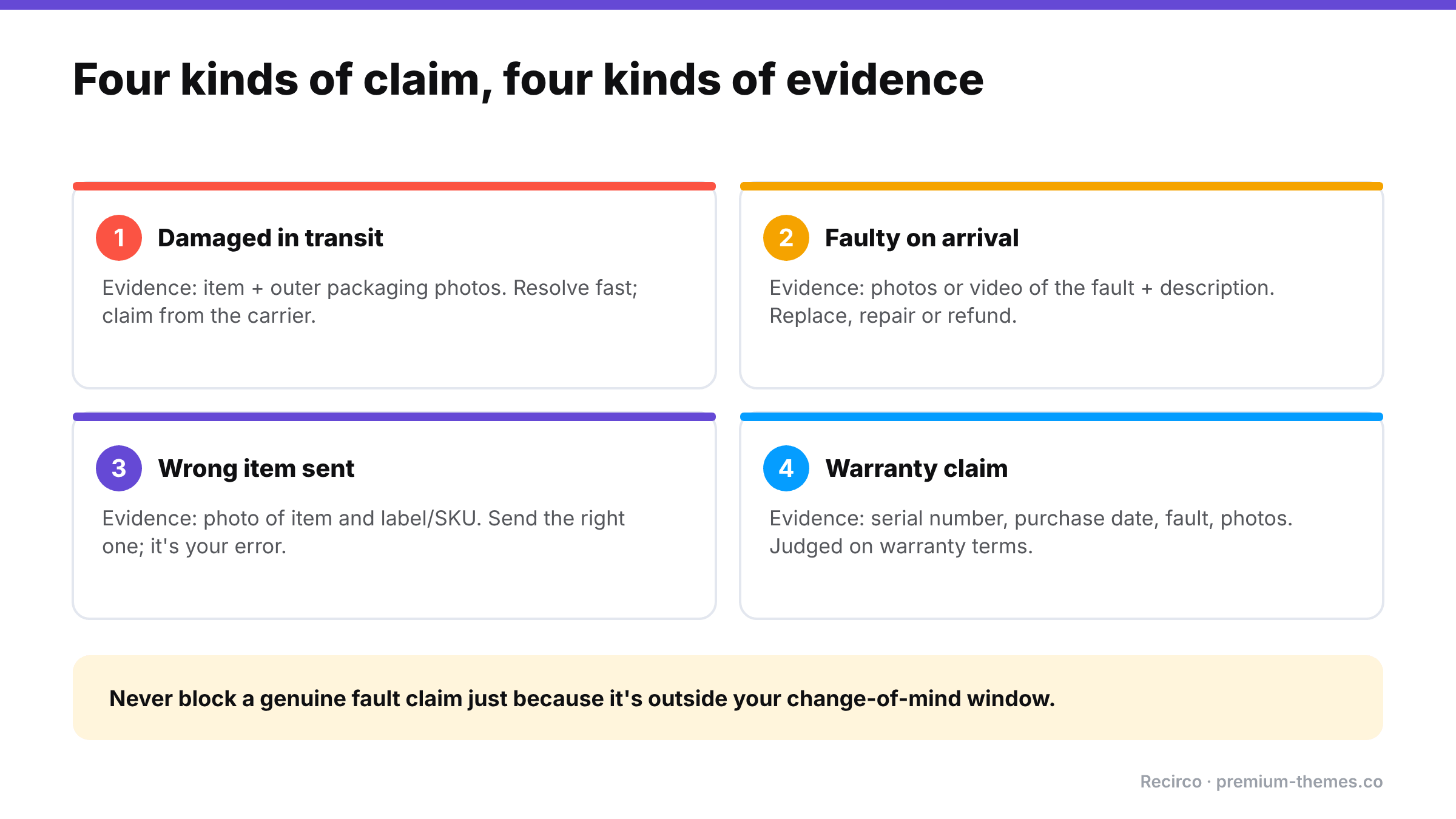
| Claim | Typical timing | Key evidence | Usual resolution |
|---|---|---|---|
| Damaged in transit | Days after delivery | Photos of item and packaging | Replacement or refund; carrier claim |
| Defective / faulty on arrival | First days or weeks | Photos/video of fault; description | Replacement, repair or refund |
| Wrong item sent | Days after delivery | Photo of item and label/SKU | Correct item sent; return or keep the wrong one |
| Warranty claim | Months later | Proof of purchase, serial number, fault description, photos | Repair, replacement, or refund per warranty terms |
Mixing them into one generic “return” flow causes problems. A warranty claim 11 months after purchase shouldn’t be rejected because it’s outside your 30-day return window. A damaged-in-transit claim shouldn’t wait until the broken item is posted back before you act.
Know your obligations first
Your warranty and your return window are not the only rules that apply. In many markets, consumer law gives buyers rights for faulty goods regardless of your policy:
- EU: sellers are generally liable for lack of conformity that becomes apparent within at least two years of delivery (the legal guarantee), separate from the 14-day withdrawal right.
- UK: the Consumer Rights Act gives a short-term right to reject faulty goods (30 days), then rights to repair or replacement, and further remedies after that.
- Australia: the Australian Consumer Law’s consumer guarantees mean a major fault entitles the customer to a repair, replacement or refund, whatever your policy says.
- US: implied warranties under state law, plus the terms of any written warranty you offer.
This is general information, not legal advice. Check the rules for each market you sell to.
The practical takeaway: your claims process should never block a legitimate fault claim just because it’s outside your change-of-mind return window.
Designing the process
1. Let customers start a claim themselves, with the right reason
A customer with a broken item shouldn’t have to compose an email. Offer clear reasons in your returns portal:
- Damaged in transit
- Faulty / not working
- Wrong item received
- Warranty claim
Make a description required for each, so you get “the left hinge snapped when opening the box” rather than “broken”.
2. Ask for photos up front, once
The single biggest time-waster in claims handling is the follow-up email: “Could you send a photo?” Ask for photos as part of the claim, and say exactly what you need:
- The item showing the damage or fault
- The outer packaging (for transit damage, essential for carrier claims)
- The shipping label (for wrong-item claims)
- The serial number plate (for warranty claims)
3. Capture serial numbers for warranty products
For electronics, appliances, tools and anything with a meaningful warranty, record serial numbers. They let you:
- confirm the item was bought from you, and when
- check it’s still inside its warranty period
- spot the same serial being claimed twice
- identify batches with recurring faults
4. Decide when you need the item back
Collecting a broken $15 item can cost more in shipping than the item is worth. Set a threshold:
- Below the threshold: photo evidence is enough; send a replacement or refund; customer keeps or disposes of the item.
- Above it: item comes back (with a prepaid label) for inspection, repair or a supplier claim.
5. Respond fast to transit damage and wrong items
These are almost always your problem (or your carrier’s), and the customer did nothing wrong. Aim to approve within one working day and ship the replacement promptly. Use the photos to file the carrier claim yourself.
6. Record everything against the order
Reason, description, photos, serial number, decision, who made it, and what was sent or refunded. When the same customer claims again, or a supplier asks for evidence, it’s all in one place.
7. Feed the data back
Claims are product feedback with photos. If one product has repeated “faulty” claims, talk to the supplier. If “damaged in transit” clusters on one carrier or one packaging type, change it.
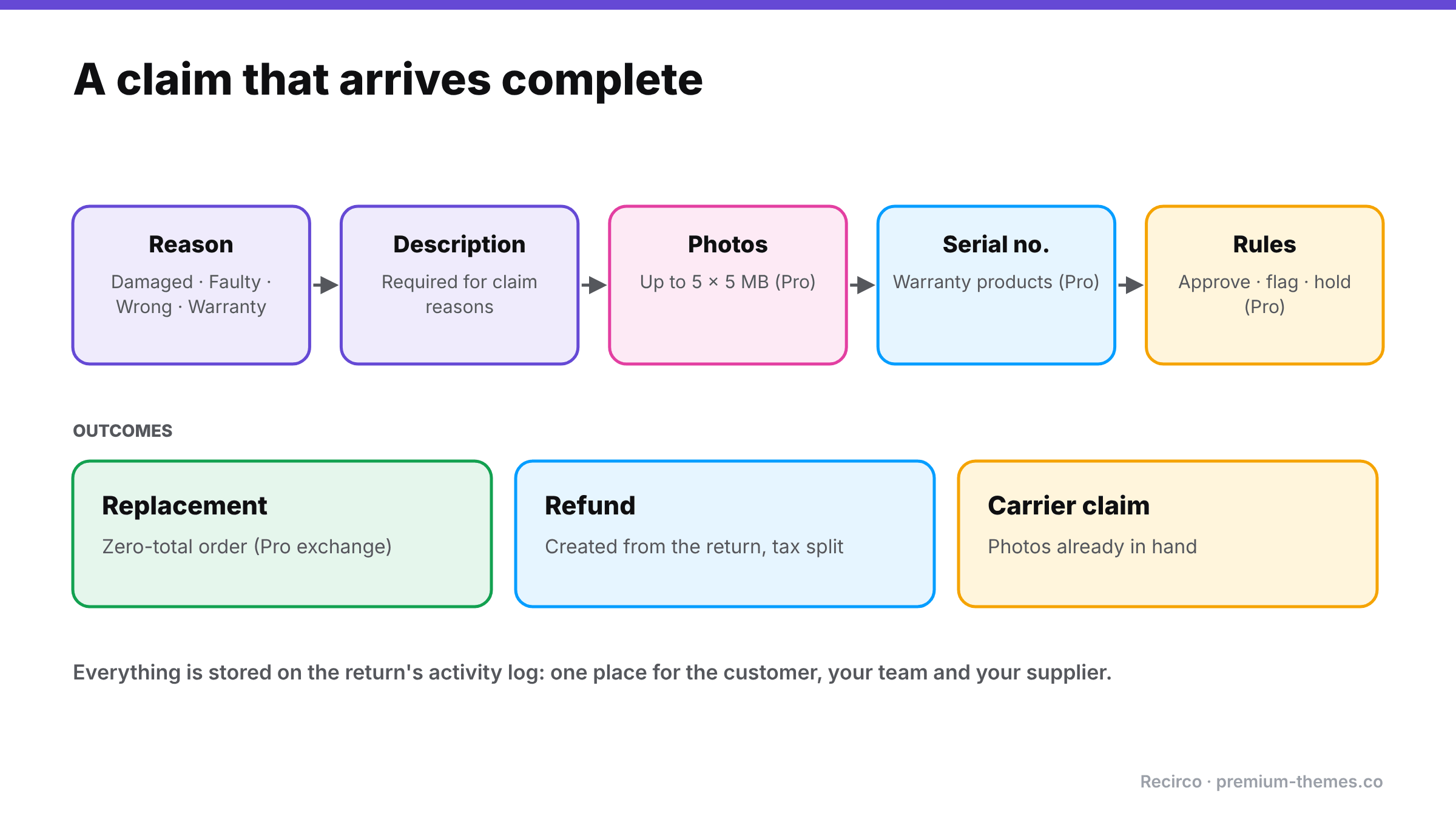
What a good claim looks like when it arrives
Compare two versions of the same claim reaching your team.
Email version: “Hi, my order arrived broken. Please help.” No order number, no photos, no detail. Your team replies asking for the order number and photos. The customer replies two days later with one blurry photo. You ask for a photo of the packaging. They’ve thrown it away. Five emails and a week later, you send a replacement anyway, without evidence for a carrier claim.
Portal version: order #7731 selected automatically from the customer’s account; item “Ceramic table lamp”; reason “Damaged in transit”; required description “Base cracked into two pieces, box crushed on one corner”; four photos attached: lamp, crack close-up, outer box, shipping label. Your team approves in two minutes, ships a replacement the same day, and files the carrier claim with the photos already in hand.
Same customer, same broken lamp. The second version took a fraction of the time, kept the customer happy, and recovered the cost from the carrier.
Using claims data to fix problems upstream
Every claim is a data point. Reviewed monthly, claims data answers questions that are otherwise expensive to investigate:
- Is one product failing more than others? A spike in “faulty” claims on one SKU or one batch of serial numbers points at a supplier problem. Raise it with photos and serials as evidence.
- Is one carrier or service damaging more parcels? Compare “damaged in transit” rates by shipping method.
- Is packaging good enough? If damage clusters on fragile categories, change the packaging for those products before changing carriers.
- Are “wrong item” claims rising? That’s a picking problem: check labelling, bin locations and new staff training.
A claims process that captures structured reasons, photos and serials turns this from guesswork into a ten-minute monthly review.
Working with your carrier on damage claims
When an item is damaged in transit, the cost usually belongs to the carrier, if you can prove it. Carriers typically want the claim filed within a set period, photos of the damaged item and the packaging, the tracking number, and proof of the item’s value. Some want the packaging kept for inspection. Because a good claims process collects photos and the order details at the moment the customer reports the damage, you can file the carrier claim the same day instead of chasing evidence weeks later.
Deterring abuse without punishing honest customers
A good claims process deters most abuse simply by asking for specific evidence consistently. Beyond that:
- Packaging photos make “it arrived broken” harder to fake.
- Serial number checks stop claims for items bought elsewhere and repeat claims on one unit.
- Warranty dates from the purchase date stop out-of-warranty claims passing as in-warranty ones.
- Rules that flag rather than reject, such as several claims from one customer in a short period, or very high-value claims, send those cases to a human without slowing everyone else.
What you shouldn’t do is make every customer jump through hoops because of a few bad actors. (More on this in return fraud and serial returners.)
Setting it up with Recirco
Recirco – Returns & Exchanges for WooCommerce (free) gives you the foundation:
- A self-service returns portal in My Account, where customers pick the order, items and a reason. Recirco ships with six seeded reasons you can edit, and each reason can require an explanation. Set “Damaged”, “Faulty” and “Wrong item” to require details.
- An admin queue with search, filters and bulk actions, so claims don’t get lost among change-of-mind returns.
- Internal notes and customer notes, plus an activity log on every return.
- Restock timing you choose. For damaged and faulty items, you’ll typically restock never (automatically) and decide after inspection.
- Refunds from the return, with net and tax split correctly.
Recirco Pro adds the claims-specific tools:
- Warranty management: set a warranty length per product, let customers register serial numbers, and calculate cover from the purchase date, so warranty claims are judged on warranty terms, not your return window.
- Photo uploads: customers attach up to 5 photos per claim (5 MB each) when they submit, so the evidence arrives with the claim.
- Conditional approval rules: automatically approve, reject with a reason, flag or hold claims based on conditions, with the first matching rule winning and the deciding rule recorded in the activity log. Fast-track low-value transit damage; hold high-value warranty claims for inspection.
- Exchanges: send a replacement of the same or a different variant as a zero-total order in Processing.
- Carrier labels via Shippo, generated on approval, for claims where you want the item back.
- Analytics: reasons ranked by count and value, and the most-returned products. Your early-warning system for supplier quality problems.
A claims policy you can adapt
Damaged, faulty or wrong items
If your order arrives damaged, faulty or isn’t what you ordered, start a claim from My Account → Returns within [7] days of delivery. Choose the matching reason, describe the problem, and attach photos of the item and its packaging. We’ll respond within one working day and send a replacement or refund at no cost to you. For items under [$25], you won’t need to send anything back.
Warranty claims
Products marked with a warranty are covered for [12 months] from the date of purchase. Register your serial number in your account. To claim, choose “Warranty claim”, enter the serial number, describe the fault and attach photos. If we need the item back, we’ll email you a prepaid label.
This policy doesn’t affect your statutory rights.