WooCommerce’s block-based Cart and Checkout are now the default for new stores, and many established stores have switched to them. They’re faster and easier to customize, but they work differently from the old shortcode checkout, and they fail differently too.
The WordPress.org forums have a steady stream of threads with the same messages: “There was a problem with your order”, “There was an error processing your order. Please check for any charges in your payment method”, block checkout breaking only in a secondary language on a multilingual site, or extensions that “aren’t compatible with the Checkout block”. WooCommerce’s own developer blog has published rounds of checkout fixes for exactly this kind of issue.
This guide explains how block checkout works under the hood, why that matters when it breaks, the common causes, and how to make sure you hear about it before customers do.
How block checkout is different
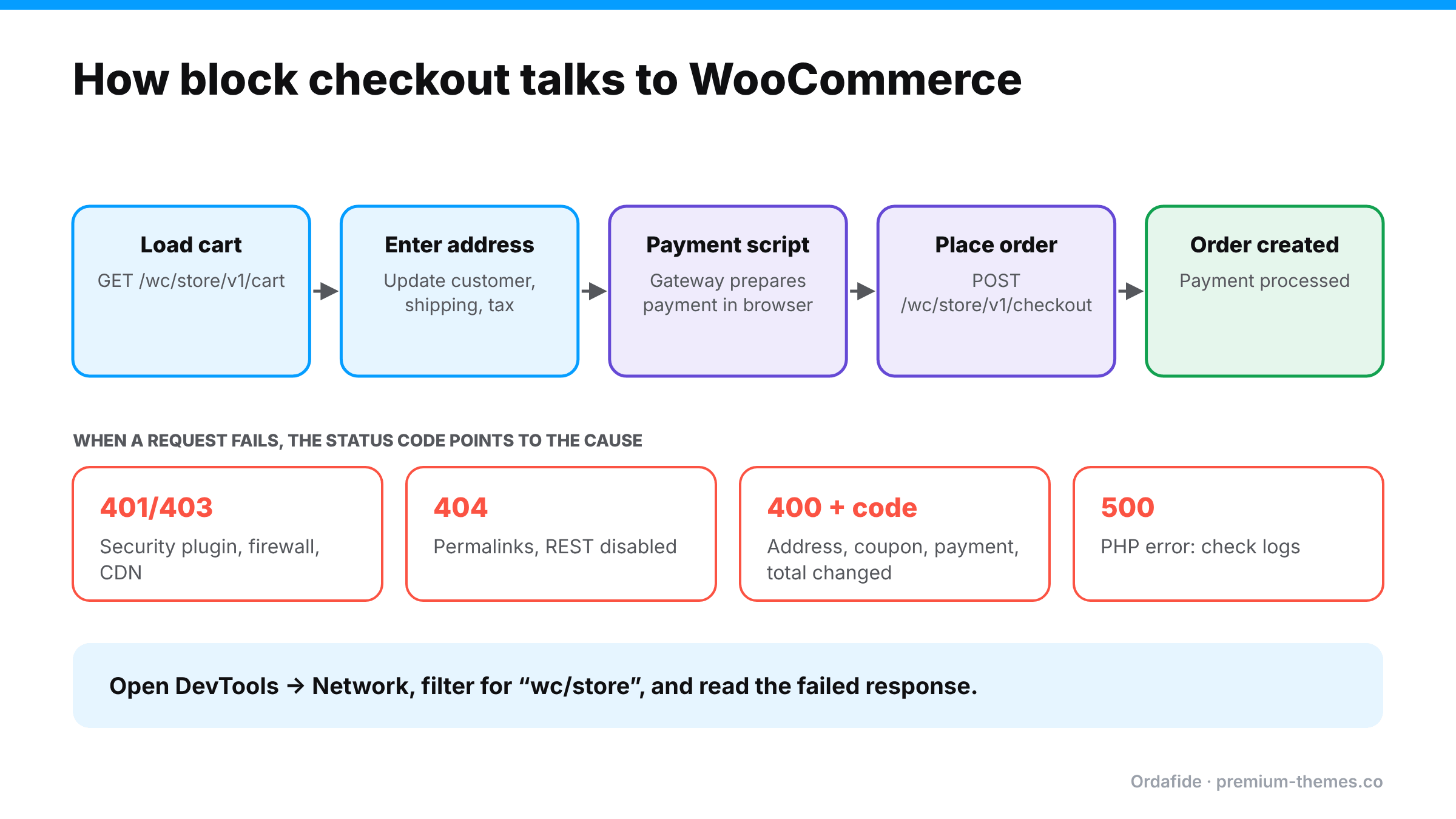
The classic checkout is a PHP-rendered form posted back to your site. The block checkout is a JavaScript application in the browser that talks to WooCommerce through the Store API, a set of REST endpoints under /wp-json/wc/store/v1/.
When a shopper uses block checkout:
- The browser calls the Store API to load the cart (items, totals, shipping rates).
- As the shopper types an address, the browser calls the API to update the customer and recalculate shipping and tax.
- The payment method’s script (Stripe, PayPal and so on) prepares the payment in the browser.
- Place order sends everything to the checkout endpoint, which creates the order and processes payment.
That means block checkout can break in places classic checkout never touched:
- If the REST API is blocked or broken, the checkout can’t load or submit.
- If a payment plugin doesn’t support blocks, its method may be missing from the checkout.
- If any extension that changes the cart (fees, custom fields, discounts) isn’t block-compatible, its changes may be missing or cause errors.
- Errors are often shown as a generic message in the browser, while the real reason is in an API response only developers look at.
The common causes
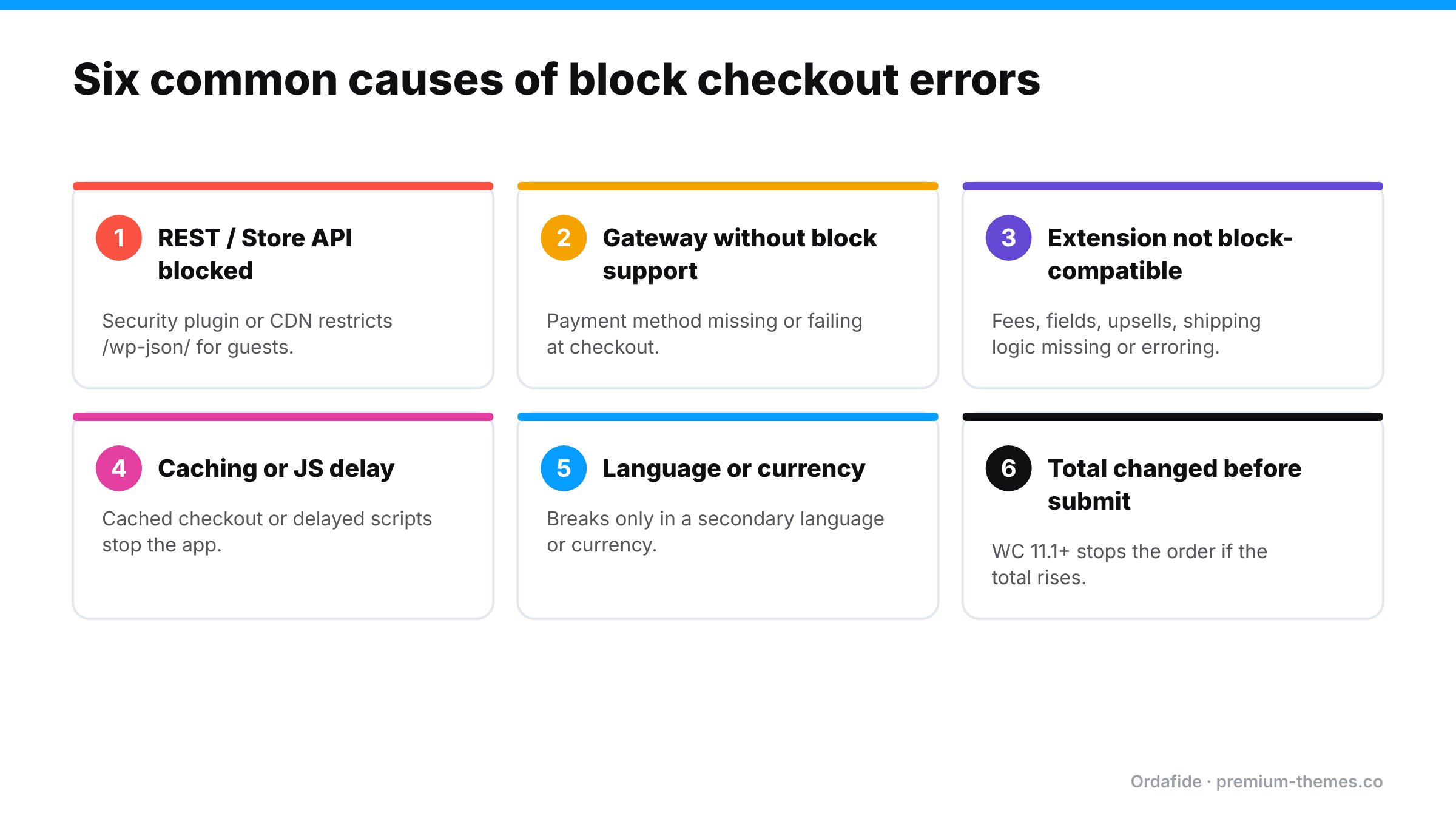
1. The REST API or Store API is blocked
Security plugins, firewalls, CDN rules and “disable REST API” settings sometimes block /wp-json/ requests for visitors who aren’t logged in. Classic checkout may still work; block checkout fails. A WordPress Site Health warning about the REST API is a strong hint.
2. A payment method that doesn’t support blocks
Payment plugins must register a separate integration for the Checkout block. An older or less-maintained gateway may simply not appear in block checkout, or may appear but fail at the payment step.
3. An extension that isn’t block-compatible
Checkout field editors, conditional fees, gift options, upsells and some shipping plugins hook into classic checkout. On block checkout their logic may not run, may run twice, or may throw an error. WooCommerce shows an incompatibility notice in the editor for extensions that haven’t declared support. Take it seriously.
4. Caching and optimization
Page caching of cart or checkout, or script optimization that defers, combines or delays the checkout’s JavaScript, can break the app. Cart and checkout pages and the Store API should never be cached, and checkout scripts should be excluded from “delay JS” features.
5. Multilingual and multi-currency setups
Language and currency switchers change URLs, prices and REST behaviour. Problems that only appear in a secondary language or currency are common, and easy to miss if you only test in your main language.
6. Price changes between load and submit
From WooCommerce 11.1, block checkout stops an order if the total increases between page load and Place order, asking the shopper to refresh. That protects customers, but if dynamic pricing, currency or coupon plugins frequently change totals, shoppers will keep hitting it. (Order totals guide)
7. Server errors and timeouts
A PHP fatal error or timeout on the checkout endpoint shows up in the browser as a generic error. The real message is in your PHP error log or WooCommerce → Status → Logs.
8. Bot protection that blocks real shoppers (or doesn’t block bots)
The Store API is also a target for card testing bots. WooCommerce has added rate limiting and worked with CAPTCHA plugin authors so their protection covers block checkout. Misconfigured protection can block real customers; missing protection invites attacks. (Card testing guide)
How to diagnose a block checkout error
1. Reproduce it like a customer. Private window, logged out, on mobile and desktop, in every language and currency you sell in, with each payment method.
2. Open developer tools → Network. Filter for wc/store. Watch the requests as you load the checkout, enter an address and click Place order. A red request (4xx or 5xx) is your culprit. Click it and read the response: it usually contains a specific error code and message.
3. Read the status code:
- 401/403: something is blocking the API (security plugin, firewall, CDN rule, nonce problem from caching).
- 404: the REST route isn’t reachable (permalinks, rewrite rules, or REST disabled).
- 400 with an error code: WooCommerce rejected the request for a reason in the message (invalid address, coupon, payment data, total changed).
- 500: a PHP error. Check the logs.
4. Check logs. WooCommerce → Status → Logs for fatal errors and gateway logs around the time of the failure.
5. Switch to classic temporarily (if needed). If you need to keep selling while you investigate, replacing the Checkout block with the classic checkout shortcode is a valid short-term fix, provided your extensions support it.
6. Conflict test on staging. Default theme, then disable plugins one at a time, keeping WooCommerce and the gateway on.
A worked example: the security plugin update
A store using block checkout updates its security plugin. The new version adds a default setting that restricts REST API access for visitors who aren’t logged in, a sensible hardening for many sites.
- The checkout page loads normally, so it’s cached HTML and looks fine.
- When a logged-out shopper enters their address, the Store API call to update the cart returns 401. Shipping rates never load.
- Place order fails with “There was a problem with your order”.
- Logged-in customers (including the store owner testing from the admin) can check out fine, because they’re authenticated.
The owner’s own test passes. Sales from new customers fall to almost zero, while repeat customers who happen to be logged in still buy. It’s a confusing pattern, until you test logged out with the Network tab open and see the 401 on wc/store/v1/cart/update-customer.
The fix is a one-line exception in the security plugin for the Store API routes. Finding it is the hard part, which is why the diagnosis steps above start with “reproduce it like a customer”, meaning logged out.
Classic vs block checkout: which breaks how
| Failure | Classic checkout | Block checkout |
|---|---|---|
| REST API blocked for guests | Usually unaffected | Breaks |
| Gateway without block support | Works | Method missing or failing |
| Extension without block support | Works | Feature missing or errors |
| Page caching of checkout | Nonce/session errors | Nonce/session errors |
| JS delay/defer | Payment field may not load | App may not initialize |
| Total changes before submit | Proceeds | Stopped if total increases (WC 11.1+) |
If you switch between the two, re-test everything. They’re different code paths.
The part that hurts: you rarely see the error
Block checkout errors happen in the customer’s browser. Unless they email you, you never see the message. Your server may log nothing at all for a blocked request. Your uptime monitor is checking the home page. And because the checkout page itself loads, even a quick visual check can look fine.
The result is a familiar story: conversion quietly falls, and nobody knows why. (Sales suddenly dropped?)
Monitoring the Store API with Ordafide Pro
Ordafide Pro includes synthetic checkout monitoring that checks your shop, product, cart and checkout pages and the Store API every 15 minutes, recording status and response time and whether the expected page content was really there. An optional deep mode adds a test product to a cart through the same path a shopper uses. It never creates orders, so your data stays clean, and it raises a finding only after two consecutive failures to avoid false alarms.
Because it checks the Store API directly, it catches the class of failure that’s specific to block checkout: the classic page looks fine, but the API the block depends on is blocked or erroring.
Pro also adds order volume anomaly detection (a drop in orders compared with comparable past hours), gateway reconciliation, and alerts via Slack, SMS, email or signed webhook.
The free Ordafide plugin helps with the aftermath. Checkout errors often produce orders that are half-finished or duplicated as customers retry. Ordafide flags stuck payments, paid-but-cancelled orders, duplicate charges and totals that don’t add up, so you can clean up the orders affected while checkout was misbehaving.
Block checkout health checklist
- Cart, checkout and
/wp-json/wc/store/excluded from page caching - Checkout scripts excluded from JS delay/combine features
- Security plugin and firewall allow the Store API for logged-out visitors
- Every payment method you offer supports the Checkout block
- Every checkout-related extension declares block compatibility
- Tested in every language and currency, on mobile and desktop
- CAPTCHA (if any) supports block checkout and the Store API
- Automated monitoring of the Store API, not just the home page
Before switching an existing store to block checkout
If you’re moving from the classic checkout to the Checkout block, a little preparation prevents most of the errors above:
- List every plugin that touches cart or checkout (gateways, fees, fields, shipping, upsells, gift cards) and confirm each supports the Checkout block.
- Check for template overrides in your theme for cart and checkout. The block doesn’t use them.
- Test on staging with every payment method, logged in and out, in every language and currency.
- Exclude the Store API from caching and confirm security tools allow it.
- Switch at a quiet time, watch orders closely for the first days, and keep the classic shortcode ready as a fallback.
Reading a Store API error response
When you find a failed wc/store request in the Network tab, the response is usually JSON with a code and a message. A few you’ll commonly see:
- a nonce or authentication error: often caching serving a stale page, or a security plugin interfering with authentication
- invalid address or shipping errors: a shipping zone or validation plugin rejecting the input
- payment errors: the gateway rejected the payment data, so check the gateway’s own logs
- cart or total errors: an item went out of stock, a coupon expired, or the total changed
Copy the full code and message into your notes or a support ticket. It turns “checkout is broken” into a precise, fixable error.