On this page
- Why WISMR tickets happen
- The five moments that create tickets
- Moment 1: "Did my request go through?"
- Moment 2: "Is it approved? What do I do now?"
- Moment 3: "Did you get my parcel?"
- Moment 4: "Where's my money?"
- Templates for each moment
- Two ways to answer: push and pull
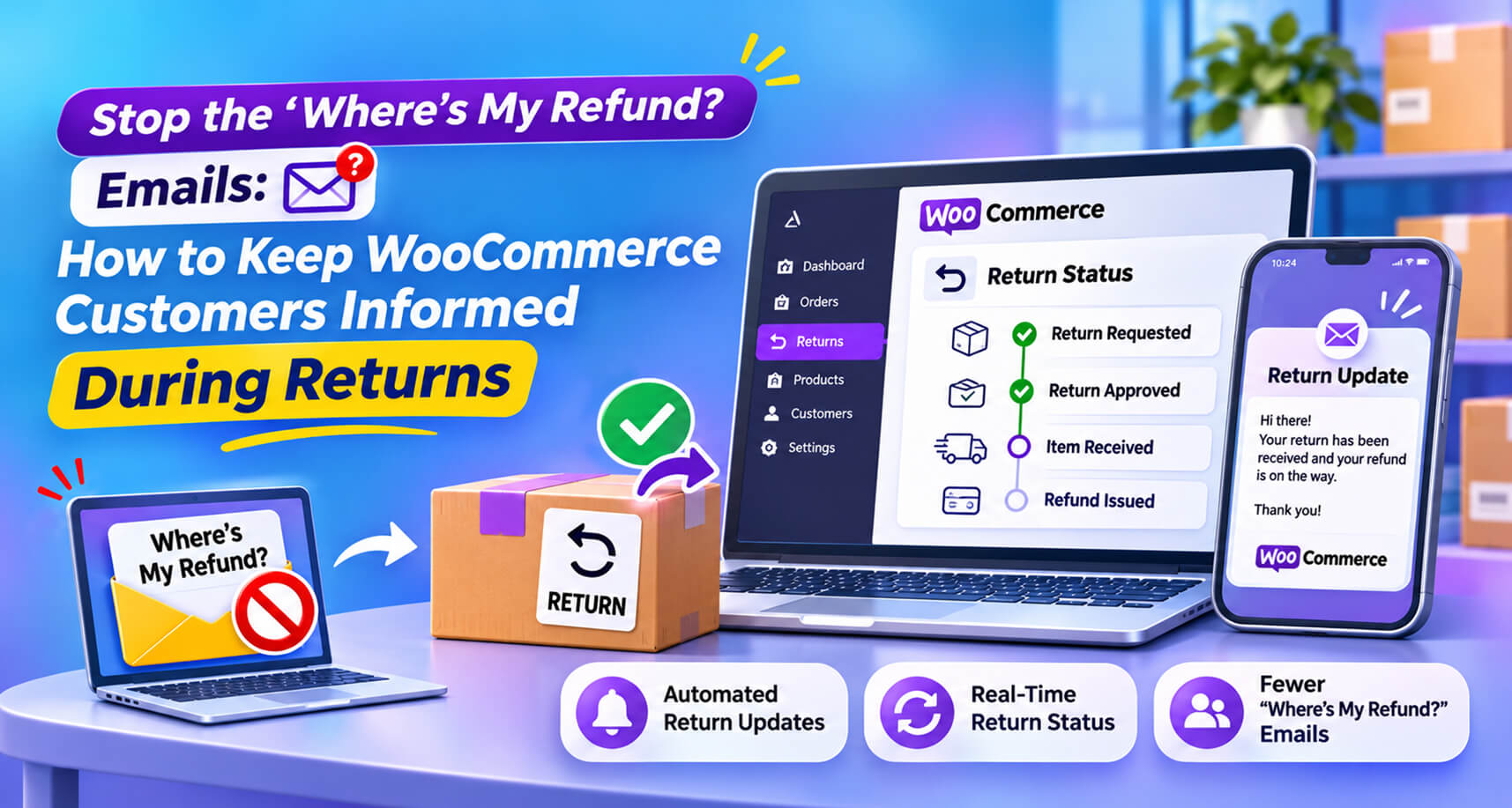
- What a good return status page shows
- Writing refund timing honestly
- Before and after: a week of return tickets
- Internal service levels that prevent tickets
- Setting it up with Recirco
- Don't forget the team side
- Measuring success
Look through any store’s support inbox in January and you’ll find the same handful of messages over and over:
- “I sent my return last week. Did you get it?”
- “Where’s my refund?”
- “Is my return approved? Where do I send it?”
- “I’ve heard nothing since I asked to return this.”
- “My bank says nothing has come in.”
In retail support these are often called WISMR tickets (“where is my refund?”), a cousin of the “where is my order?” tickets that flood inboxes before delivery. They’re frustrating for everyone: the customer feels ignored, and your team spends hours answering questions a status update could have answered automatically.
And they matter beyond support cost. The NRF found 71% of consumers are less likely to shop with a retailer again after a poor returns experience, and four in five would share a bad returns experience with friends and family ([NRF, October 2025](https://nrf.com/media-center/press-releases/consumers-expected-to-return-nearly-850-billion-in-merchandise-in-2025)). A customer who’s anxious about their money is one quiet week away from calling their bank.
This guide identifies the moments where customers go looking for information, what to tell them at each, and how to automate it in WooCommerce so the questions stop arriving.
Why WISMR tickets happen
Every one of these emails has the same root cause: the customer doesn’t know what’s happening, and has nowhere to look.
With email-based returns, the process is invisible to the customer. They send a request into the void, ship a parcel into the void, and wait for money to appear. Every gap in communication becomes a ticket.
WooCommerce alone makes this harder:
- There’s no return record for the customer to look at. Only the original order.
- There’s no “return received” or “return approved” email. WooCommerce has a refund email, but nothing before it.
- Partial refunds don’t change the order status, so even the order page gives no clue anything happened.
The five moments that create tickets
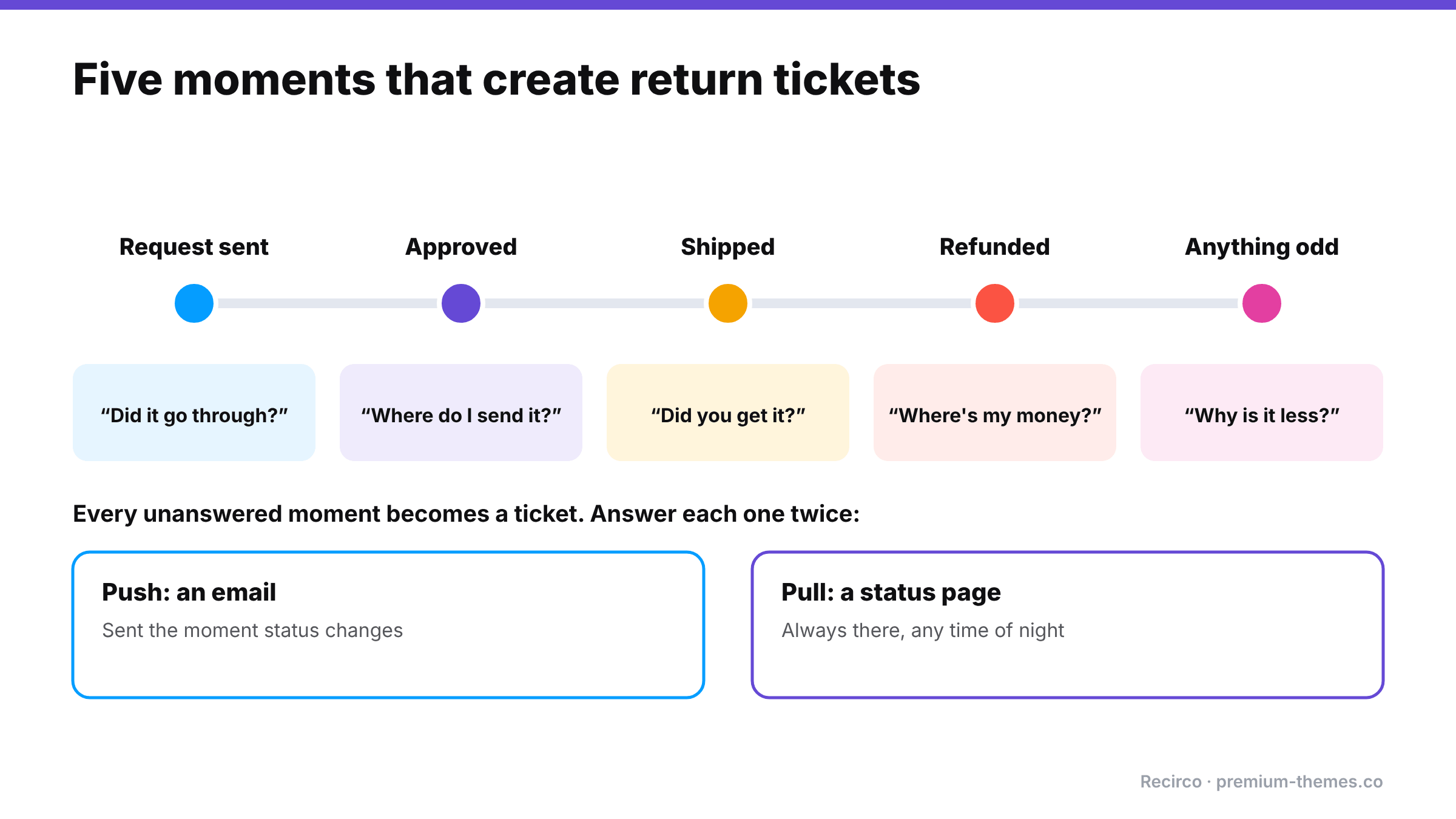
Map your return process and you’ll find customers need information at five points. Miss any one, and tickets follow.
Moment 1: “Did my request go through?”
When: immediately after they ask to return something.
What they need: confirmation it was received, a return number, and when they’ll hear back.
Ticket if missing: “I filled in your form, did it work?”
Moment 2: “Is it approved? What do I do now?”
When: when you approve (or reject) the return.
What they need: the decision, where to send the item, the return number to include, how to package it, the label if you provide one, and any deadline.
Ticket if missing: “Where do I send it?” / “Is it approved yet?”
Moment 3: “Did you get my parcel?”
When: after they’ve shipped it.
What they need: reassurance that you know it’s on the way, and confirmation when it arrives.
Ticket if missing: “I posted it a week ago, has it arrived?”
Moment 4: “Where’s my money?”
When: after the item arrives and is inspected.
What they need: confirmation of the refund amount, the method, the date it was issued, and how long their bank typically takes to show it.
Ticket if missing: “Where’s my refund?” This is the big one, and the one most likely to turn into a dispute.
Moment 5: “Anything else I need to know?”
When: whenever something unusual happens: a partial refund, a deduction, a delay, a question about condition.
What they need: a clear, human explanation, before they notice something unexpected on their statement.
Ticket if missing: “Why was I refunded less than I paid?”
Templates for each moment
Adapt these for your emails and status page.
Moment 1: Request received
We’ve got your return request for order #6120 (return number RET-1043). We’ll review it within one working day and email you with next steps. You can check its status any time in My Account → Returns.
Moment 2: Approved
Good news: your return RET-1043 is approved. Please send the item(s) to [address] within 14 days, with your return number inside the parcel. [Your prepaid label is attached.] When you’ve sent it, add your tracking number in My Account → Returns so we can watch for it.
Moment 3: Received
Your return RET-1043 has arrived. We’ll check it within [2] working days and then process your refund.
Moment 4: Refunded / completed
We’ve refunded $24.30 to your original payment method today. Most banks show refunds within 5–10 working days. Your return RET-1043 is now complete. Thanks for shopping with us.
Moment 5: Something unusual
We’ve received your return RET-1043. One of the two items was returned without its tags, so under our returns policy we’ve refunded $22.50 for the other item. If you have any questions, just reply to this email.
Two ways to answer: push and pull
Customers get information in two ways:
- Push: emails sent at each moment. Proactive, but easy to miss or land in spam.
- Pull: a status page they can check whenever they want. Always there, always current.
You need both. Emails tell people something changed; the status page answers the question at 11 p.m. on a Sunday when they wonder, again, whether you’ve received the parcel.
What a good return status page shows
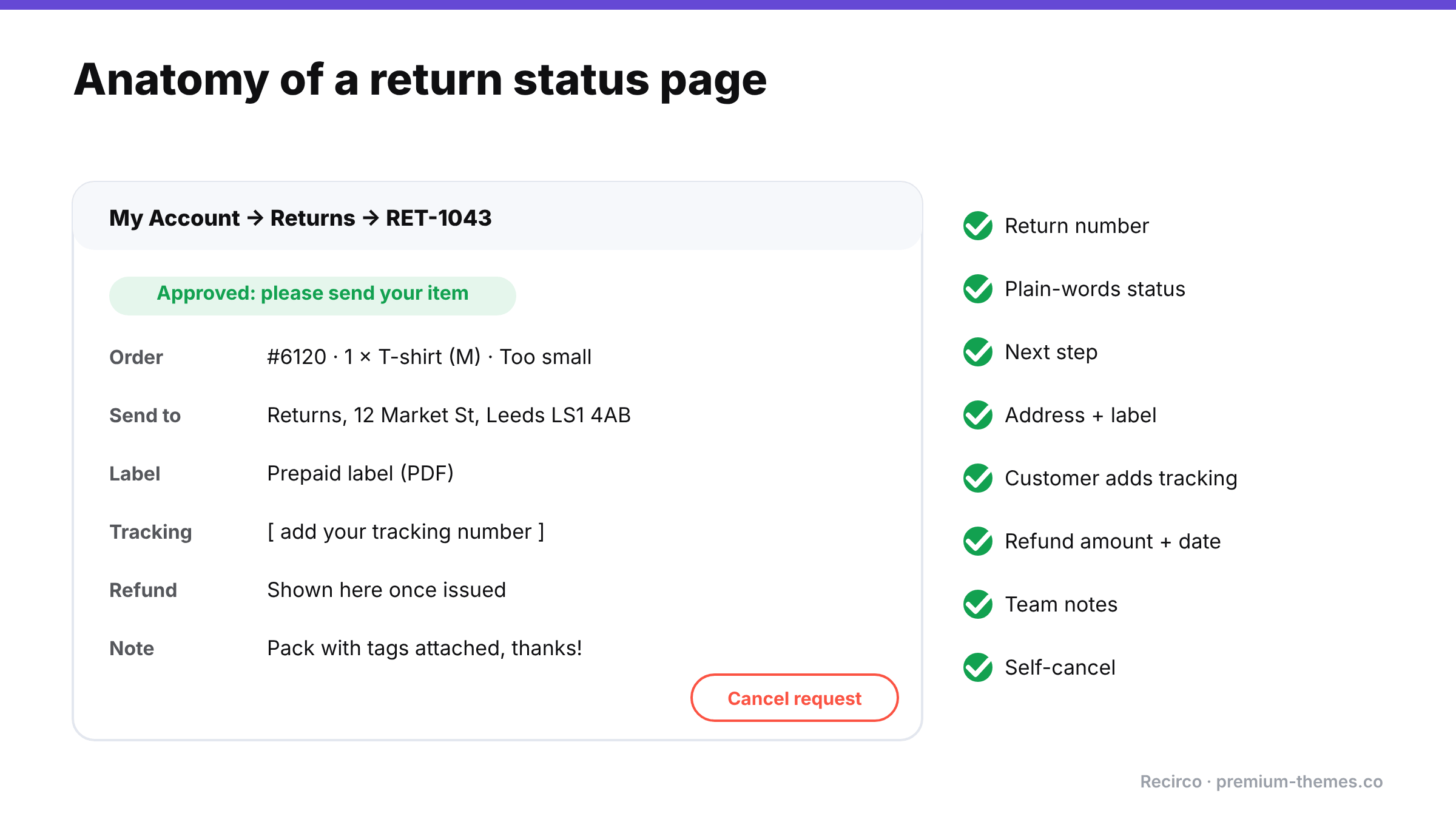
- Return number and the order it belongs to
- Items being returned, with quantities and reasons
- Current status in plain words (“Approved: please send your item”, “Received: being checked”, “Refunded on 14 Jan”)
- Next step for the customer, if any
- Return address and any label
- Tracking number they’ve added (and a way to add one)
- Refund amount and date once issued
- Notes from your team, where relevant
- A way to cancel the request if they change their mind
Writing refund timing honestly
The most common WISMR trigger is the gap between “we refunded you” and “the money appears”. Card refunds commonly take several working days to show on a statement, depending on the bank. Say so explicitly in the refund email:
“We’ve refunded $54.20 to your Visa ending 4242 today, 14 January. Most banks show refunds within 5–10 working days. If you can’t see it after that, reply to this email and we’ll send you the refund reference to give your bank.”
Specific amount, specific method, specific date, an honest timeframe, and a clear next step. That one paragraph prevents more tickets than anything else in this guide.
Before and after: a week of return tickets
Before: a store processing about 60 returns a week by email receives roughly 45 return-related emails on top of the requests themselves: “did you get my request?” (10), “where do I send it?” (8), “did my parcel arrive?” (12), “where’s my refund?” (13), “why is my refund less?” (2). At around five minutes each to find the order and reply, that’s nearly four hours a week of answering questions about things that already happened.
After: requests are made in a portal that confirms them instantly; approval emails include the address and label; customers add tracking numbers and see “Received” on their status page; the refund email states the amount, date and expected bank timing. Most of those 45 emails never get written. The ones that remain are genuine exceptions that deserve a human.
The difference isn’t working harder. It’s that every question now has an answer waiting before it’s asked.
Internal service levels that prevent tickets
Customer-facing updates only help if the steps behind them happen on time. Agree internal targets:
- Approve or reject within one working day of the request.
- Mark received the same day the parcel arrives.
- Refund within two working days of arrival (or on arrival for low-risk returns).
- Reply to customer notes within one working day.
Track them. When a step slips, the “where’s my refund?” emails come back.
Setting it up with Recirco
Recirco – Returns & Exchanges for WooCommerce is free, and is built to cover all five moments without extra tools.
Pull: a status page in My Account
- A Returns tab in My Account listing each return with its RMA number.
- Live status for every return, enforced by a seven-status workflow, so what the customer sees always reflects where the return really is.
- Your return address and policy text on the page; labels displayed when available.
- Customers can submit a tracking number themselves and cancel their own request.
- Customer-visible notes from your team appear alongside the return.
Push: six editable emails
- Request received (moment 1)
- Approved and Rejected (moment 2)
- Completed (moment 4)
- Customer note (moment 5): send a message to the customer straight from the return
- Admin alert, so your team knows a request is waiting
All six are editable in HTML and plain text, so you can add the refund-timing wording above. Your team gets an admin queue with a pending badge, status counts, filters and bulk actions, so requests are approved quickly and moment 2 isn’t delayed.
Refunds are created from the return as real WooCommerce refunds, so the refund in the customer’s account, the refund at the gateway and the return’s status all agree. There’s no “the system says refunded but the money hasn’t moved” confusion.
Recirco Pro reduces ticket volume further:
- Carrier labels via Shippo, generated on approval, so customers get a tracked label instead of asking how to send it.
- Conditional approval rules for instant decisions on routine returns: moment 2 happens in seconds.
- Exchanges and store credit with a balance page in My Account, so credit customers can check their balance themselves.
- Analytics including average days to resolve, the number that predicts WISMR volume.
Don’t forget the team side
Customers aren’t the only ones who need visibility. Your team needs to see, at a glance, which returns are waiting on them: requests to approve, parcels arrived but not checked, refunds not yet issued. A queue with status counts and a pending badge does this. Without it, steps slip quietly, and the customer-facing updates stall with them.
When several people handle returns, a shared view also stops two people answering the same customer, or one promising something the other contradicts. Internal notes on each return keep the story consistent: whoever picks it up next can see exactly what was said and done.
Measuring success
Track these monthly:
- Return-related tickets per 100 returns. The headline number. It should fall sharply once status pages and emails are in place.
- Average days to resolve. Faster returns mean fewer “where’s my refund?” messages.
- Time from arrival to refund. The gap most likely to cause anxiety.
- Disputes on returned orders. Should approach zero.
Frequently asked questions
How do I reduce "where is my refund" emails?
Send updates at each stage (request received, approved, received, refunded), give customers a status page they can check any time, and state refund timing honestly in the refund email.
Does WooCommerce send return status emails?
WooCommerce sends a refund email, but has no return request, approval or received emails. Recirco adds six editable return emails.
Can customers track their return in WooCommerce?
With Recirco, yes. Customers see live status, return address, labels and refund details in My Account, and can add their own tracking number.
How long do refunds take to reach customers?
It depends on the bank and payment method; card refunds commonly take several working days to appear. Tell customers the date you refunded and a realistic timeframe.
What should a refund email say?
The exact amount, the payment method it went back to, the date you issued it, a realistic timeframe for the bank to show it, and what to do if it doesn't appear.
Should customers be able to cancel a return request?
Yes. People often change their mind and decide to keep an item. Letting them cancel it themselves saves an email and keeps your queue accurate. Recirco lets customers cancel their own requests.
What's the single biggest cause of "where's my refund?" emails?
Silence between the item arriving and the money appearing. A "received" update plus an honest refund-timing message closes that gap.