On this page
- Why it's worth doing
- What a good WooCommerce returns portal needs
- Step-by-step: setting up a free returns portal with Recirco
- Step 1: Install and activate
- Step 2: Set your return window
- Step 3: Exclude what can't be returned
- Step 4: Set up return reasons
- Step 5: Add your return address and policy text
- Step 6: Choose when stock goes back
- Step 7: Review the emails
- Step 8: Test it as a customer
- What processing a return looks like
- Going further: exchanges, store credit and labels
WooCommerce can issue refunds. What it can’t do out of the box is handle returns.
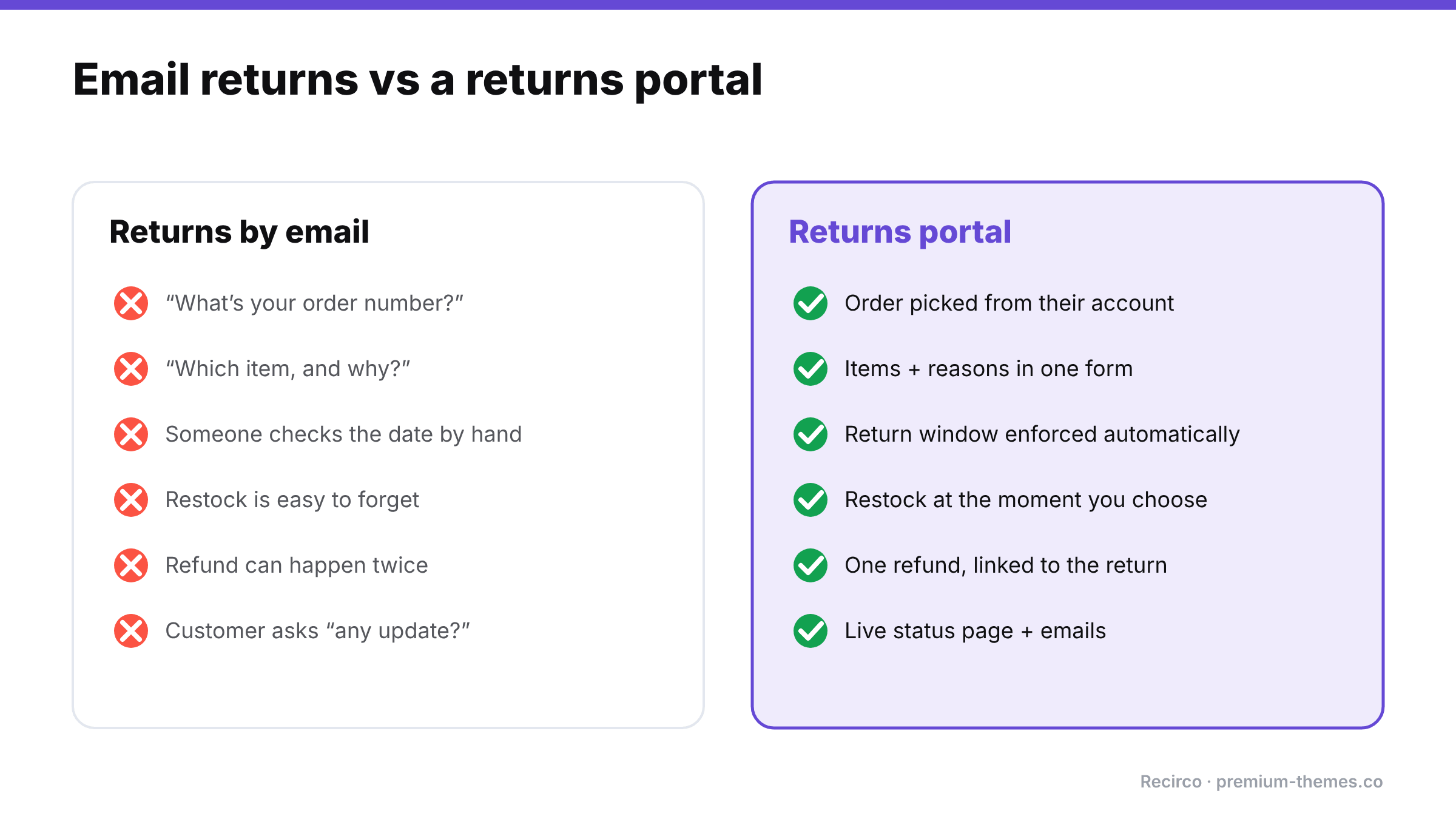
There’s no way for a customer to request a return from their account, no approval step, no RMA number, no return reasons, no return window. So most stores end up running returns through email: “Hi, I’d like to return my order…” followed by a back-and-forth to find the order number, which item, why, whether it’s still in the return window, and where to send it.
That works at five returns a month. At fifty, it becomes a part-time job and a source of mistakes: forgotten restocks, refunds issued twice, late returns approved because nobody checked the date.
This guide shows how to replace that email thread with a proper self-service returns portal, for free.
Why it’s worth doing
Returns aren’t an edge case. The National Retail Federation estimated that 19.3% of online sales would be returned in 2025, and that 76% of consumers are more likely to choose a retailer offering an instant refund or exchange. 71% said they’re less likely to shop with a retailer again after a poor returns experience (NRF, October 2025).
A clear, self-service returns process does three things:
- It cuts support time. Customers submit everything you need in one go.
- It enforces your policy consistently. The system checks the return window, not a tired staff member.
- It builds buying confidence. Shoppers check returns policies before they buy. An easy process removes a reason to hesitate.
What a good WooCommerce returns portal needs
For customers:
- A Returns area inside My Account, not a separate form they have to find
- Only eligible orders and items offered (inside the return window, not already refunded, not excluded)
- Per-item quantities and a reason for each
- A status page showing what happens next, where to send the item, and an RMA number
- The ability to add a tracking number and cancel their own request
For your team:
- A single approval queue with search, filters and bulk actions
- A clear status workflow that can’t be skipped or reversed by accident
- Restocking at the right moment
- Refunds created from the return, with no double-refunding
- Notes (internal and customer-facing) and an activity log
- Emails at each step
Step-by-step: setting up a free returns portal with Recirco
We’ll use Recirco – Returns & Exchanges for WooCommerce, a free plugin on WordPress.org. It requires WordPress 6.2+, PHP 7.4+ and WooCommerce 7.0+, supports HPOS and block checkout, and makes no outbound calls. Your returns data stays in your own database.
Step 1: Install and activate
Go to Plugins → Add New, search for Recirco, install and activate. WooCommerce must already be active.
Step 2: Set your return window
Go to WooCommerce → Returns settings and set:
- Return window (days). How long customers have to request a return.
- What the window counts from: the order’s completed, paid or created date. “Completed” is usually fairest if you mark orders complete when they ship or are delivered.
- Eligible order statuses. Typically Completed (and Processing if you allow returns before shipping is marked complete).
Selling to EU customers? EU consumers have a legal right to withdraw from most online purchases within at least 14 days of receiving the goods. Set your window to at least that. More on this in our WooCommerce return policy guide.
Step 3: Exclude what can’t be returned
Exclude specific products or categories such as final-sale items, personalized products, underwear or perishables. Excluded items simply won’t appear as returnable in the portal.
Step 4: Set up return reasons
Recirco comes with six common reasons pre-loaded. You can edit them and choose which ones require an explanation. For example, “Damaged or defective” might require details, while “Changed my mind” doesn’t. Good reason data is how you’ll later reduce your return rate.
Step 5: Add your return address and policy text
Add the address customers should send items to and a short policy summary. Customers see these on their return status page along with the RMA number. You can set your own RMA prefix (e.g. ‘RMA-‘ or ‘RET-‘), customize the portal’s URL slug, and adjust the policy text.
Step 6: Choose when stock goes back
Pick when returned items are added back into inventory: never, on approval, on arrival, or on completion. For most stores, on arrival is safest. You only restock what physically came back.
Step 7: Review the emails
Recirco sends six editable emails (HTML and plain text): request received, admin alert, approved, rejected, completed, and customer note. Adjust the wording to match your brand voice.
Step 8: Test it as a customer
Log in as a test customer with a completed order, open My Account → Returns, and submit a request. If the Returns page shows a 404, go to Settings → Permalinks and click Save once to refresh WordPress’s URL rules.
What processing a return looks like
(For the reasoning behind each step, see our WooCommerce RMA workflow guide.)
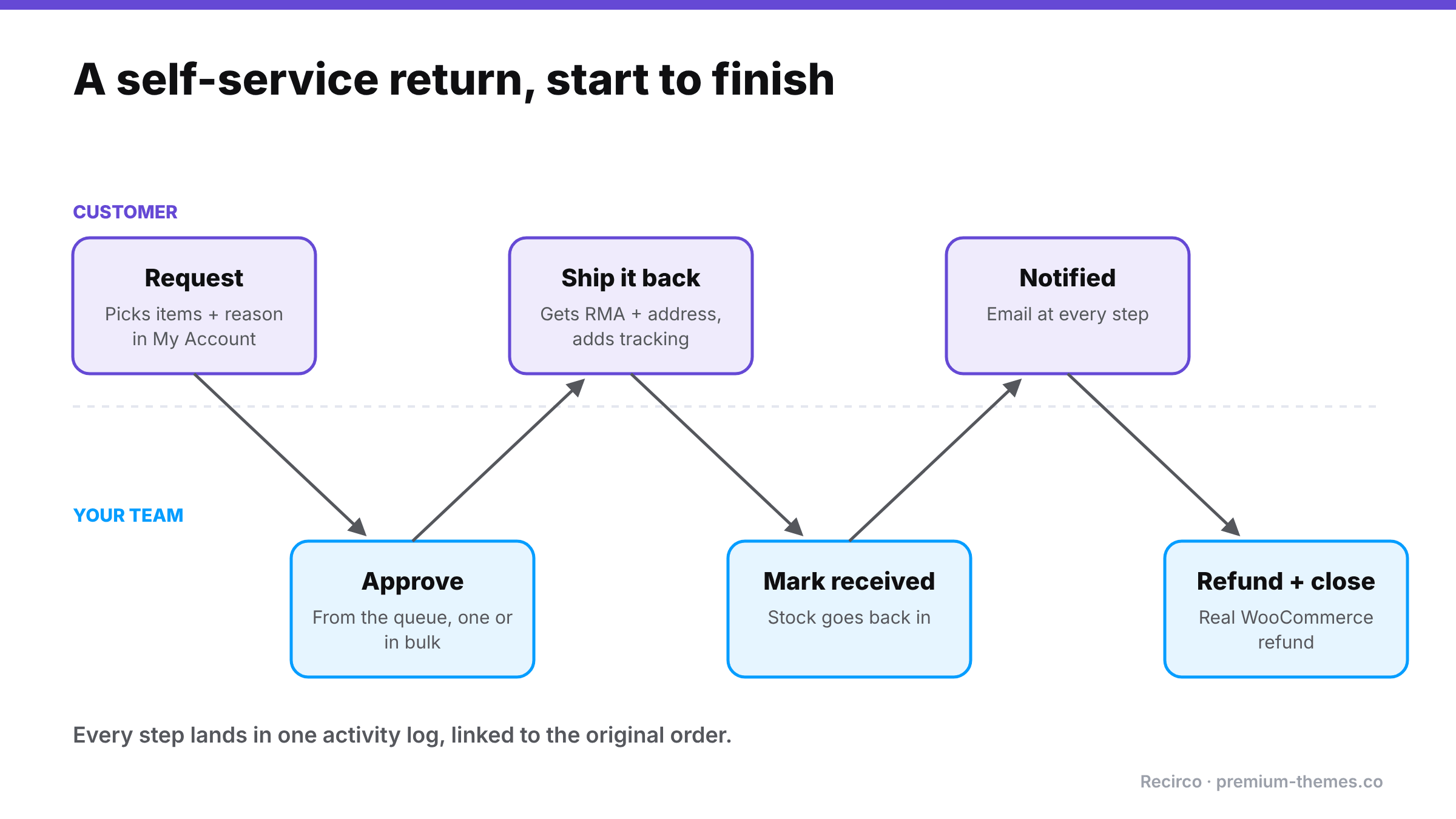
- The customer submits a request. You get an admin alert and see it in the queue with a pending badge.
- You (or a teammate) open it, review the items, reasons and order, and approve or reject. Several at once with bulk actions if you like.
- The customer gets the approval email with the RMA number and return address, ships the item, and adds a tracking number.
- When the parcel arrives, you mark it received. Stock is restocked if you chose on arrival.
- You create the refund from the return. Recirco creates a proper WooCommerce refund, optionally sent through your payment gateway, with net and tax split from the original line. Auto-refund on completion is available but off by default.
- The return is completed and the customer is notified. Every step is in the activity log, and a panel on the order edit screen shows the return.
Going further: exchanges, store credit and labels
The free plugin is a complete returns system. If you want to keep more revenue from returns and automate the busywork, Recirco Pro adds:
- Exchanges and variant swaps. Customers pick a replacement size or colour, and a zero-total replacement order is created on completion.
- Store credit with an optional bonus percentage and expiry, applied at checkout.
- Conditional approval rules to auto-approve, reject, flag or hold requests.
- Carrier return labels via Shippo, generated on approval.
- Returns analytics: reasons, most-returned products, value returned and time to resolve.
- Warranty claims with serial numbers and photo uploads.
We go deeper on why exchanges matter in Exchanges vs refunds.
Frequently asked questions
Does WooCommerce have a built-in returns system?
No. WooCommerce supports refunds from the order screen, but has no customer-facing return requests, approval workflow, RMA numbers or return windows. You need a plugin for that.
Is there a free WooCommerce returns plugin?
Yes. Recirco's free version on WordPress.org includes a My Account returns portal, admin approval queue, return windows, exclusions, reasons, restocking, refunds from the return and six editable emails.
Can guests request returns?
Not in the current version of Recirco. Requests come from customer accounts.
Can I customize how the returns portal looks?
Yes. Copy the template files from the plugin's 'templates/' folder into 'yourtheme/recirco/' and edit them there. Your changes survive plugin updates.