Handcrafted Beautiful Bootstrap HTML Templates for your Business Website.
Someone reads it, retypes the address into a spreadsheet, and refunds from memory. The stock never goes back on the shelf. And at the end of the season, nobody can tell you which product came back most, or why. Recirco replaces that with a portal your customers use and a queue you actually work.
The free plugin is free forever. No account, no phone home, no nag screens.
A broken checkout you find out about in an hour. A broken returns process you find out about in your stock count, six weeks later, when a customer buys something you don't have.
The parcel arrived, the refund went out, and the item is still sitting in a crate behind the desk. Your catalogue says one in stock. There are none — or there are two, and neither is listed. Every manual return is a chance for inventory and reality to drift apart.
Someone refunds in the payment gateway because it's quicker, then a colleague marks the order refunded in WooCommerce, then the return gets completed and a third refund is attempted. Two of those are recoverable. The one that actually left the account is not.
You publish a 30-day policy. Day 44 arrives with an unhappy email, and arguing costs more than the refund does, so you take it. Do that often enough and the policy is decorative — you're running whatever window each customer decides to argue for.
Half your returns say "didn't fit". You know that anecdotally. You cannot put a number on it, cannot say which supplier it clusters around, and so you buy the same product again next season and it comes back again.
The order sits in WooCommerce. The money sits at the gateway. The stock sits in your warehouse. The conversation sits in an inbox. Nothing joins them up, so the failure mode isn't an error message — it's a small, quiet disagreement between four records that each look fine on their own.
Free isn't a demo with the useful parts removed. It runs a real store's returns end to end: the customer requests, you approve, stock goes back, money goes out, everybody gets emailed. If you never buy Pro, this still does the job.
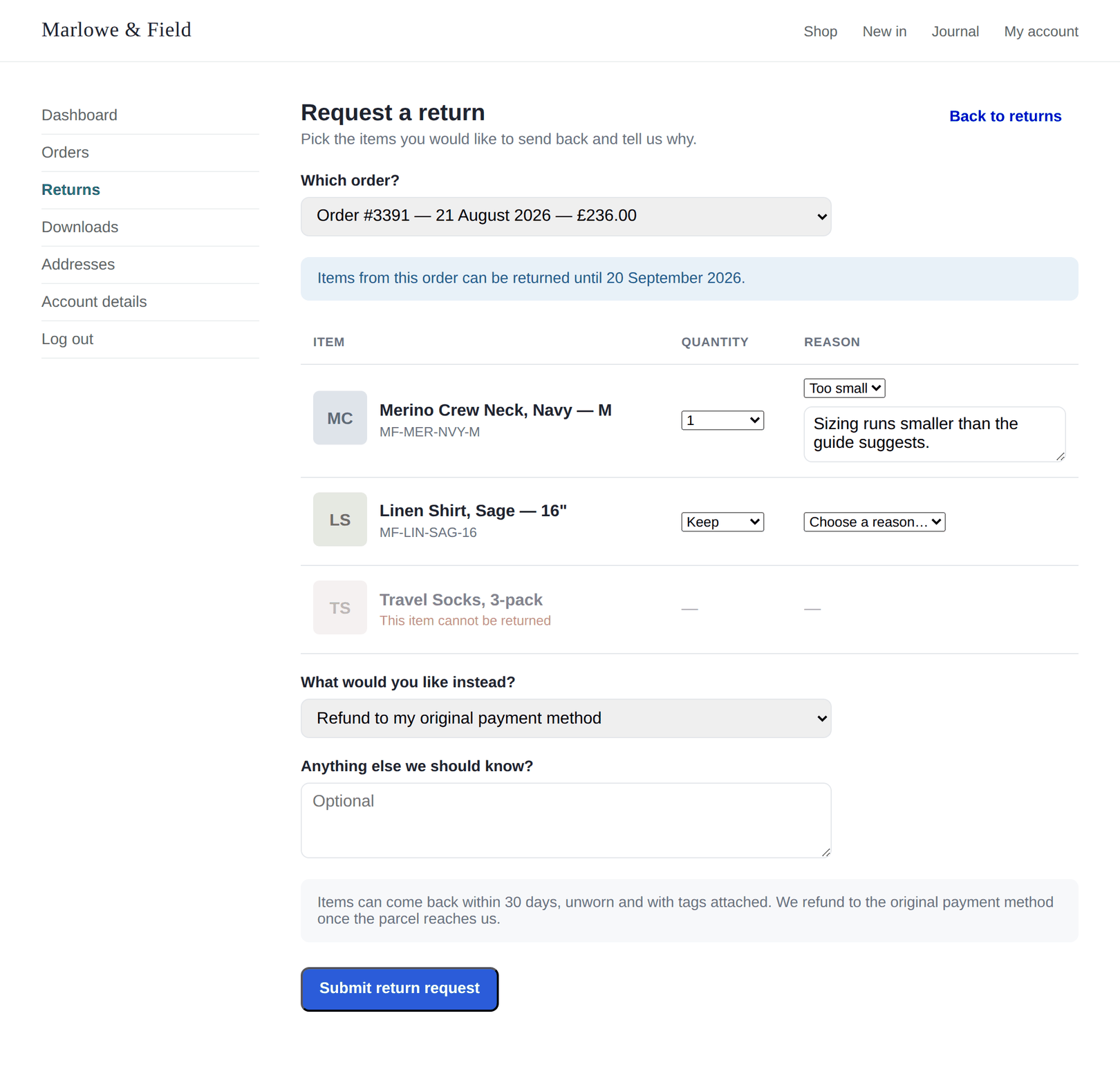
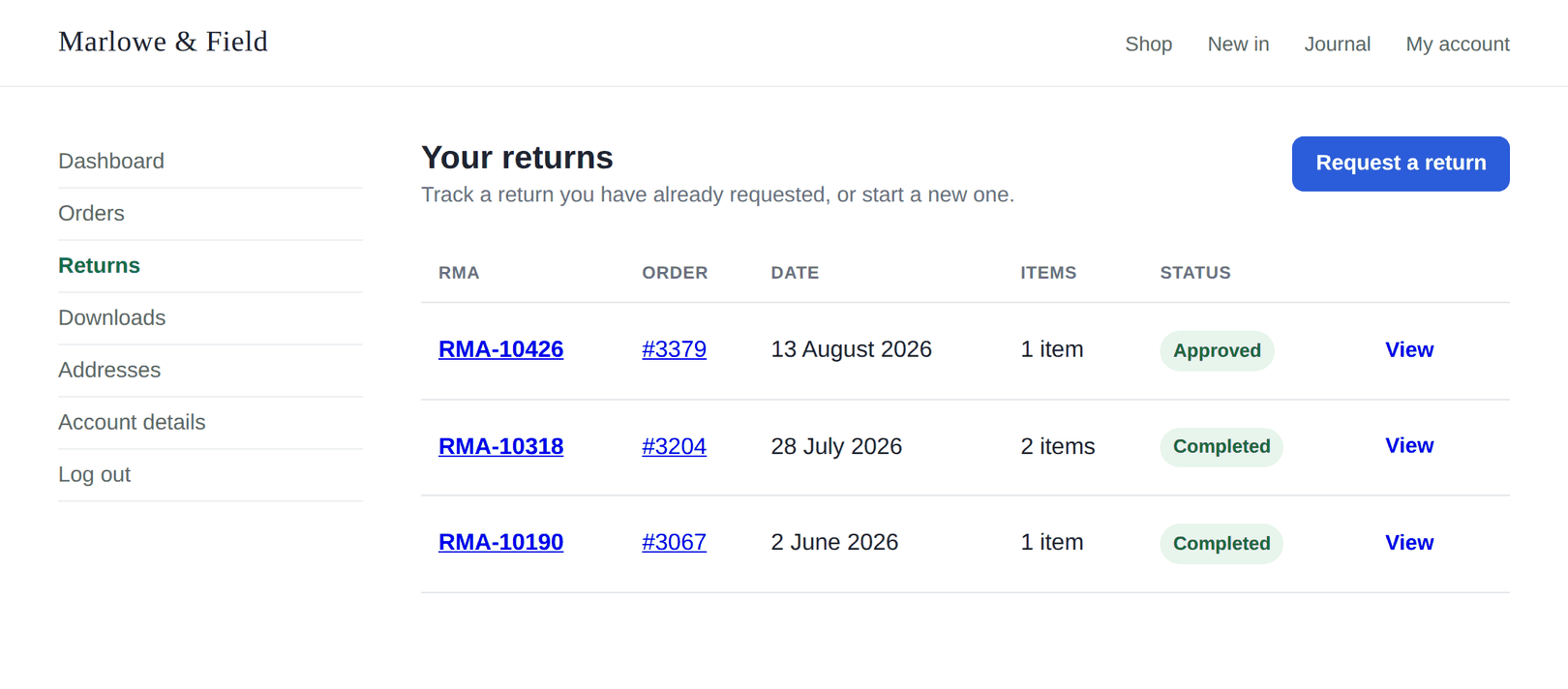
A Returns tab appears in My Account. The customer picks the order, the items, the quantities and a reason, and submits. No email chain, no form plugin, no back-and-forth about what they actually want.
Eligibility is decided per unit, not per order. Items outside the window, already refunded, or on your excluded list simply aren't offered — so the request that lands in your queue is one you can actually accept.
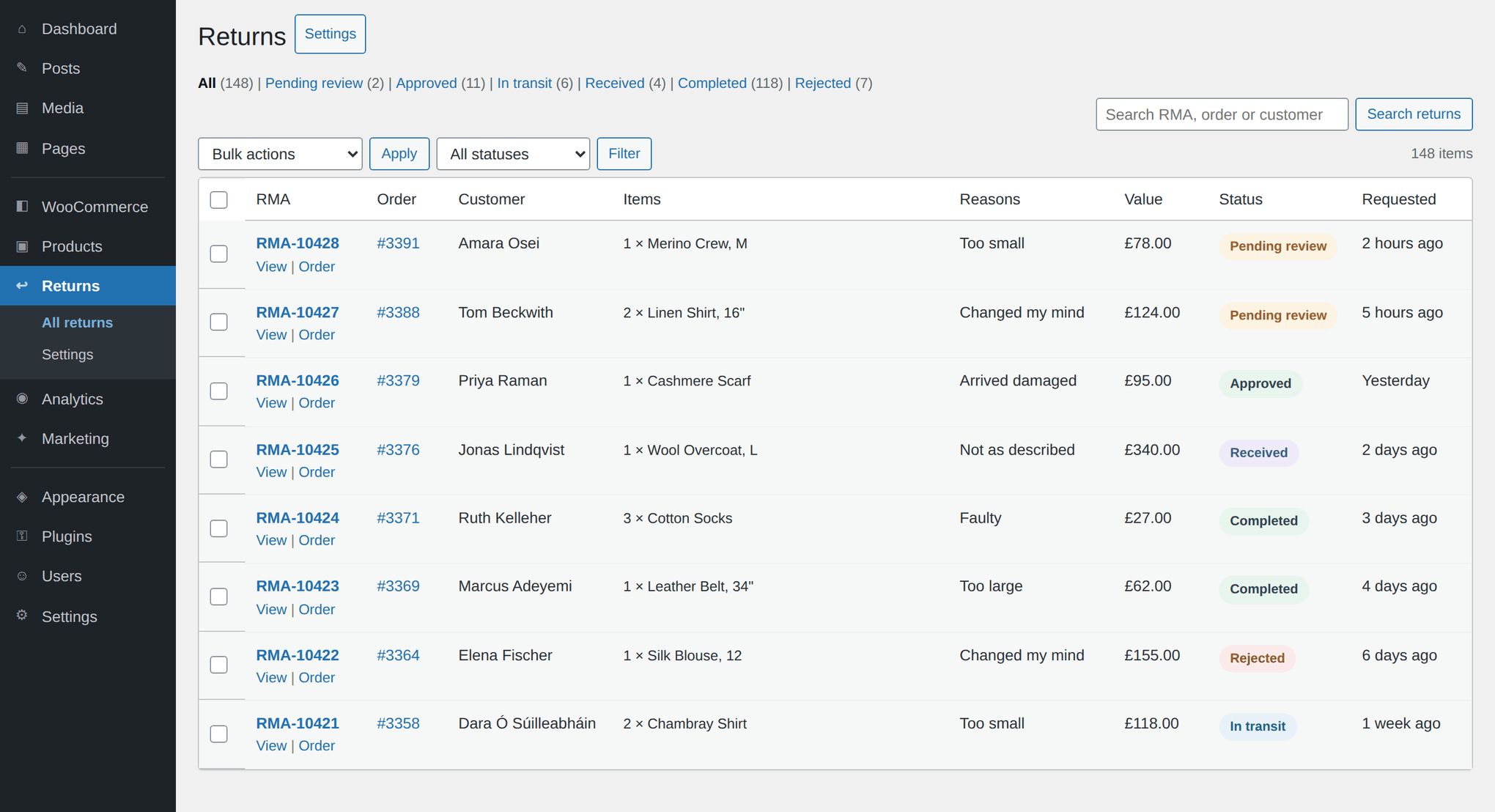
Search, filters and live status counts, with bulk approve, reject and mark received. The count of things waiting on you sits on the admin menu, so a return can't sit unseen for a week.
Seven statuses and a guarded state machine. A rejected return cannot quietly become a refunded one, because the illegal transition is refused rather than merely discouraged.
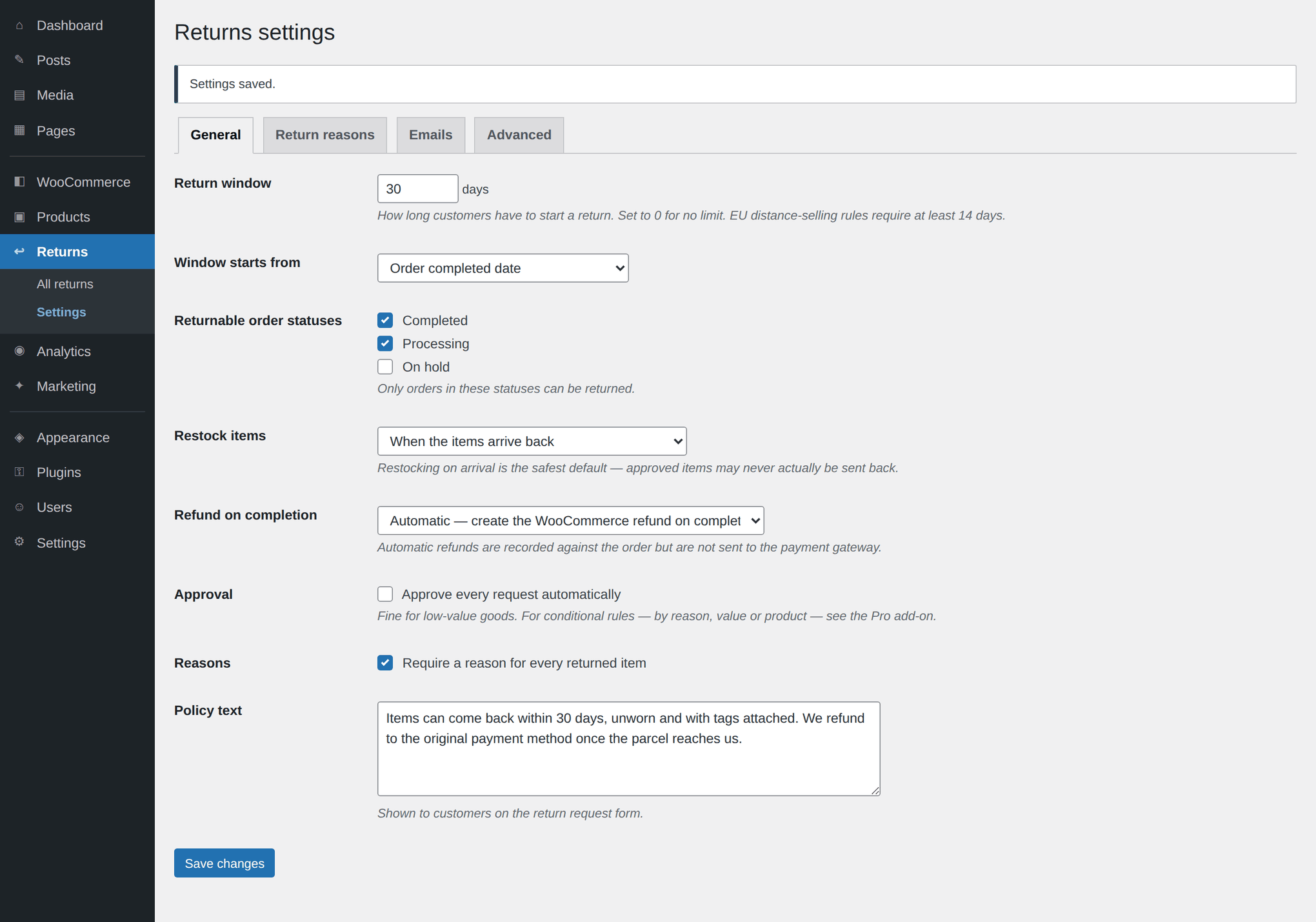
Put stock back never, on approval, on arrival, or on completion. Most stores want "on arrival" — the goods are in your hands and countable. It's one setting, and it applies to every return from then on.
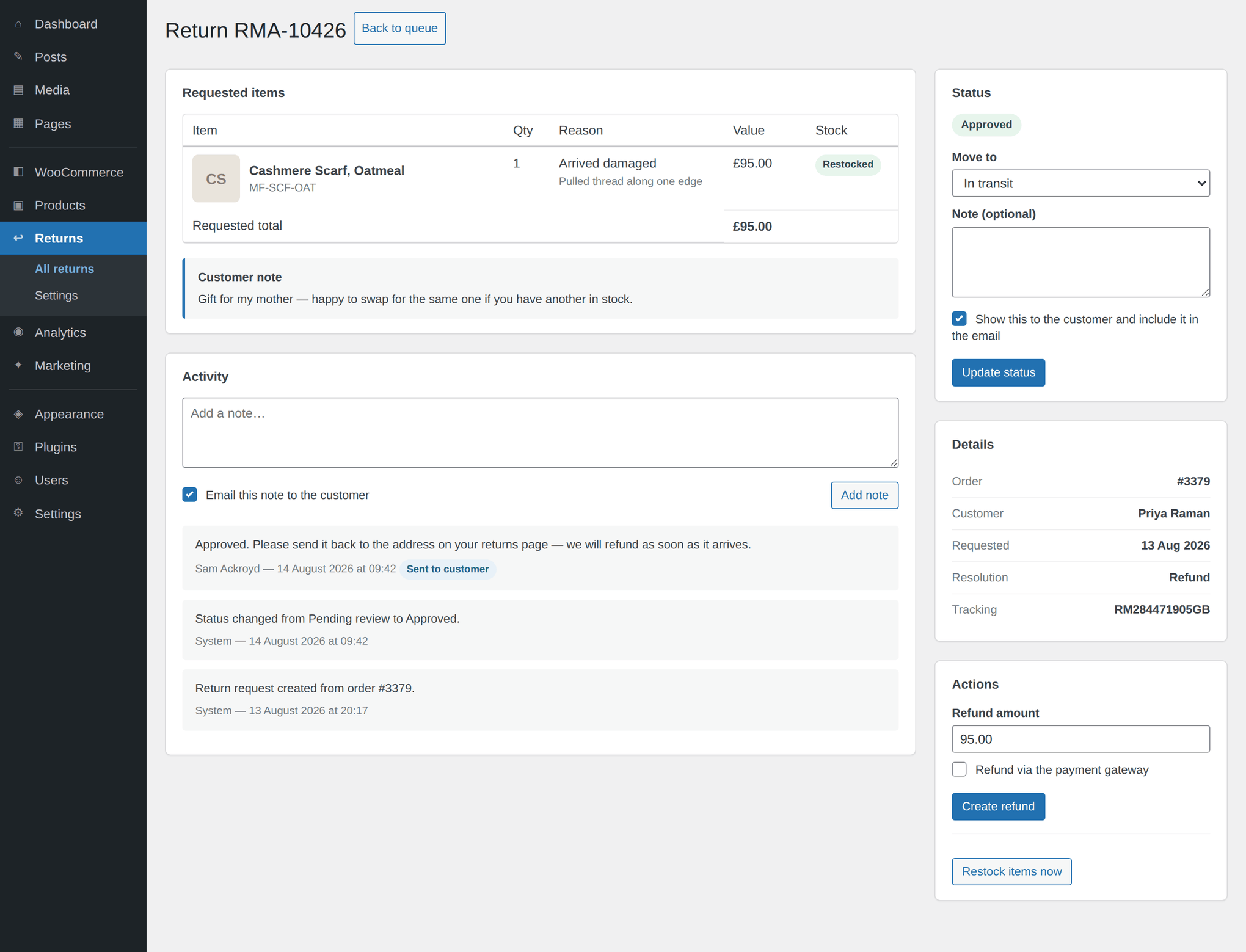
Create a real WooCommerce refund without leaving the return screen, optionally pushed to the payment gateway. Net and tax are split from the original order line, so your tax report still balances afterwards.
Write a note when you change a status and tick whether it reaches the customer. It appears on their return page and travels in the status email. Untick it and it stays internal, on the activity log.
Request received, admin alert, approved, rejected, completed, customer note — all editable under WooCommerce → Settings → Emails, in HTML and plain text, like every core Woo email.
Set the window in days and measure it from the order's completed, paid or created date — they are not the same date, and which one you pick changes who qualifies. Exclude individual products or whole categories for hygiene items, clearance and perishables. Custom reasons, each of which can demand a written explanation before the form will submit.
📢 EU merchants: the statutory minimum is 14 days. Recirco won't stop you setting less; it will just be your policy, not the law's.
There is a point where returns stop being an inbox problem and start being a margin problem. Every Pro feature does one of three things: keeps revenue in the store, removes labour from your day, or tells you what to stop buying.
The customer picks the size or colour they actually wanted. On completion a zero-total replacement order drops into Processing and gets picked through your normal flow. The sale stays a sale.
Offer more in credit than in cash — £55 of credit instead of a £50 refund — and most customers take it. Spendable at checkout, so the money never leaves.
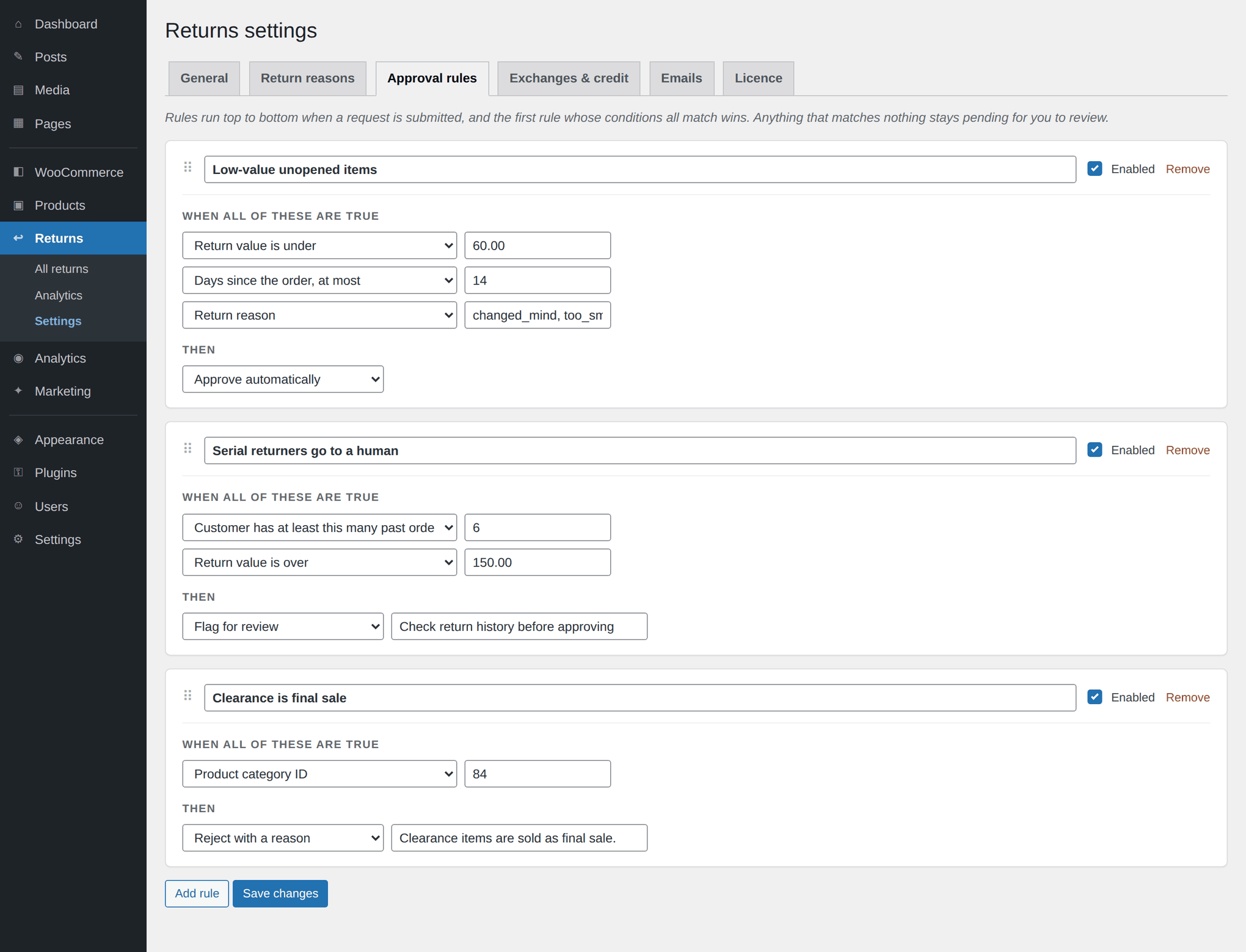
Seven conditions, four actions, first match wins. Cheap unopened items approve themselves at 2am; anything expensive or suspicious waits for a human.
Generate a real return label on approval and attach it to the email. The customer stops asking how to send it back, and you stop pasting tracking numbers into replies.
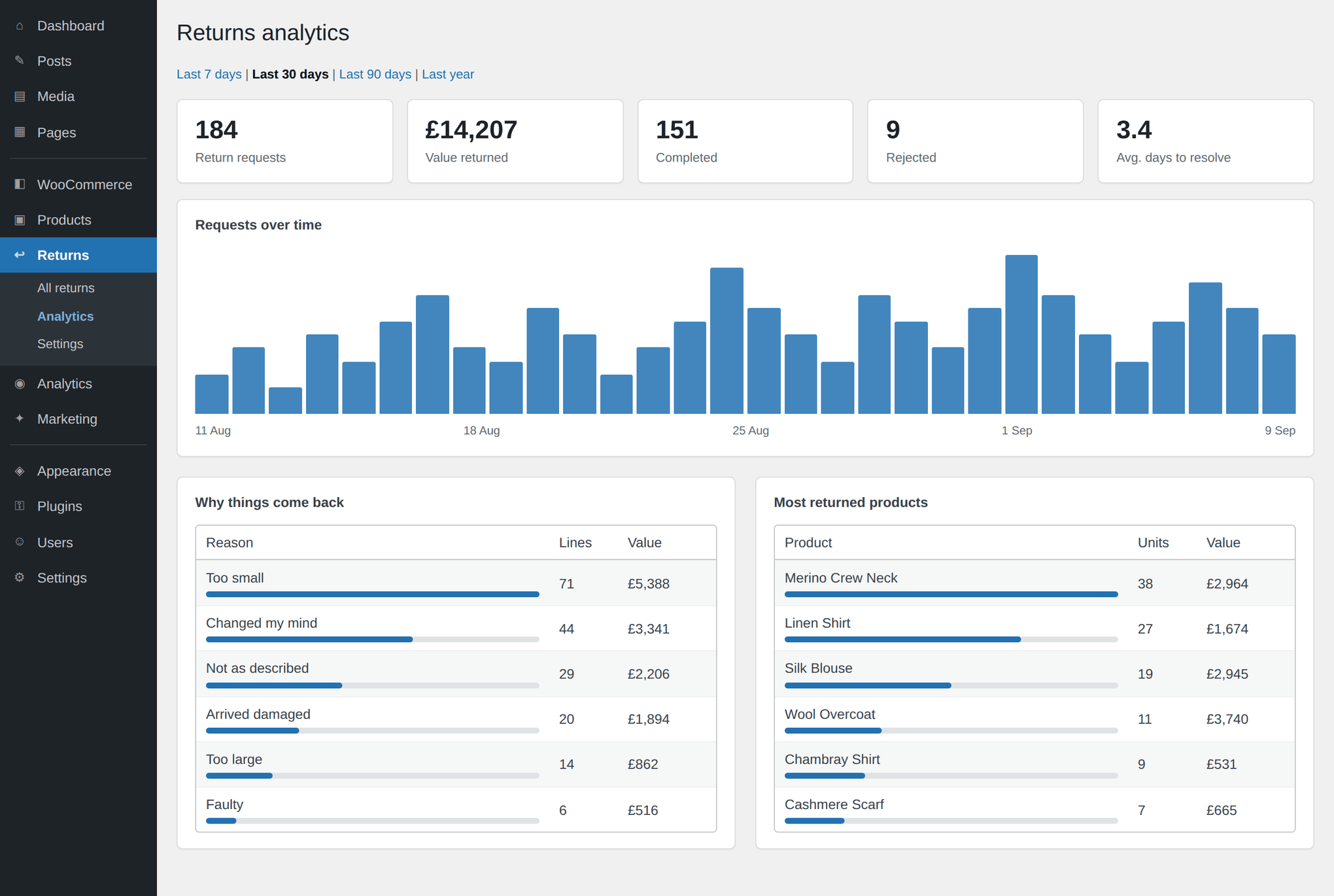
Volume over time, value returned, average days to resolve, reasons ranked by value, and the most-returned products. This is the report that changes next season's buying.
Register serial numbers, run cover from purchase date rather than registration, and let customers attach up to five photos to a claim. A damage dispute resolves in one exchange instead of five.
Pro adds no core files and patches nothing. It boots on the free plugin's own hooks and builds on the same documented API any third party gets.
A refund is a lost sale recorded politely. An exchange is the same logistics with the revenue still in the store, and for apparel — where "wrong size" is most of the return volume — it's the resolution the customer wanted in the first place.
The customer selects the replacement variant when they raise the request, so you're not guessing. On completion Recirco creates a zero-total order in Processing, which your warehouse picks, packs and ships through exactly the flow it already knows.
Credit is held as an append-only ledger. The balance is always derived from the entries, never stored as a number that can drift — so an adjustment made at 3pm and a purchase made at 3.01pm can never disagree about what's left.
At checkout, credit is applied as a negative fee. That matters more than it sounds: coupons get blocked by rules, restricted by product, and fought over by other plugins. Every gateway honours a negative fee.
Free gives you one switch: approve everything automatically, or approve nothing automatically. Most stores can't use either, because the right answer depends on what came back and who sent it.
Pro replaces the switch with rules. Seven conditions — reason, order value, days since order, product category, customer return history, requested resolution and current status — and four actions: approve, reject with a stated reason, flag for review, or hold. First match wins, and every decision is written to the activity log with the rule that made it.
Free will display a label if one exists, but it can't put one there. Pro generates it. Shippo is implemented today, with the cheapest rate selected by default, and the provider interface means another carrier can be added without touching the return workflow itself.
You can also attach a label by hand — some merchants have a negotiated account and a PDF they'd rather use, and that path stays open.
Return data is only worth collecting if it eventually reaches a purchase order. The reports are built around that: which products come back, for which stated reasons, and what that costs you — ranked by value, not just by count, because ten cheap returns and one expensive one are not the same problem.
The daily series is gap-free, so a quiet day shows as a zero rather than vanishing and flattering the trend line.
A 30-day return window and a two-year warranty are different promises, and most returns plugins only model the first. Recirco Pro tracks warranty length per product and lets customers register a serial number, so an in-warranty claim can be raised long after the return window has closed.
Cover runs from the purchase date, not the registration date — otherwise a customer who registers late is quietly rewarded for it. Quantity limits still apply: a unit that has already been refunded stays gone.
This plugin moves money and stock. A few things are worth ruling out explicitly, because they're the ones that would cost you if they went wrong.
A return records the refund it created. Ask for a second one — by hand, or by completing a return that was already refunded — and it is refused with a message, not attempted and quietly failed into a log.
Every transition passes one guarded gate. There is no code path that moves a return sideways, no bulk action that skips the check, and no filter that can loosen it without you writing that filter yourself.
No licence check, no telemetry, no version ping. Pro talks to exactly two kinds of place: the licence server you point it at, and the carrier account you connect. Nothing else, ever.
The amount refunded, the date it went out, your note, and an item table that says “Refunded” rather than “Expected refund” once money has actually moved.
Returns live in three custom tables rather than as posts, which is what keeps the queue fast and lets analytics group by reason and product. Uninstalling does not delete that data unless you deliberately tick the option under Advanced — because "I removed the plugin to test something" should not be an irreversible act.
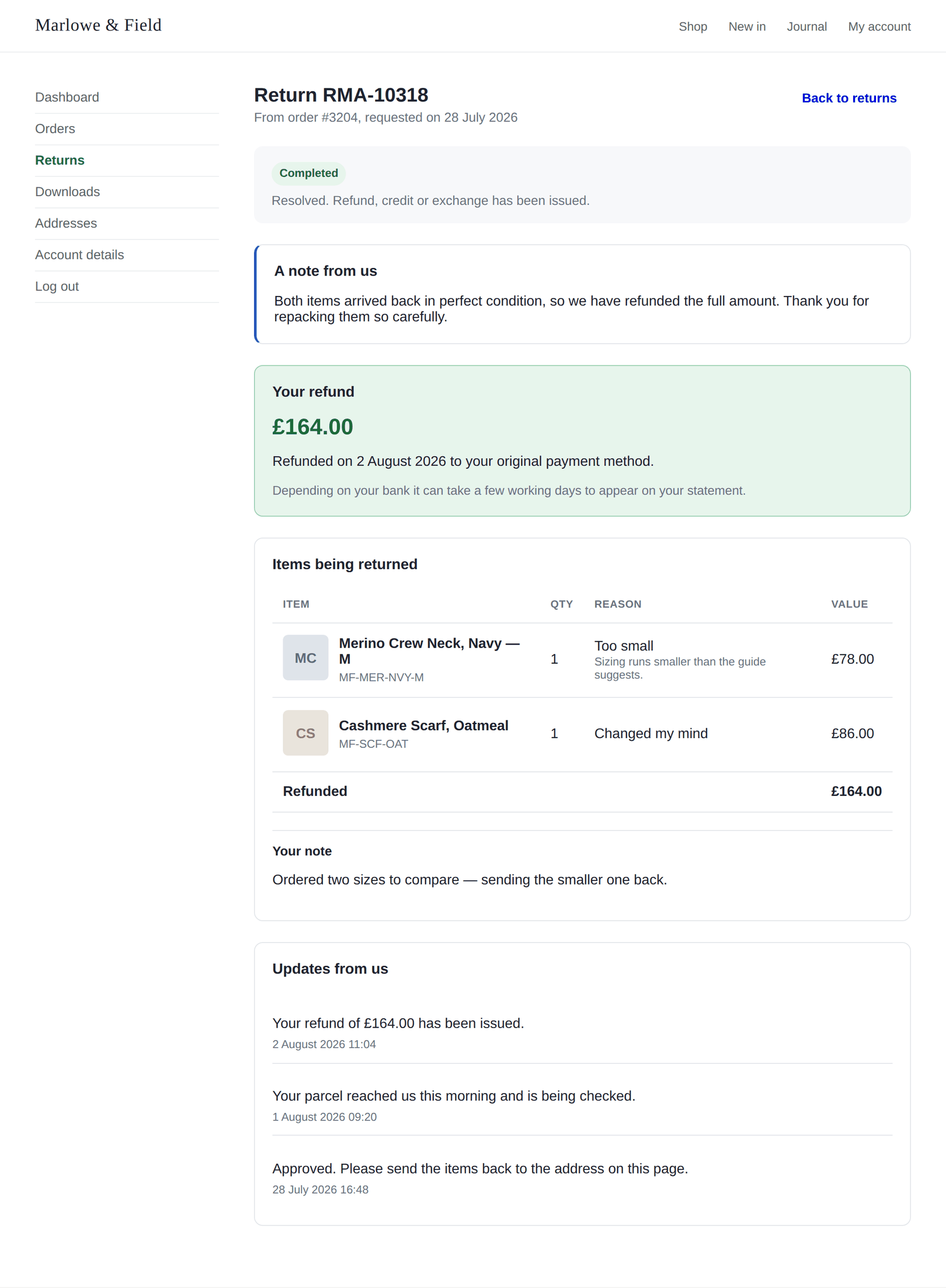
There is no onboarding wizard, no account to create and no data to import. The parts that need a decision from you are the window and the restock timing.
From Plugins → Add New, or upload the zip. WooCommerce needs to be active first. If the Returns page in My Account 404s, visit Settings → Permalinks once to flush your rewrite rules — that's a WordPress quirk, not a Recirco one.
WooCommerce → Returns. Choose the window in days and the date it runs from, pick which order statuses are eligible, and exclude the products and categories that can't come back. Six return reasons are seeded; edit them to match how your customers actually talk.
Requests arrive with a pending badge on the menu. Open one, read the reason and the customer's note, approve or reject with a note that reaches them, and mark it received when the parcel lands. Stock goes back at the point you chose.
Install the add-on, paste your licence key, and the extra tabs appear. Nothing about your existing returns changes — the free plugin keeps running the workflow, and Pro builds on top of it.
Not a roadmap. Everything ticked below is implemented and shipping in the version you can download today.
| Capability | Free | Pro |
|---|---|---|
| Customer portal | ||
| Returns tab in My Account | ✓ | ✓ |
| Self-service request formPick the order, the items, the quantities and a reason | ✓ | ✓ |
| Item-level eligibilityHides units outside the window, already refunded, or excluded | ✓ | ✓ |
| Reason-triggered detail field“Arrived damaged” demands an explanation; “changed my mind” doesn’t | ✓ | ✓ |
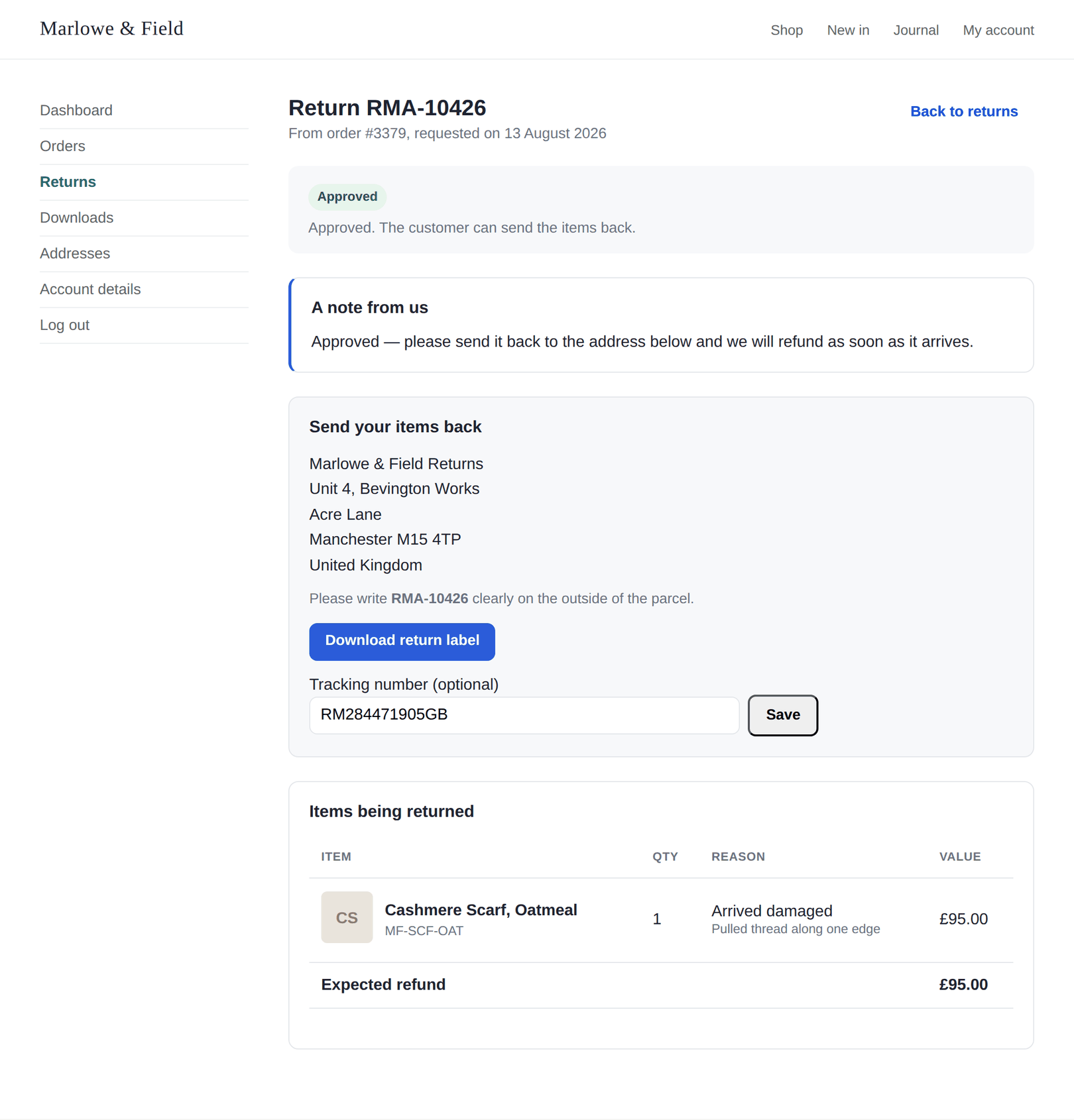
| Status tracking page per return | ✓ | ✓ |
| Customer cancels their own request | ✓ | ✓ |
| Customer submits a tracking number | ✓ | ✓ |
| Photo uploads with the requestUp to 5 images, 5 MB each, validated by file contents | — | ✓ |
| Store credit balance & history page | — | ✓ |
| Warranty registration page | — | ✓ |
| What the customer gets back | ||
| Refund to the original payment method | ✓ | ✓ |
| Exchange & variant swapThe customer picks the size or colour they wanted | — | ✓ |
| Store creditAppend-only ledger; balance always derived, never stored | — | ✓ |
| Credit bonus percentageOffer more in credit than in cash to retain the revenue | — | ✓ |
| Credit spendable at checkoutApplied as a negative fee, which every gateway honours | — | ✓ |
| Admin queue | ||
| Approval queue with search & filtersStatus links with live counts | ✓ | ✓ |
| Bulk actionsApprove, reject, mark received, delete | ✓ | ✓ |
| Pending count badge on the menu | ✓ | ✓ |
| Return detail screen & activity log | ✓ | ✓ |
| Internal notes and customer-emailed notes | ✓ | ✓ |
| Returns panel on the order edit screen | ✓ | ✓ |
| Stats strip above the queue | — | ✓ |
| Workflow & automation | ||
| Guarded status state machineIllegal transitions are refused, not just discouraged | 7 statuses | 7 statuses |
| Automatic approvalFree is a single on/off switch for every request | All or nothing | ✓ |
| Conditional approval rulesReason, value, days since order, category, customer history, resolution | — | 7 conditions |
| Rule actionsApprove, reject with a reason, flag, or hold — first match wins | — | 4 actions |
| Restock timingNever, on approval, on arrival, or on completion | ✓ | ✓ |
| Create a WooCommerce refund from the returnOptionally pushed to the payment gateway | ✓ | ✓ |
| Auto-refund on completion | ✓ | ✓ |
| Replacement order on completionZero-total order in Processing, picked through the normal flow | — | ✓ |
| Return shipping | ||
| Return address and RMA on the parcelShown on the status page and in the approval email | ✓ | ✓ |
| Label shown to the customerFree will display a label if one exists, but can’t put one there | Display only | ✓ |
| Attach a label by hand | — | ✓ |
| Carrier label generationShippo implemented; cheapest rate selected by default | — | ✓ |
| Generate the label on approval | — | ✓ |
| Provider interface for other carriersAdd a carrier without touching the return workflow | — | ✓ |
| Emails | ||
| Transactional emailsReceived, admin alert, approved, rejected, completed, note | 6 emails | 6 emails |
| Editable under WooCommerce → EmailsSubject, heading and body like any core Woo email | ✓ | ✓ |
| HTML and plain-text versions | ✓ | ✓ |
| Analytics | ||
| Requests over timeGap-free daily series, so quiet days stay visible | — | ✓ |
| Value returned and average days to resolve | — | ✓ |
| Why things come backReasons ranked by lines and by value | — | ✓ |
| Most-returned productsThe report that changes what you buy next season | — | ✓ |
| Date ranges7, 30, 90 or 365 days | — | 4 ranges |
| Warranty | ||
| Warranty length per product | — | ✓ |
| Customer registration with serial numberCover runs from purchase, not from registration | — | ✓ |
| In-warranty items outlive the return windowQuantity limits still apply — a refunded unit stays gone | — | ✓ |
| Configuration | ||
| Return window in daysMeasured from the completed, paid or created date | ✓ | ✓ |
| Eligible order statuses | ✓ | ✓ |
| Non-returnable products and categoriesHygiene items, clearance, perishables | ✓ | ✓ |
| Custom return reasonsSix seeded; each can demand an explanation | ✓ | ✓ |
| RMA prefix and next number | ✓ | ✓ |
| Custom portal URL slug and policy text | ✓ | ✓ |
| Credit bonus, expiry and warranty defaults | — | ✓ |
| For developers | ||
| Documented actions | 26 | 26 |
| Documented filters | 29 | 29 |
| Theme template overridesCopy to yourtheme/recirco/ | ✓ | ✓ |
| HPOS compatible | ✓ | ✓ |
| Licence key, update checker, grace period14 days, so a licence-server blip never breaks returns | N/A | ✓ |
No feature tiers, no per-return fees, no percentage of your refunds. The only thing that changes between plans is how many stores you can run it on.
Recirco free is on WordPress.org and stays free — the portal, the queue, restocking, refunds and all six emails. Pro is an add-on that sits on top of it.
Get the free pluginper year, 1 site
For one shop you care about.
per year, 5 sites
For a brand with a few storefronts, or a small studio.
per year, 25 sites
For the agency that maintains other people’s stores.
Prices in USD. Licences renew yearly and you can cancel any time — 14-day refund policy, no questions asked. If a licence lapses, Pro keeps working on the version you have; you just stop getting updates. The free plugin never stops working either way.
Somewhere around a few returns a week, reading each one stops being possible and the process quietly becomes "whatever the person on support decided that day". Exchanges and store credit are the two features that pay for the licence outright: keep a handful of £50 refunds in the store as credit or a swap, and Pro has covered a year.
The analytics are the slower, larger win. Knowing which product accounts for a fifth of your returns changes a purchase order, and that's worth more than the plugin costs by an order of magnitude.
A returns process running on email is a support ticket generator, and the tickets land on you. Putting a real portal in front of it removes a recurring category of "can you just…" from your week.
It's also a billable line. Setting up return windows, exclusion rules and approval logic for a client is a defined piece of work with a visible outcome, and the Agency licence covers 25 stores at roughly the price of an hour's work.
No, and that's deliberate. The free plugin runs a complete returns workflow — portal, queue, eligibility rules, restocking, refunds and six emails. Plenty of stores will never need more than that. Pro is for when you want the money to stay in the store rather than go back out of it.
Recirco reads orders through the WooCommerce CRUD layer and only writes when you tell it to — creating a refund, or restocking an item. It never edits order line items, never changes order status on its own, and never touches an order that has no return against it.
Yes. The plugin declares compatibility with High-Performance Order Storage and with the cart and checkout blocks, and reads orders through the CRUD layer rather than post meta. It works on stores running either storage mode.
In three custom database tables in your own database — not as custom post types. That keeps the admin queue fast on a store with thousands of returns, and lets analytics group by reason and product without expensive meta queries.
Nothing is sent anywhere. The free plugin makes no outbound calls at all.
Not in this version. A request is tied to a customer account so the portal can authenticate the person raising it. If you sell heavily to guests, a guest lookup by order number and email is the obvious next step — say so and it moves up the list.
Yes. Copy any file from the plugin's templates/ folder into
yourtheme/recirco/ and edit it there. Your version wins, and it
survives plugin updates. Everything customer-facing is a template.
Only if you choose that. By default you create the refund yourself from the return screen, which is what most merchants want while they're still checking the goods. If you turn on auto-refund, it fires on completion — and if a refund already exists on that return, the second one is refused rather than attempted.
Net and tax are split from the original order line and sent to WooCommerce separately, in proportion to the quantity being returned. That matters: a refund posted as a single tax-inclusive figure overstates the goods value and leaves your tax report wrong at the end of the quarter.
Pro keeps running on the version you already have. You stop receiving updates and support until you renew. There is no kill switch, no feature lockout, and no nag banner across your admin.
If the licence server is unreachable — an outage on our side, a firewall on yours — Pro carries on for a 14-day grace period rather than failing instantly, because a network blip should never stop you processing returns.
Yes. Deactivate it on the old site from the Licence tab and activate it on the new one. Growth and Agency licences can be transferred without asking anyone. If you've lost access to the old site, email support and it will be released for you.
Shippo is implemented today, with the cheapest available rate selected by default. Labels are generated on approval and attached to the approval email. Carriers sit behind a provider interface, so adding another one doesn't disturb the return workflow — and you can always upload a label by hand if you have a negotiated account.
The queue is a proper indexed table query with pagination, not a meta query across posts. Eligibility is calculated per order at request time rather than precomputed across your catalogue. Restocking and refunds happen one return at a time, on your action.
Yes — 26 documented actions and 29 documented filters, plus template overrides. Pro itself is built entirely on that API and adds no core files, which is the honest proof that the hooks are sufficient for real work.
Yes, activated per site. Each site keeps its own returns, settings and reason list. A licence activation counts per site, so a five-site network on a Growth licence uses the five activations.
This plugin moves money and stock, so a support ticket about it is never routine. Questions get read by someone who knows the codebase.
Every Pro licence includes direct email support. We aim to answer within one business day, and Agency licences go to the front of the queue.
Setup guides, a hook reference, template override instructions and the carrier setup walkthrough. A Help section ships inside the plugin, so the answer is usually one tab away.
The WordPress.org support forum, answered at the same speed. Being a free user doesn't put you at the back of a queue — bug reports from free users are how the paid version stays solid.
Install the free plugin, set a window, and let the next return come in through the portal instead of your email. You'll know within a week whether you need the rest.
Don’t Miss Out — Choose Your Plan Before Time Runs Out