
WooCommerce Troubleshooting
Handcrafted Beautiful Bootstrap HTML Templates for your Business Website.
Refunds feel like the simple part of running a store. A customer asks for their money back, you click a button, done.
Except WooCommerce stores a refund in three places that are supposed to agree: the refund record on the order, the order status, and the payment gateway. When they disagree, odd and expensive things happen:
These cases come up again and again on the WordPress.org support forums. This guide explains each mismatch, why it happens, how to find the ones already in your store, and how to make refunds reliable.
When you refund from the order screen, WooCommerce:
For a partial refund, step 3 doesn’t happen. The order keeps its existing status. That’s by design, and it confuses a lot of people.
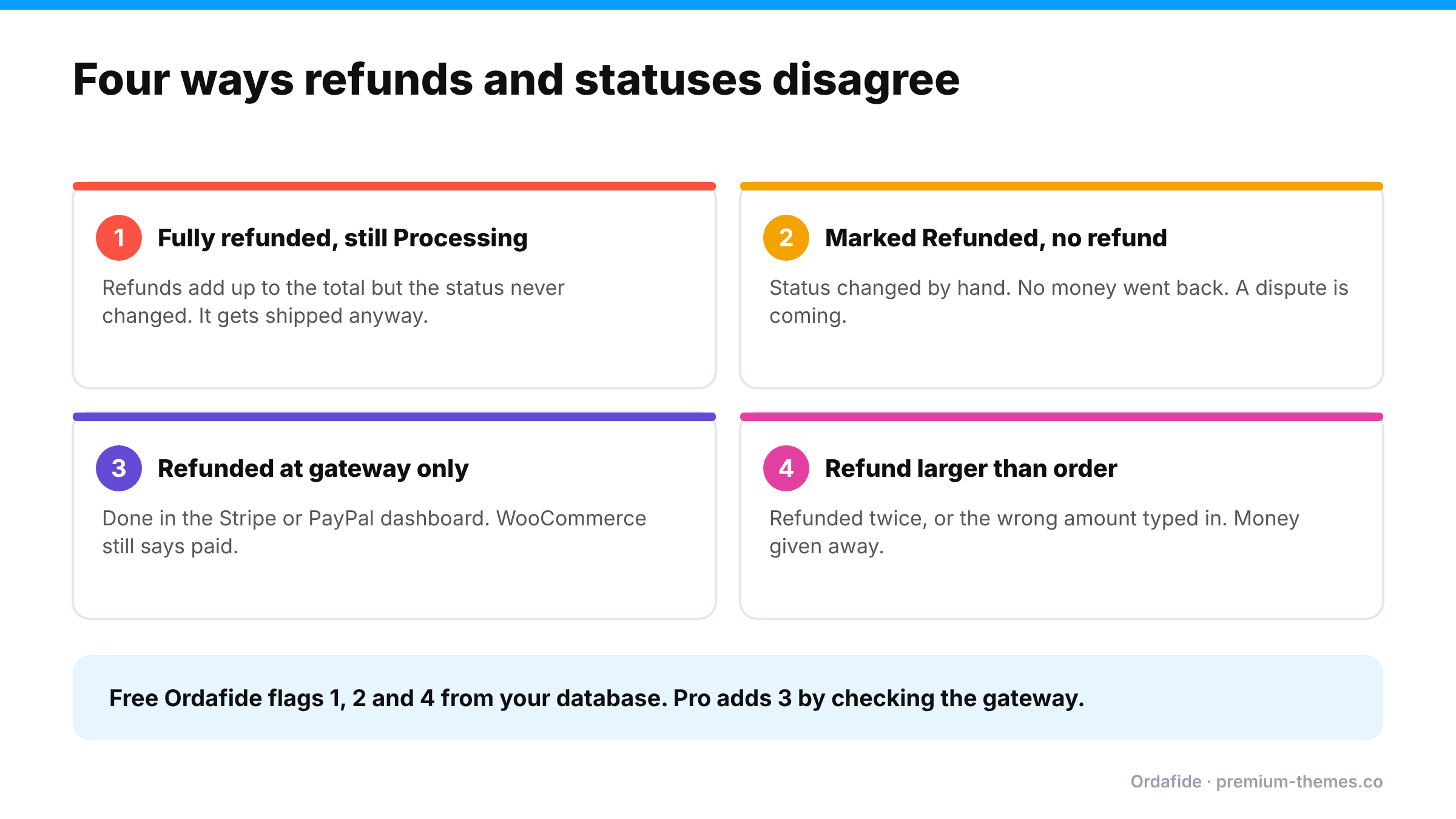
What happens: the refund records add up to the full order total, but the status never changed. Because your team works from the Processing list, the order gets shipped.
Why:
One WordPress.org thread describes exactly this with the WooCommerce PayPal gateway: refunding sent the customer refund emails and reversed the charge, but the order stayed in Processing. Changing the status manually then sent a second refund email. The issue disappeared after later updates, but the owner had no way of knowing which past orders were affected.
Cost: the full value of the goods, plus shipping, plus the refund.
What happens: someone changed the status to Refunded from the status dropdown, intending to refund, but never actually created a refund. Or they did it manually expecting the gateway to act.
Why: status and refund are separate actions. Changing the dropdown on its own doesn’t tell your gateway to send money (behaviour can vary by gateway plugin, so never rely on it).
Cost: a customer who believes they were refunded, or was promised one, and wasn’t. That’s a near-guaranteed chargeback and a lost customer.
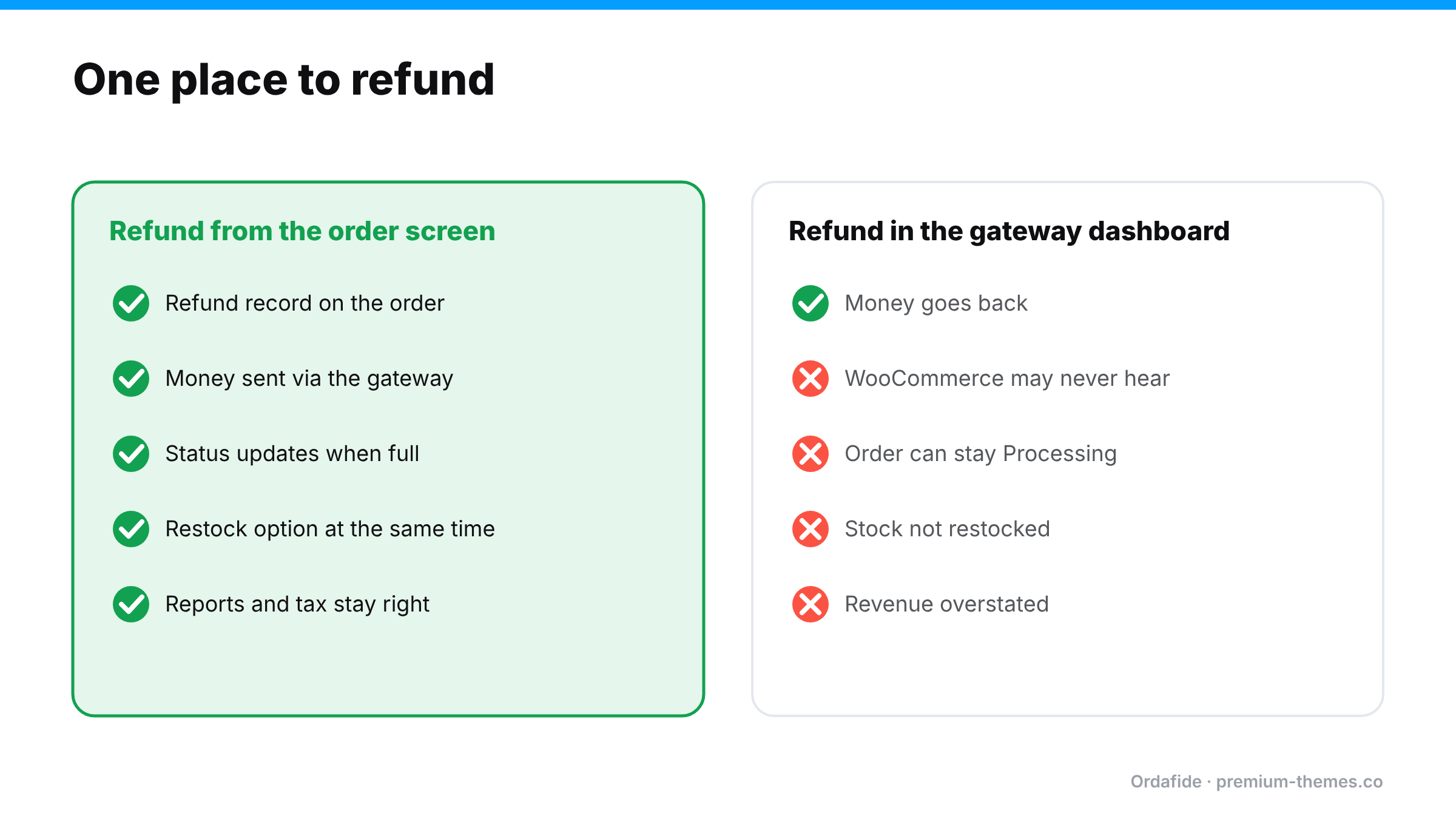
What happens: a team member refunds in the Stripe or PayPal dashboard because it’s quicker. WooCommerce never hears about it, or hears but fails to record it.
Why: some gateway plugins import dashboard refunds via webhooks, some don’t, and webhooks fail (see orders stuck on pending payment for why).
Cost: revenue overstated; stock that came back never restocked; reports and tax figures wrong; possibly the order still in Processing (back to mismatch 1).
What happens: refunds on one order exceed what was paid. This can come from refunding twice (once at the gateway, once in WooCommerce), or from a manual refund entered with the wrong amount.
Cost: money you didn’t need to give away, and a messy reconciliation.
Partial refunds deserve their own warning. WooCommerce support confirmed in a WordPress.org thread that:
The thread’s suggested workaround was a custom “Partially refunded” status via an order-status plugin. Whatever you choose, make sure your team knows that status alone doesn’t tell you whether an order has been refunded. Read the refund lines on the order.
It’s tempting to treat each mismatch as a one-off customer-service problem. But refund records feed several other parts of the business:
So a mismatch costs more than the one order. It quietly distorts the numbers you run the business on.
This is slow, but doable once. The trouble is it needs repeating, because mismatches keep happening as long as people, plugins and webhooks are involved.
Ordafide Order Integrity for WooCommerce is free and runs a Refund mismatch check on your recent orders that flags:
– orders marked Refunded with no refund record (mismatch 2)
– refunds larger than the order (mismatch 4)
– fully refunded orders still marked Processing (mismatch 1), the ones about to be shipped
Each finding explains why it matters, shows the evidence, and tells you what to check before changing anything. Findings are sorted by money at risk, and you can ignore ones you’ve reviewed. Everything runs on your own server, and the plugin never refunds, captures or voids anything.
Mismatch 3, refunds that only exist at the gateway, can’t be seen from inside WooCommerce. Ordafide Pro reconciles with Stripe, PayPal, Square, Mollie and Razorpay using read-only keys and flags refunds missing in WooCommerce, along with money with no order, paid orders with no payment and amount disagreements.
Fully refunded, still Processing: stop fulfilment immediately. Confirm the refund at the gateway, then change the status to Refunded. If the refund was already completed, choose the status change carefully so you don’t trigger a second refund. Add a note.
Marked Refunded, no refund: check the gateway. If no money went back, issue the refund now from the order screen (Refund via [gateway]) and apologize to the customer. If the money did go back outside WooCommerce, record it with Refund manually so the books agree.
Refunded at gateway only: record it in WooCommerce using Refund manually (not via gateway, or you’ll refund twice), tick Restock refunded items if goods came back, and note the gateway refund ID.
Over-refund: check the gateway for what was actually returned. If the excess was real money, decide whether to recover it from the customer. If it was a recording error, adjust and note it.
To make this concrete, here’s how mismatches tend to appear on a real store over a single week.
Monday. A customer cancels a $78 order before it ships. A team member, in a hurry, opens Stripe and refunds it there. The Stripe plugin’s webhook is being blocked by a recently installed security plugin, so WooCommerce never records the refund. The order stays in Processing.
Wednesday. The warehouse picks the Processing list, including that $78 order, and ships it. The customer now has their money and the goods. (Mismatch 1 and 3 at once.)
Thursday. A different customer emails asking for a refund on a damaged item. A new team member changes the order status to Refunded from the dropdown, assuming that sends the money. It doesn’t with this gateway. The customer waits. (Mismatch 2.)
The following week. The second customer, hearing nothing, files a dispute with their bank. Meanwhile the first team member notices the Monday order in the Stripe dashboard, realizes it wasn’t recorded, and, to “fix it”, clicks Refund via Stripe on the WooCommerce order. Stripe rejects it because the charge is already refunded. Had the first refund been partial, the second could have gone through and pushed the total refunded past what the customer paid. (A near-miss for mismatch 4.)
Three people, three reasonable shortcuts, a shipped order, a dispute and a reconciliation mess. None of it was visible on the orders screen. All of it was findable by comparing refund records, statuses and the gateway.
Paste this into your team handbook and adapt it:
How we refund
- All refunds are issued from the WooCommerce order screen using Refund via [gateway]. Never from the Stripe or PayPal dashboard.
- Never change an order’s status to Refunded to “do” a refund. Create the refund; the status follows.
- For partial refunds, select the items and quantities being refunded, and tick Restock refunded items only if the goods are back and sellable.
- If money was returned outside WooCommerce (bank transfer, gateway dashboard), record it with Refund manually and note the reference.
- Before shipping anything that’s been in Processing more than two days, check it has no refund lines.
- Return-related refunds go through our returns system, not ad hoc.
Why doesn't my WooCommerce order change to Refunded after a refund?
If the refund is partial, that's expected: partial refunds don't change status. If it's a full refund, a webhook failure, plugin conflict or gateway-side refund that wasn't fully recorded can leave the status unchanged.
Does changing the status to Refunded issue a refund?
Don't rely on it. Create the refund from the order screen with Refund via [gateway]; status should follow.
I refunded in PayPal. How do I update WooCommerce?
Use Refund manually on the order for the same amount, so WooCommerce records it without sending money twice. Note the PayPal refund ID.
How do I stop refunded orders being shipped?
Make refund lines part of your pre-shipping check, and use a tool like Ordafide that flags fully refunded orders still marked Processing.